,E.UPI .E.U,IP,OE17
if--
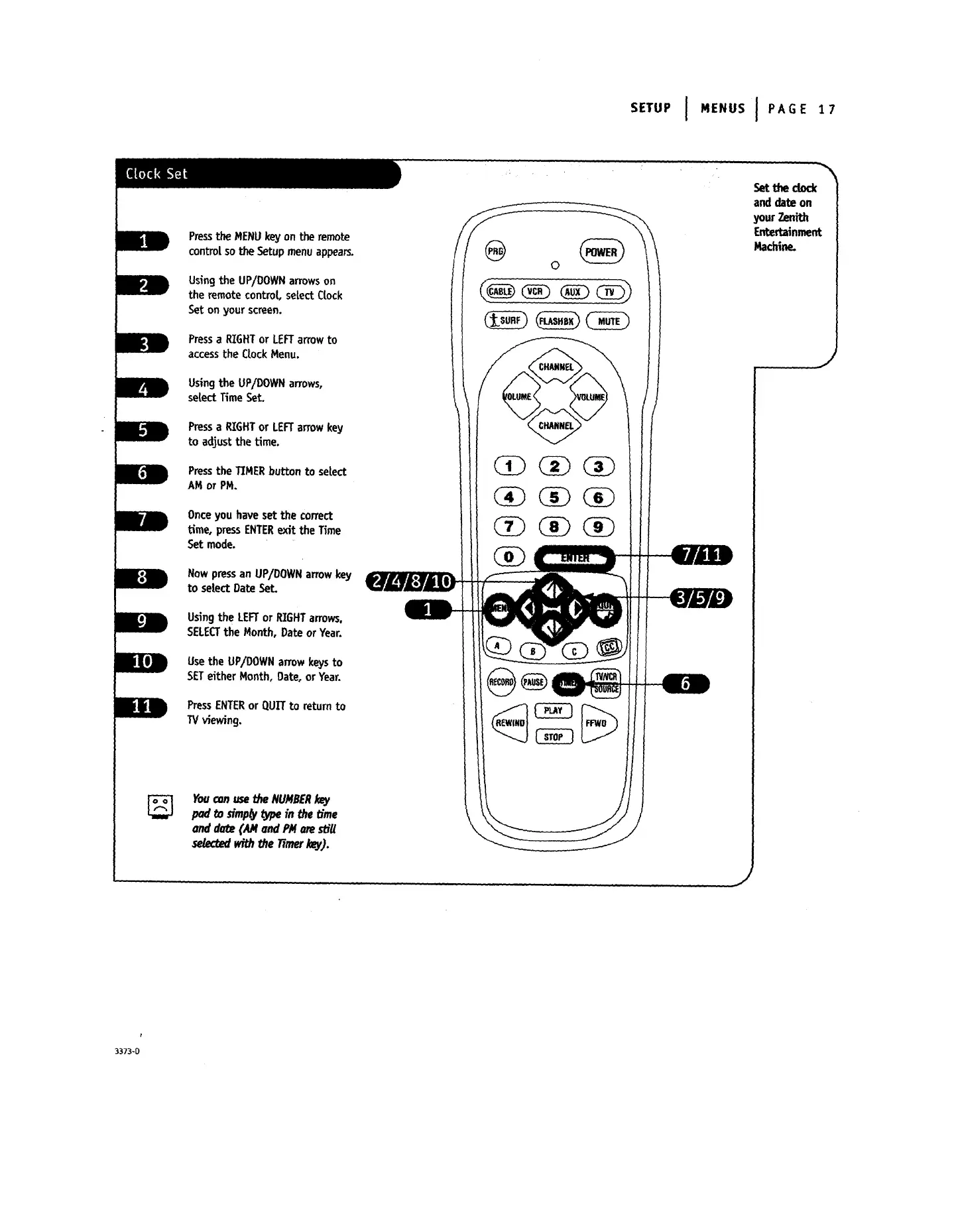
PresstheMENU keyon theremote
controlso theSetupmenu appears.
UsingtheUP/DOWN arrowson
theremotecontrol,selectClock
Seton yourscreen.
Pressa RIGHTorLEFTarrowto
accesstheCLockMenu.
Usingthe UP/DOWNarrows,
setect Time Set.
Pressa RIGHTor LEFTarrow key
to adjust the time.
Pressthe TIMERbutton to select
AM or PM.
Once you haveset the correct
Lime,pressENTERexit the Time
Set mode.
Nowpressan UP/DOWNarrowkey
to select Date Set.
Usingthe LEFTor RIGHTarrows.
SELECTthe Month, Date orYear.
Usethe UP/DOWNarrowkeysto
SETeither Month, Date,or Year.
PressENTERor QUIT to return to
TVviewing.
Youconusethe NUMBERkey
pad t_ dmp_vtype in the Lime
and date (AM and PMarestir
seteceedwith_heTimerkey).
(_ (_ (_
(_ (_ (_
Set the dock
and date on
yourZenith
Entertainment
Machine.
J
,J
3373-0




 To Next Page