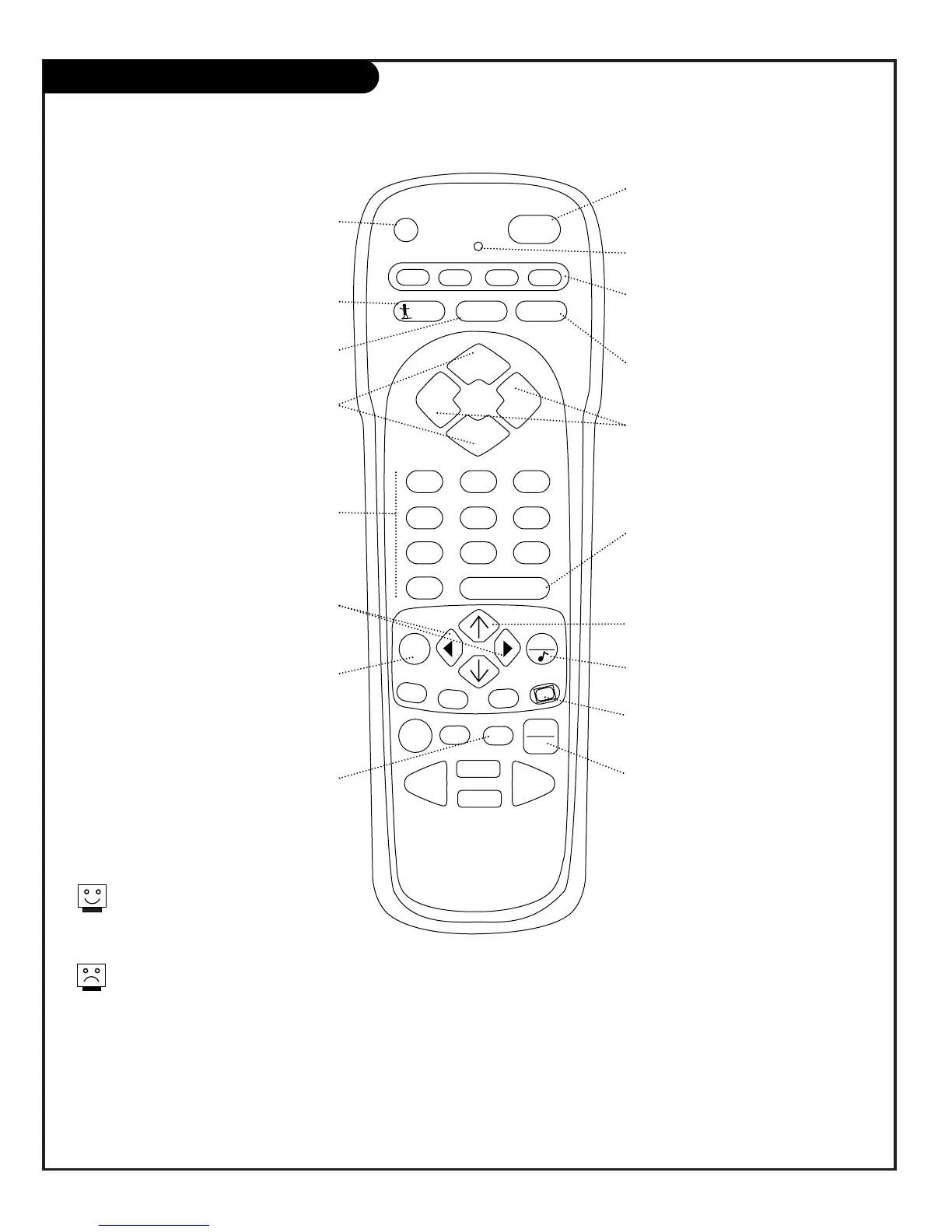
PR G ( P RO GR AM )
Progra
m
s re
m
ote to operate other
products.
FLASHBK ( F LA SHBACK )
R
eturn to the last channel viewed.
POWE R
Turns T V
O
n or
O
ff
.
CAB LE / VCR / AUX / T V ( M OD E K EYS )
S
witches re
m
ote
m
ode to control other
devices. A
U
X is for optional devices.
CHANN EL ( UP / DOW N )
Flip through available channels.
MUTE
Turns sound
O
ff and
O
n
while the picture re
m
ains.
E NT ER
S
hows the Channel /Ti
m
e
display. Press after channel nu
m
bers for
instant selection.
NUMBE R KEY PA D
S
elects channels directly and enters nu
m
eric
values for so
m
e options
.
MEN U
D
ispla ys on-screen
m
enus for TV
m
ode.
UP A R ROW
The
U
p arrow
selects
m
enu
options.
T I M ER
D
ispla ys the
S
leep Ti
m
er Menu.
VOL UM E L EF T / R I GHT
Adjusts the sound levels on your
Presentation TV.
QU I T
N
ot functional.
TV / VCR -SOUR CE
S
witches between watching TV through
your antenna /cable source, co
m
pos ite
video source,
S
-VH
S
source, or any
Co
m
puter source.
Keys dedicated to VC
R
f unctions will still operate your
VC
R
while the re
m
ote is in TV
m
ode.
The
DO
W
N
arrow key is reserved
for FM /TV on other
m
odels.
CC ( C LOSE D CAP T ION ING )
D
ispla ys the closed captions /text
m
enu.
LE FT / R I G HT A R ROW S
The
L
eft /
R
ight arrows
adjust
m
enu options.
LE D I ND ICATO R L I GHT
L
ights when keys are pressed.
SU RF
Access Channel preview and sources
m
enu.
Rem ote Key TV Mode Functions
206-3492-A
re
m
ote control part nu
m
ber
MBR3447
124-233


 To Next Page