206-3492-
O
The device you want to progra
m
should be
O
N
.
O
n the chart in this
m
anual, find the type of
device you’re progra
mm
ing and then find the
brand na
m
e. Make a note of the thr ee-nu
m
ber
code—you’ ll need it soon.
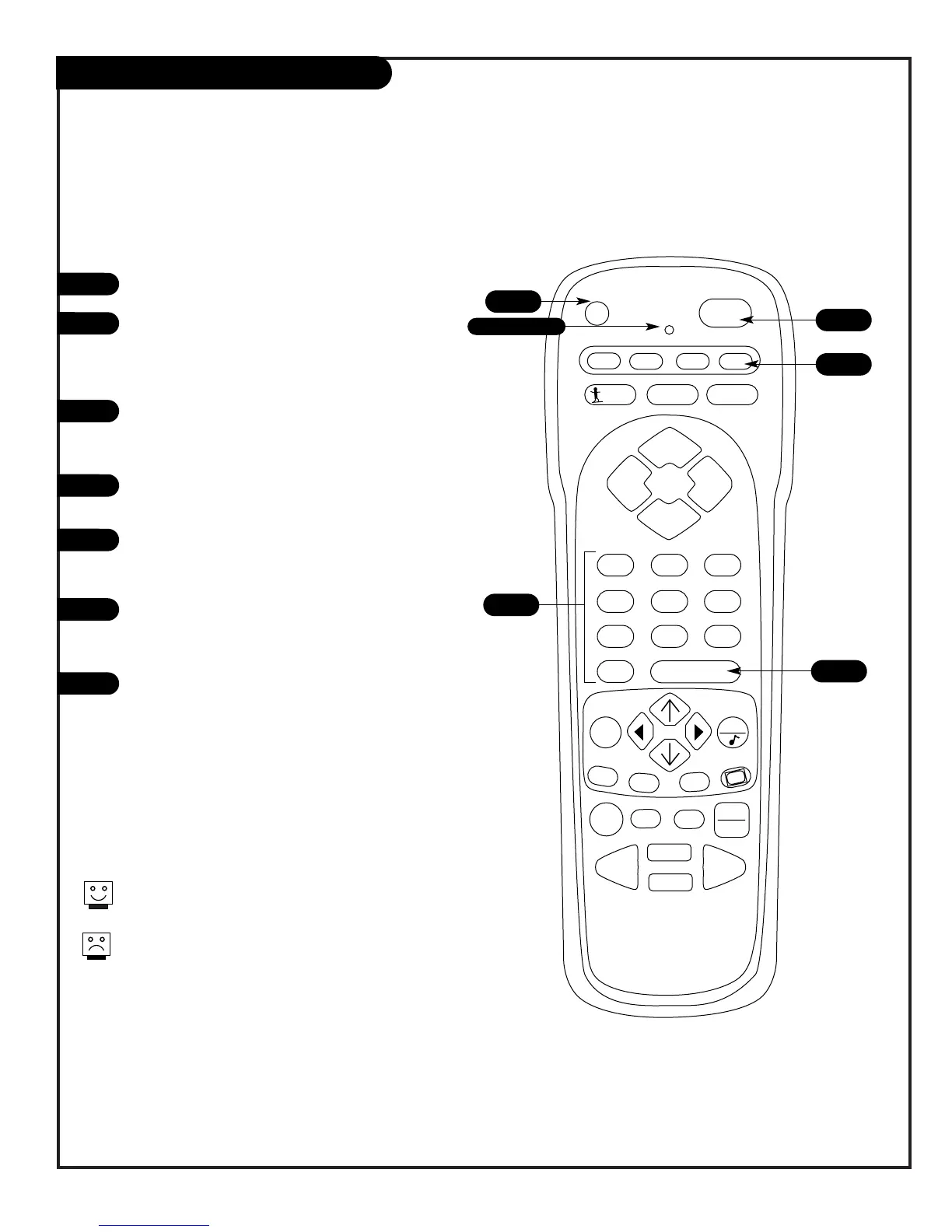
Press and hold the P
R
G
key. It’s recessed so it
doesn’ t get pushed accidentally.
W
hen the indica-
tor light turns on, you can release the key.
Push the key with the na
m
e of the device you’re
progra
mm
ing (VC
R
, CAB
L
E , A
U
X, TV).
U
sing the
N
U
MBE
R
keypad, enter the three-nu
m
-
ber code found on the chart in the
R
eference sec-
tion.
Press E
N
TE
R
to save the code The indicator light
will flash three ti
m
es and turn off if the code was
accepted.
Ai
m
the re
m
ote at the device and push the
P
O
W
E
R
key. The device should turn off. If not, try
the other codes listed and continue fro
m
step
three.
Progra
mm
ing your
Z
enith re
m
ote will allow you to use
one re
m
ote to work up to 7 different devic es!
N
ot all devices will work with your
Z
enith re
m
ote con-
trol.
1
2
3
4
5
6
7
3
Indicator Light
6
7
4
5
Programming the Remote
Progra
m
your re
m
ote to control a variety of A/ V devices


 To Next Page