EasyManua.ls Logo

Zenith MBR3447 - Programming AUX Modes

Zenith MBR3447
8 pages
Print Icon
To Next Page IconTo Next Page
To Previous Page IconTo Previous Page
Loading...
PRG
POWER
CABLE
VCR
AUX TV
SURF
ENTER
FLASHBK MUTE
CHANNEL
CHANNEL
VOLUME VOLUME
1 2 3
4 5 6
7
0
8 9
MENU
REWIND FFWD
RECORD
QUIT
A
B
C
C
C
TV/VCR
SOURCE
PAUSE TIMER
PLAY
STOP
206-3492-
O
AUX+1, AUX+2, AUX+3
R
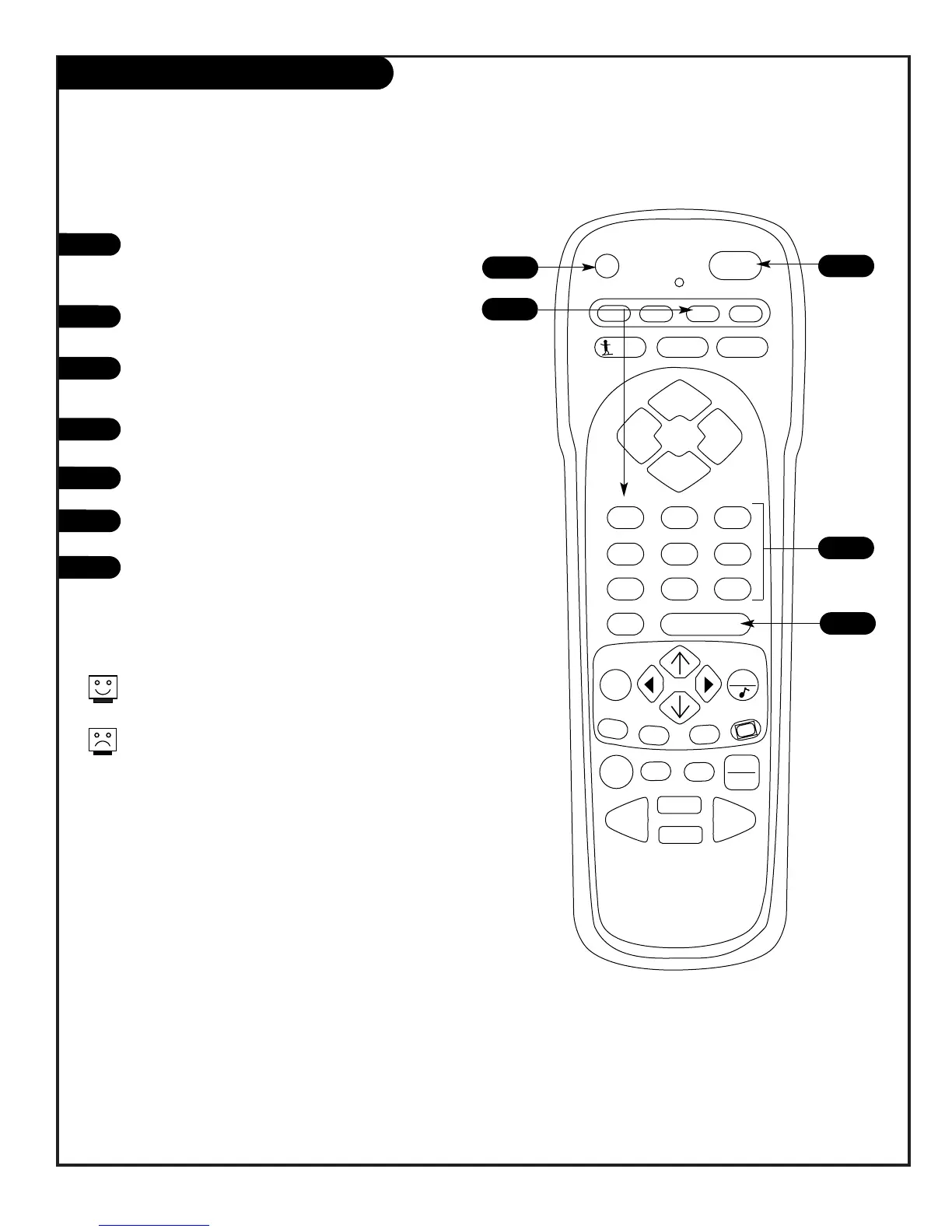
efer to the brand reference chart to find the
type and brand na
m
e of the device you
'
re pro-
gra
mm
ing.
Pre ss and hold the P
R
G
key until the indicator
light turns on.
Pre ss the A
U
X k ey and the 1 on the
N
U
MBE
R
key pad at the sa
m
e ti
m
e (for A
U
X +1).
U
sing the
N
U
MBE
R
keypad, enter the three-
nu
m
ber code for the device you
'
ve selected.
Pre ss E
N
TE
R
to save the code.
Ai
m
the re
m
ote at the device and press
P
O
W
E
R
. It should turn off.
R
epeat the steps to progra
m
A
U
X+2, and
A
U
X+3.
1
2
3
4
5
6
7
5
6
2
4
3
Progra
mm
ing your
Z
enith re
m
ote will allow you to
use one re
m
ote to work up to 7 different devic es.
S
o
m
e devices
m
ay not work with your
Z
enith re
m
ote
control.
PAGE 04
Provided by www.ReplacementRemotes.com | For remote control help go to www.WikiRemotes.com
To Purchase original remote controls and manuals go to www.ReplacementRemotes.com

Related product manuals