STANDARD CONNECTIONS FOR YOUR TV
CONNECTION CENTER
ANT
___ VHF/UHF
TV CONNECTION CENTER
ANTENNA/CABLE
75-chin antenna or cable-TV connection
to your TV. Attach your antenna, cable-
TV line or VCR to this jack.
CONNECTION OPTIONS
Your TV may be connected in many different ways. The following illustrations show the most con:mon, and recommended connec-
tions for your new TV.
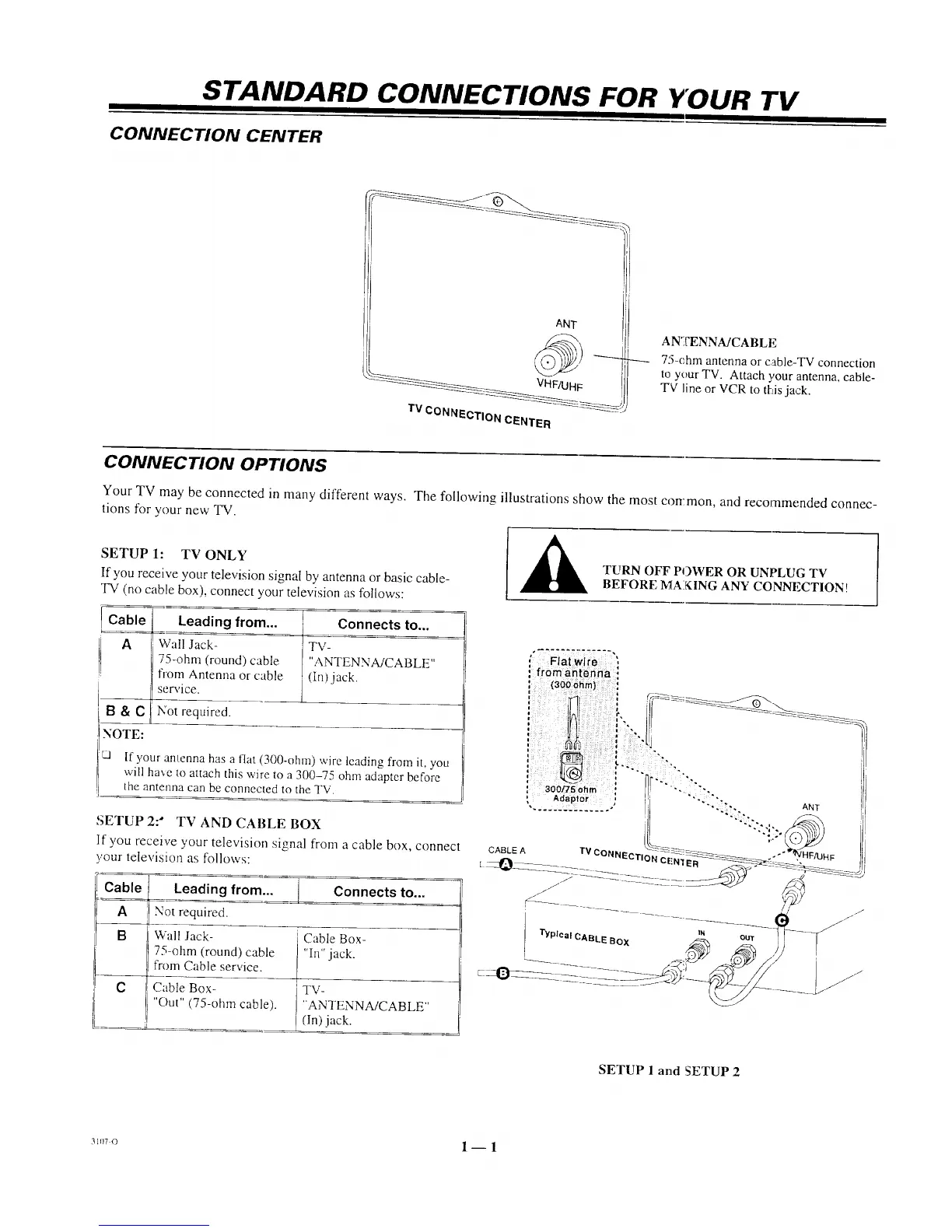
SETUP 1: TV ONLY
If you receive your television signal by antenna or basic cable-
TV (no cable box), connect your television as follows:
1
Cable Leading from... _ Connects to...
A Wall Jack- TV-
75-ohm (round) cable "ANTENNA/CABLE"
from Antenna or cable (in)jack.
__ service.
R & e Not required.
i
NOTE:
L,I If your antenna has a flat (300-ohm) wire leading from it, you
will ha',e Io attach this wire to a 300-75 ohm adapter before
the antenna can be connected to the TV.
SETUP 2: _ TV AND CABLE BOX
If you receive },our television signal from a cable box, connect
,.'our television as follows:
Cabl_ Leading from... ] Connects to...
A Not required.
B Wall Jack- Cable Box-
75-ohm (round) cable "In" jack.
from Cable service.
C Cable Box- TV-
"Out" (75-ohm cable). "ANTENNA!CABLE"
(In) jack.
A
TURN OFF POWER OR UNPLUG TV
BEFORE MAiKING ANY CONNECTION!
l'h/plcal CABLE BOX IN our
SETUP 1 and SETUP 2
31,.o 1-- 1




 To Next Page