EasyManua.ls Logo

Zenith System 3 - More about Antennas

Zenith System 3
16 pages
Print Icon
To Next Page IconTo Next Page
To Previous Page IconTo Previous Page
Loading...
MORE
ABOUT
ANTENNAS
INDOOR
ANTENNAS
To
view
a
UHF
channel
(14
through
83),
rotate
the
bow-tie
Your
Zenith
TV
has
both
a
VHF
dipole
(rabbit
ears)
antenna
for
the
best
picture.
antenna
and
a
UHF
clip-on
bow-tie
antenna.
Be
sure
that
the
75
OHM
coaxial
cable
is
connected
to
The
first
thing
to
do
after
unpacking
your
TV
set
is
to
the
75
OHM
coaxial
input
connector
as
shown
in
the
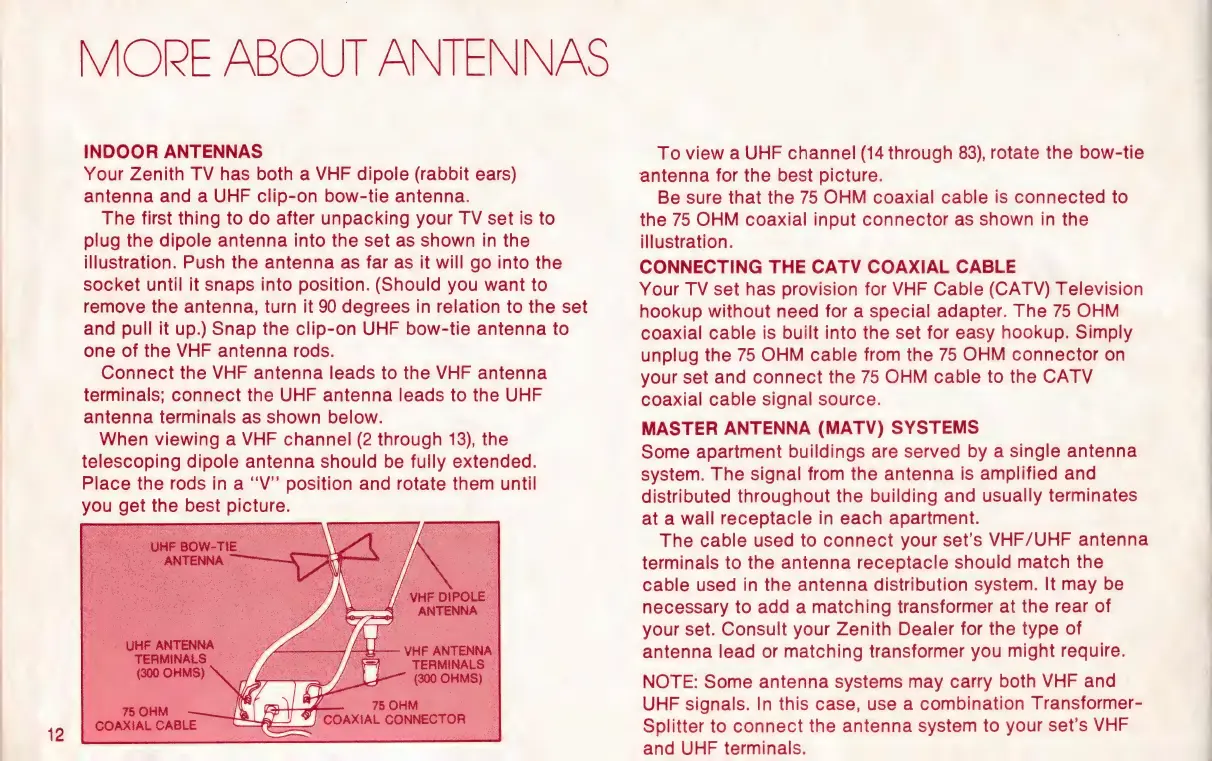
plug
the
dipole
antenna
into
the
set
as
shown
in
the
illustration.
.
illustration.
Push
the
antenna
as
far
as
it
will
go
into
the
CONNECTING
THE
CATV
COAXIAL
CABLE
socket
until
it
snaps
into
position.
(Should
you
want
to
Your
TV
set
has
provision
for
VHF
Cable
(CATV)
Television
remove
the
antenna,
turn
it
90
degrees
in
relation
to
the
set
hookup
without
need
for
a
special
adapter.
The
75
OHM
_and
pull
it
up.)
Snap
the
clip-on
UHF
bow-tie
antenna
to
coaxial
cable
is
built
into
the
set
for
easy
hookup.
Simply
one
of
the
VHF
antenna
rods.
unplug
the
75
OHM
cable
from
the
75
OHM
connector
on
Connect
the
VHF
antenna
leads
to
the
VHF
antenna
your
set
and
connect
the
75
OHM
cable
to
the
CATV
terminals;
connect
the
UHF
antenna
leads
to
the
UHF
coaxial
cable
signal
source.
antenna
terminals
as
shown
below.
When
viewing
a
VHF
channel
(2
through
13),
the
telescoping
dipole
antenna
should
be
fully
extended.
Place
the
rods
in
a
“‘V”
position
and
rotate
them
until
you
get
the
best
picture.
MASTER
ANTENNA
(MATV)
SYSTEMS
Some
apartment
buildings
are
served
by
a
single
antenna
system.
The
signal
from
the
antenna
is
amplified
and
distributed
throughout
the
building
and
usually
terminates
at
a
wall
receptacle
in
each
apartment.
The
cable
used
to
connect
your
set’s
VHF/UHF
antenna
terminals
to
the
antenna
receptacle
should
match
the
cable
used
in
the
antenna
distribution
system.
It
may
be
necessary
to
add
a
matching
transformer
at
the
rear
of
your
set.
Consult
your
Zenith
Dealer
for
the
type
of
antenna
lead
or
matching
transformer
you
might
require.
NOTE:
Some
antenna
systems
may
carry
both
VHF
and
UHF
signals.
In
this
case,
use
a
combination
Transformer-
Splitter
to
connect
the
antenna
system
to
your
set’s
VHF
and
UHF
terminals.

Other manuals for Zenith System 3

Related product manuals