OPERATION I PAGE 23
This page explainshow to usethe remoteto pLaytapes on your VCR.
Auto/ManuaL Tracking Adjustment
YourVCRadjuststrackingautomaticatLywhen you playa tape. If
the tape wasrecordedon a different VCR,streaks(video noise)
may appear.WhiLethe tape is pLaying,pressTRK(V/A) to
adjustthe tracking manually.
Real-Time Tape Counter
PressENTERtwice to keepthe tape counter on the TV screen.
PressENTERrepeatedlyto removeat[ displays.Thecounter
resetsto 0:00:00 when you insert a cassetteor when a tape is
rewoundto its beginning.
Pause/Forward/Reverse Slow-Motion Video
(White in play mode) PressPAUSEfor still video. PressPAUSE
again, and follow on-screeninstructionsfor Forwardor Reverse
stowmotion. PressFFWDor REWto control stowspeedduring
stowmotion. PressPLAYto resumenormaltape playing.
Note: Whenthe reverseslowmodecontinues_r morethan 30
seconds,the VCRwill automaticaLLychange to play mode.
Tape Rewind and Fast Forward
(WhiLein Stop mode) Pressand release REWor F FWD(Fast
Forward),as desired.PressSTOPwhen tape reachesdesired
[ocaUon.
Reverse/Forward Search
(Whilein Play mode) Pressand releaseREWor F FWD,as
desired,PressPLAYto resume normal tape playing.
CMSkip (CommercialSldp)
(White in play mode) PressingCMSKTPon the remoteskips
commercialsor other programmaterial. Pressing1, ?, 3, or 4
times skips30, 60, 90, or 120 seconds,respectively. CMSKIP
skipsa fur[ 120 secondsof commercialsin a few seconds,then
resumesnormalplayback.
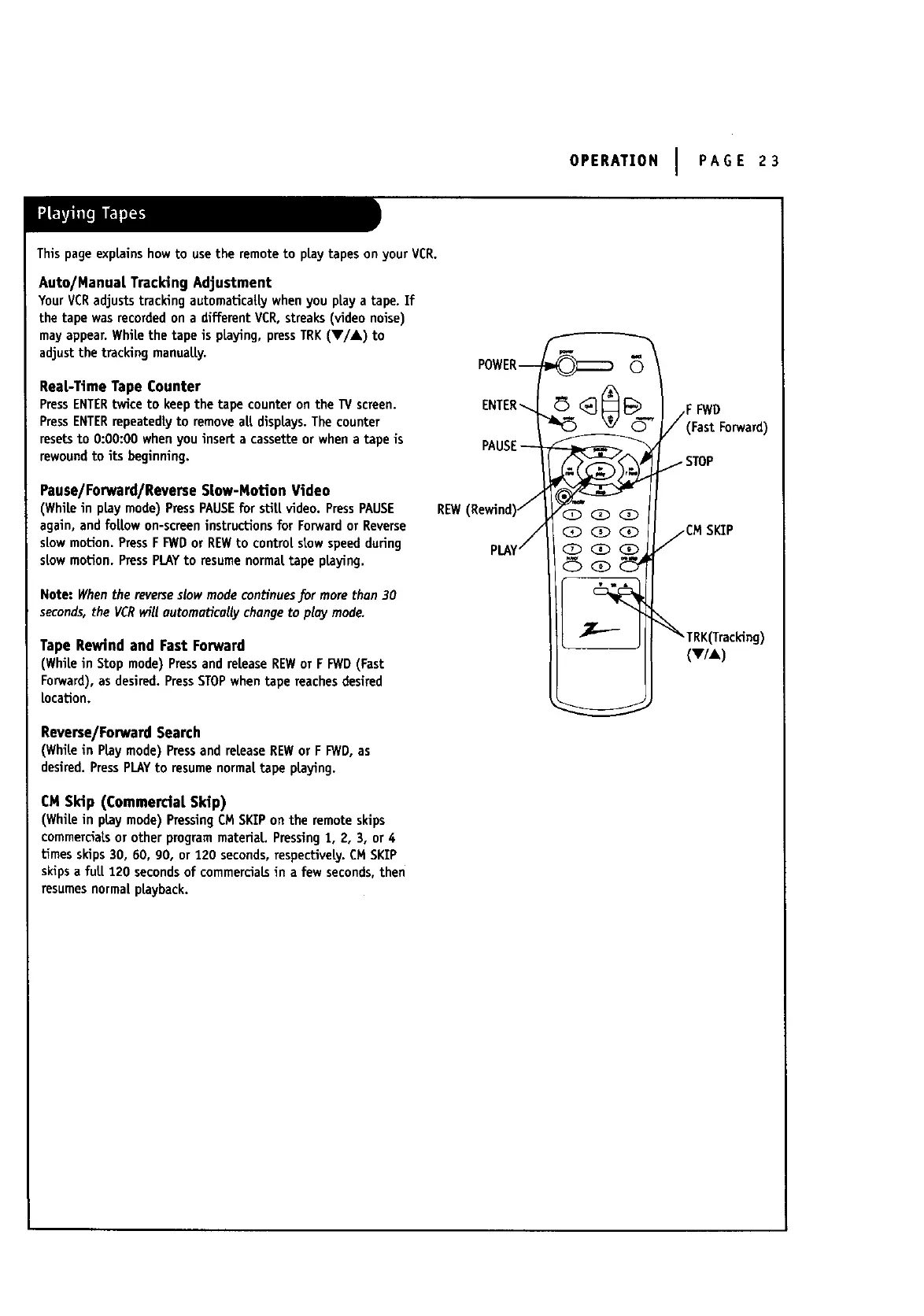
POWER--
ENTER-_
PAUSE--
REW(Rewind)/
PLAY/
(2_QQ
Q (3) (3_
F FWD
(Fast Forward)
STOP
/CM SKIP
_TRK(Tracking)
(V/A )



 To Next Page