EasyManua.ls Logo

Zenner multidata WR3 - User Manual

Zenner multidata WR3
12 pages
Print Icon
To Next Page IconTo Next Page
Loading...
multidata
Installation and operating manual
Electronic energy calculator for heat meters
M-Bus and 2 inputs/outputs optional
All that counts.
EnergyMetering

Other manuals for Zenner multidata WR3

Question and Answer IconNeed help?

Do you have a question about the Zenner multidata WR3 and is the answer not in the manual?

Summary

General information

Initial verification

Details about the initial verification process and its validity period.

Electro-magnetic interference

Guidance on avoiding interference and proper cable placement for reliable operation.

Care instructions

Instructions for cleaning the device and information on its maintenance-free nature.

Declaration of Conformity

States compliance with EU directives and provides a link for more information.

Status display; Error codes

Technical data

Technical data I;O

Specific technical specifications for input/output functionalities of the device.

Communication

M-Bus (optional)

Details on the optional M-Bus interface, its compliance, and operating baud rates.

Dimensions

Installation instructions

Safety instructions

Crucial safety precautions for personnel and procedures during installation.

General Information

General guidance and checks to perform before and during installation.

Installation heat calculator

Recommendations and methods for mounting the heat calculator unit.

Connection sensors

Detailed instructions for connecting temperature and flow sensors correctly.

Switch 2-;4-wire

How to switch between 2-wire and 4-wire measuring systems using the internal switch.

Connection flow sensor

Guidelines for connecting the flow sensor, including wire length and polarity.

External power supply

Information on the external power supply, automatic switching to battery, and battery status.

Operation test

Steps for testing the calculator after installation and checking for errors.

Sealing

Instructions on how to seal the device to prevent unauthorized opening.

Maintenance

Information regarding authorized personnel for repairs and overhauls.

Connector pin assignment

Summary

General information

Initial verification

Details about the initial verification process and its validity period.

Electro-magnetic interference

Guidance on avoiding interference and proper cable placement for reliable operation.

Care instructions

Instructions for cleaning the device and information on its maintenance-free nature.

Declaration of Conformity

States compliance with EU directives and provides a link for more information.

Status display; Error codes

Technical data

Technical data I;O

Specific technical specifications for input/output functionalities of the device.

Communication

M-Bus (optional)

Details on the optional M-Bus interface, its compliance, and operating baud rates.

Dimensions

Installation instructions

Safety instructions

Crucial safety precautions for personnel and procedures during installation.

General Information

General guidance and checks to perform before and during installation.

Installation heat calculator

Recommendations and methods for mounting the heat calculator unit.

Connection sensors

Detailed instructions for connecting temperature and flow sensors correctly.

Switch 2-;4-wire

How to switch between 2-wire and 4-wire measuring systems using the internal switch.

Connection flow sensor

Guidelines for connecting the flow sensor, including wire length and polarity.

External power supply

Information on the external power supply, automatic switching to battery, and battery status.

Operation test

Steps for testing the calculator after installation and checking for errors.

Sealing

Instructions on how to seal the device to prevent unauthorized opening.

Maintenance

Information regarding authorized personnel for repairs and overhauls.

Connector pin assignment

Overview

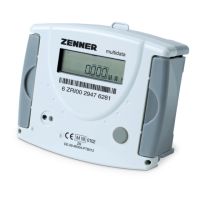
The ZENNER multidata is an electronic energy calculator designed for heat meters, offering optional M-Bus and two inputs/outputs. It is a modern and up-to-date heat calculator, featuring expressive symbols in its display and easy menu navigation for simple readout. The device is operated with a single button and is equipped with a long-life battery designed for operation during the initial verification validity period (5 years), with a reserve of at least another year.

Function Description

The multidata calculator measures and displays energy consumption in MWh, kWh, GJ, or MJ. It processes data from flow sensors (contact pulsers or active pulsers) and temperature sensors (PT500, optional PT100, PT1000) to calculate heat energy. The device complies with the new European Measuring Instruments Directive (MID), meaning it carries a declaration of conformity (e.g., M09) instead of an initial verification stamp. After being placed on the market, national regulations for legal verification apply within the EU. In Germany, the initial verification validity for heat meters is 5 years, after which the device may no longer be used for commercial billing.

The calculator provides status displays and error codes to indicate operational status and detected faults. Symbols like "Flow existent," "Attention!" (for system/device errors), "Data transmission," "Emergency operation," and "External power supply" are shown in the main display. Error codes, such as "Short-circuit return sensor" (1), "Interruption return sensor" (2), "Hardware error" (5), "Battery empty or wrong temp. sensor" (6), "Emergency operation" (100), "Battery life time exceeded" (1000), and "Initial verification expired" (2000), help diagnose issues. If multiple errors occur, their sum is displayed.

Communication Features

The multidata offers various communication options:

  • Pulse Outputs: Calculators with two pulse outputs typically provide energy information via the first output (I/O1) and volume information via the second (I/O2). The pulse value is permanently set and corresponds to the last position of the associated display value (e.g., 0.01 MWh = 10 kWh for an energy output of 10 kWh).
  • Pulse Inputs: The calculator can also be ordered with two optional inputs. The pulse value for these inputs can be viewed in the display (Level 1). For water meters with potential-free reed contacts, the connection to the inputs can be made in any direction. Polarity should be considered when connecting to a Building Management System (BMS).
  • M-Bus (optional): The optional M-Bus interface complies with EN 1434-3 and operates at a fixed 2400 baud, configurable to 300/9600 baud if needed. The M-Bus connectors are provided twice for incoming and outgoing wires.
  • Other Interfaces (optional): ZR-Bus, RS-232, and remote readout outputs are also available.

Important Technical Specifications

  • Temperature Range: 1-150 °C
  • Temperature Difference Range: 3-120 k
  • Display: Multifunctional LCD, 8-digit, floating
  • Display Unit: MWh, kWh, GJ, MJ
  • Interface Flow Sensor: Models with contact pulsers or active pulser
  • Temperature Sensor Connection: PT500, optional PT100, PT1000
  • Max. Cable Length Temperature Sensor (2-wire): 12.5 m (PT500), 2.5 m (PT100), 20 m (PT1000)
  • Max. Cable Length Temperature Sensor (4-wire): 20 m
  • Ambient Temperature: 5-55 °C
  • Power Supply: Battery 3.6 V Lithium, optionally mains supply 230 V
  • Battery Lifetime: 6 years, optionally 11 years
  • Protection Class: IP 54 / IP 6, according to DIN 40050
  • Mechanical/Electro-magnetic Class: M1/E1
  • Accuracy Class: 3
  • Measuring Cycle: Dynamic, typically 30s/10s
  • I/O Load: Max. 30V DC/20 mA
  • I/O Type: Open Drain, n-channel FET
  • Pulse-duty Factor: 1:1 (out); 1:9 (in)
  • Input Frequency Max.: 1 Hz / 200 Hz (optional)
  • Closing Time Tp: 400 ms < Tp < 600 ms
  • Dimensions: Height: 106 mm, Width: 126 mm, Depth: 54 mm

Usage Features

  • Menu Navigation: The device features an easy-to-use menu system with three levels.
    • Level 1 (Main Display): Shows energy, volume, external counter values, segment test, supply and return temperatures, temperature difference, flow, maximum flow, instantaneous power, and maximum power.
    • Level 2: Displays energy at SRD (System Reference Date), date SRD, SRD value external counters, monthly values for energy and inputs, serial number, customer number, and device numbers for inputs.
    • Level 3: Provides sensor type and installation point, pulse value, basic configuration, model number, 1st monthly value for heat energy and inputs, date battery end, time, date, M-Bus address, baud rate, input display, error status, and software version.
  • Button Operation:
    • A brief press (S) switches through the display items from top to bottom.
    • A 2-second press (L) updates the menu or switches to a sub-menu.
    • Holding the button (H) switches between different display levels.
  • 2-/4-wire Switch: Calculators with a 4-wire measuring system can be switched to 2-wire using a switch on the top left side of the connection board.
  • External Power Supply: An optional external power supply is available. In case of failure, the device automatically switches to battery supply. Battery lifetime can be checked in Level 3.

Maintenance Features

  • Care Instructions: Plastic surfaces should be cleaned with a damp cloth only. Abrasive or aggressive cleaning agents should not be used.
  • Maintenance-Free: The device is maintenance-free during its service life.
  • Repairs: Repairs or overhauls can only be performed by the manufacturer or authorized companies.
  • Sealing: The device must be sealed with the included seals to prevent unauthorized opening.
  • Battery Replacement: If an external power supply is used, the battery needs to be replaced after its specified date, which can be checked in the display (Level 3).
  • Error Code Check: After installation, the calculator should be checked for error codes. Most errors can be cleared by pressing the button. If an error persists, it will be detected and displayed again in the next measuring cycle. It is important to verify that volume information is updated and displayed temperatures correspond to actual values while the system is running.

Zenner multidata WR3 Specifications

General IconGeneral
BrandZenner
Modelmultidata WR3
CategoryCalculator
LanguageEnglish