ASSEMBLY INSTRUCTIONS
PACKAGE CONTENTS
Congratulations on your purchase of a new ZENROLL e-bike! Your e-bike comes in
the box fully assembled. Open the bike box and remove the e-bike from the bike
box. Carefully remove the packaging material protecting the bike frame and
components. Open the small box and carefully set out all contents. Ensure all the
following pieces are included with the e-bike:
‣
The main body of the e-bike
‣
The charger
‣
A pair of foot pedals
‣
Tools and keys
FRAME & HANDLEBAR
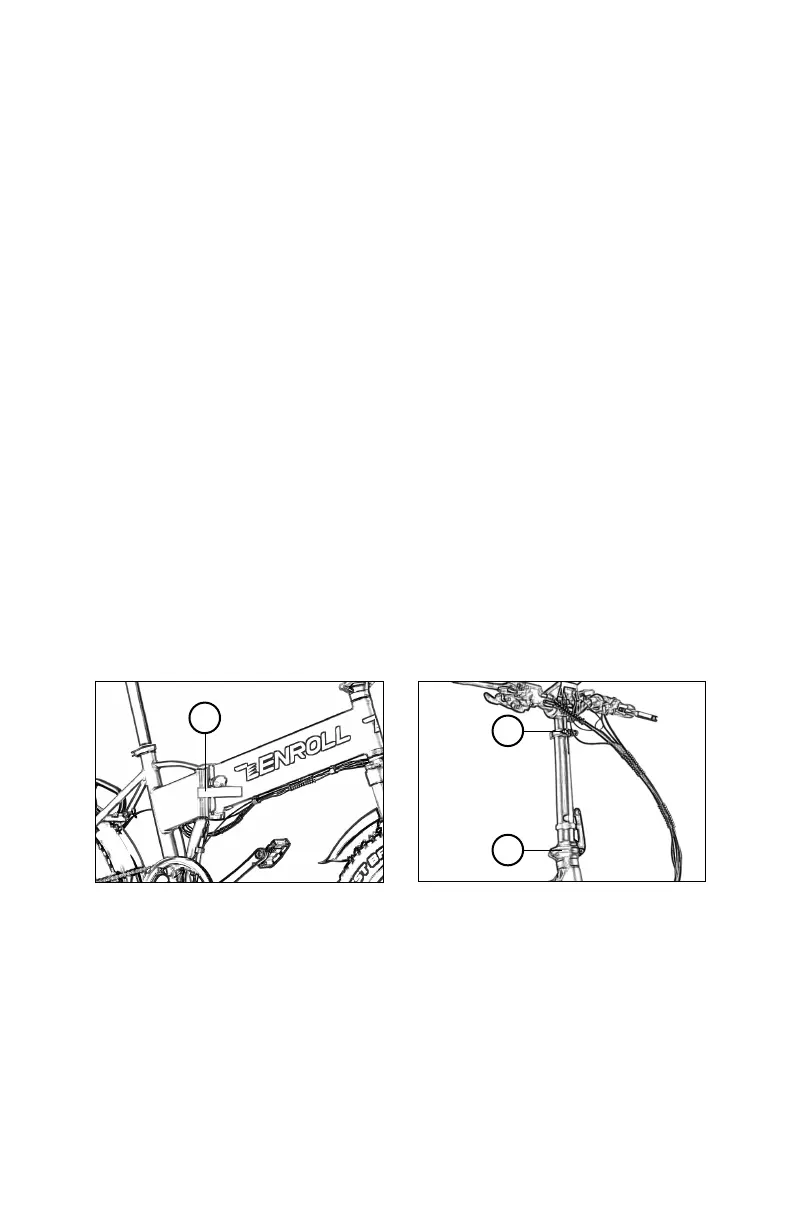
1. To unfold the bike frame, grab the handlebar stem and rear end of the bike
while standing near where the battery is exposed. Lift the bike slightly off the
ground and swing the bike to its closed position. Push down on the clasp firmly
until it locks into position.
2. Insert the handlebar stem into the steering column. Push the clasp down firmly
so that it is locked in position.
3. Pull the steering column to its upright position. Push the clasp down firmly so
that it is locked in position.
SEAT POST & PEDALS
4. Insert the pedestal stem into the seat column of the main body frame, use the
built-in lever to tighten.
5. Attach a pedal on each side of the crank, note the distinction between left
pedal and right pedal. Match the right pedal with “R” stamped on the axle and
turn clockwise to install it; match the left with “L” and turn counterclockwise.
Tighten the pedals with a 15mm open-end wrench in the tool box.


 To Next Page