Firmware Updates
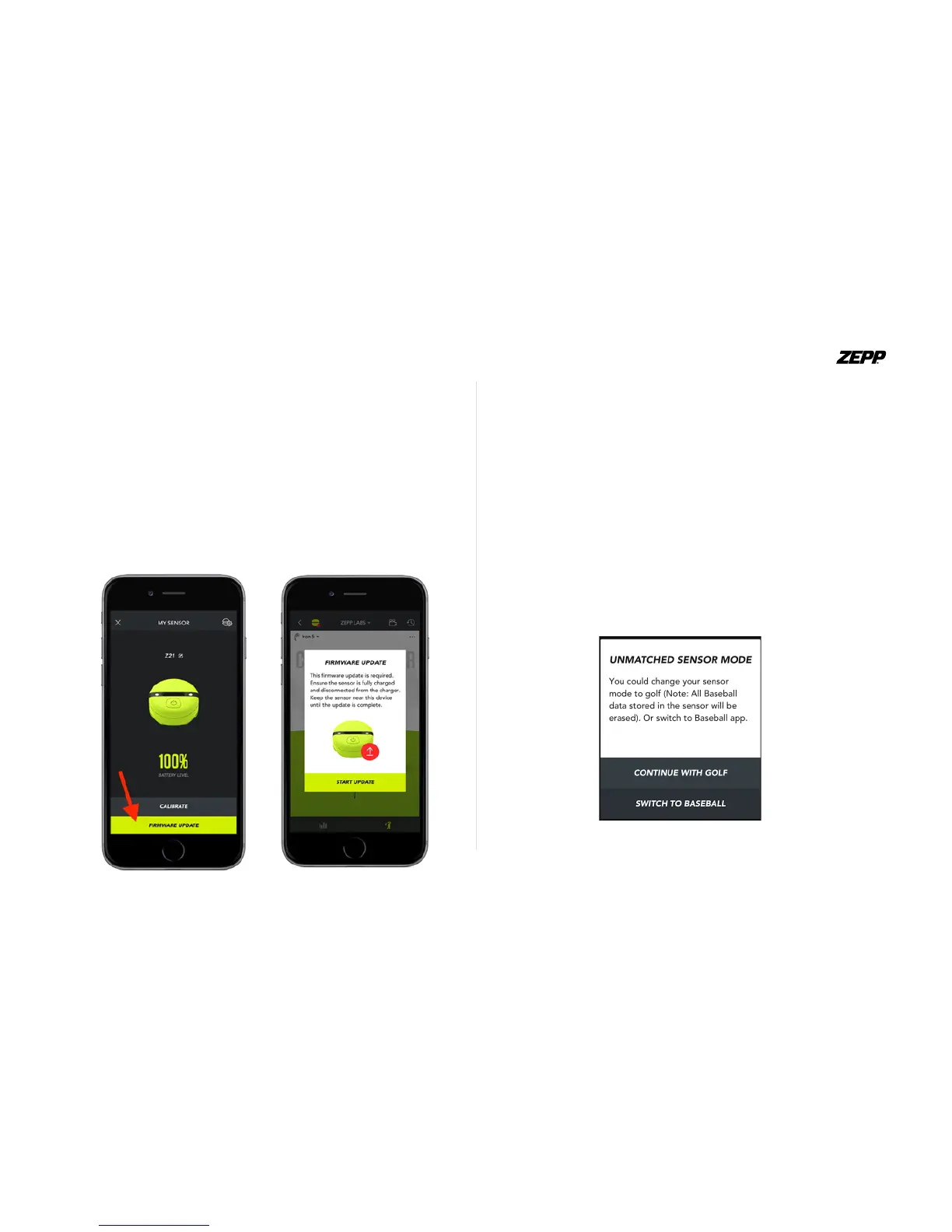
Updating the rmware will improve accuracy and overall performance of the
sensor. To check if a rmware update is available, sync the sensor to the app.
If an update is available you will see the “rmware update” notication in the
“My Sensor” screen of the Zepp Golf app.
A mandatory rmware update will be sent from our servers from time to time,
once the sensor is connected to the app. If a mandatory update is available
make sure that the sensor is fully charged and that you allow at least 3 mins
for the update to complete.
Multi-Sport Functionality
Your sensor will work with 2 Zepp Sports Apps: Zepp Golf and Zepp
Baseball. Simply download the mobile app of choice and attach the sen-
sor to the appropriate bat, or golf mount. To use the sensor for a dier-
ent sport, connect your sensor to your mobile device and open the app of
your choice. A popup menu will appear asking you to change modes of
the sensor. Tap either continue or switch option to the sport you want to
use.
Once mode is changed a notication will inform you that the change was
successful.
ZEPP GOLF USER GUIDE Page 6


 To Next Page