C OPERATION
Insert the plug into the wall outlet.
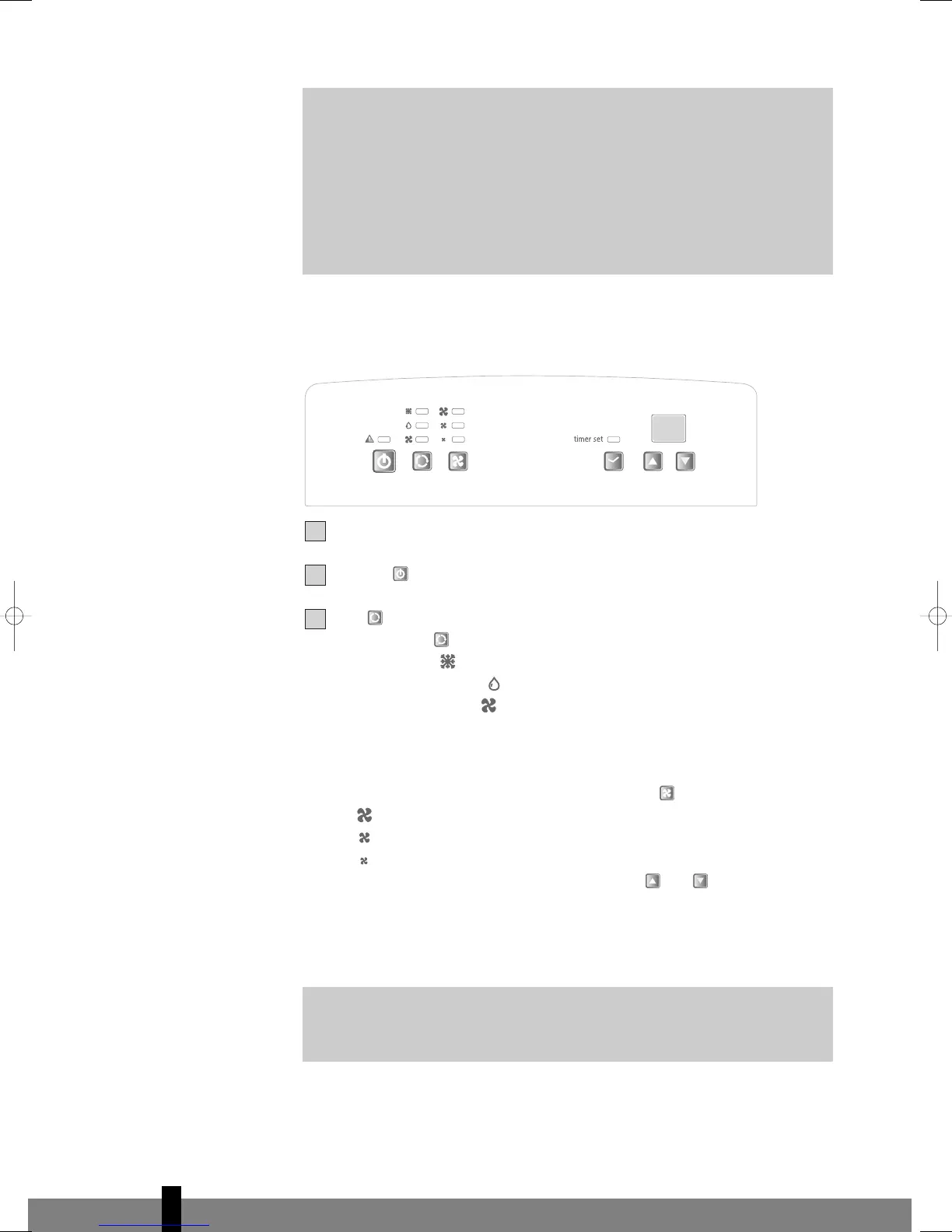
Press the -button to switch on the air conditioner.
With -button you can change the operating mode of the unit.
By pressing the -button the following modes appear:
• Cooling, the light lits.
• Dehumidifying, the light lits.
• Air circulation, the light lits.
COOLING
When the unit is in the cooling mode, the following functions apply:
• The fan speed can be adjusted by pressing the -button
Maximum setting.
Medium setting.
Lowest setting.
• The temperature can be set by pressing the and buttons, anywhere
between 16°C en 32°C. The display will show the set temperature for 15
seconds. Fifteen seconds after setting the required temperature, the
display will show the room temperature.
G
It depends on the environment whether the required temperature will
be reached. It is not a malfunction of the air conditioner if the room
temperature remains above the “set temp”.
G
I
MPORTANT
The flexible exhaust hose should be less than 1m during operation,
which provides the best performance. This length has been designed
especially according to the specifications of the air conditioner. Do not
use an extension or exchange for a different hose as that may lead to
malfunctioning. The exhaust air must flow freely, any blockage can lead
to overheating of the air conditioner. Take care to prevent any bow or
bend in the exhaust hose.
4
68
man_P3xx_1 19-04-2007 13:25 Pagina 68



 To Next Page