Function-Decoders MX681, MX685, MX686, MX687, MX688 Page 3
2 Technical Information
Allowable track voltage **) ................................................................................... min. 10 V
MX681 ........................................................................................................ … max. 35 V
MX685, MX686, MX687, MX688, MX689…….. DCC and DC-Analog operation . max. 35 V
MX685, MX686, MX687, MX688, MX689 AC-Analog operation .. max. power pulse 50 V
Maximum continuous motor current MX681, MX681R, MX681N ......................................... 0.8 A
MX685, MX685R, MX685P16 ................................. 1.0 A
MX688N18 .................................................................. 0.7 A
MX686, MX686D, MX687V / W / WD, MX689 ............ 1.2 A
Operating temperature ............................................................................................ - 20 to 100
o
C
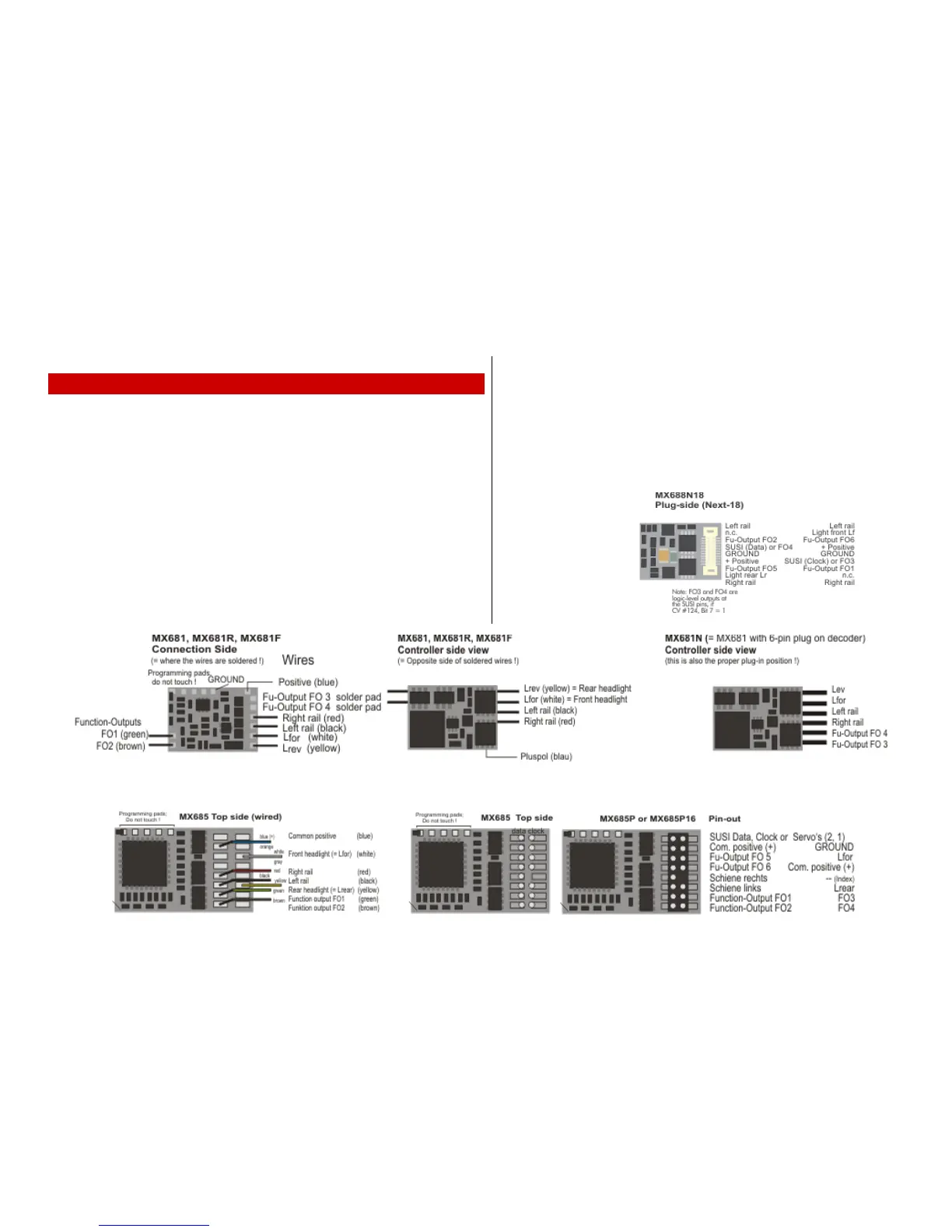
Dimensions (L x W x H) ............ MX681, MX681R, MX681N…………………….. 12 x 8.5 x 2 mm
MX685, MX685R, MX685P16 ………………. 20 x 11 x 3.5 mm
MX686, MX686D……………………………. 20.5 x 15.5 x 4 mm
MX688N18……………………………………... 15 x 9.5 x 2.8 mm
MX687V, MX687W, MX687WD ……...….... 28 x 15.5 x 4 mm
MX689, MX689P22………………………………..30 x 15 x 4 mm
*) The short circuit protection is carried out for the total current of all outputs. Use the “soft start” op-
tion (i.e. CV #125 = 52) to prevent cold-start problems of light bulbs (in-rush current interpreted as a
short circuit, which leads to the output being turned off!
Software - Update:
ZIMO decoders can be updated by the user, provided that one of the following update devices is at
hand: ZIMO decoder update-module MXULF (since 2011), system-cab MX31ZL or command sta-
tion MX10. The updating process is carried out via a USB stick (MXULF, MX31ZL / MX10) or a PC
with Windows operating system and the program ZIMO Firmware Flasher (within the ZIMO Sound
Programmer ZSP).
The same hardware together with the program ZSP is also used to load sound projects into the de-
coder.
There is no need to remove the decoder or to open up the locomotive. Just set the locomotive on
a track section connected to the update module and start the update with the computer or other
equipment mentioned above.


 To Next Page