(1) Post the mounting template on the
wall. Drill the holes according to
the marks on the template (holes
Version: V1.1 Date: Nov. 2011
(2) Remove the screw on the
(3) Take away the back plate.
(5) Tighten the screw on the bottom,
plate on the wall according to the
(4) Fix the plastic pad and the back
RS485
TCP/IP
Lock
Sensor
①
③
Alarm
RS232/RS485 Converter
②
NC LOCK
-
+
DC12V
+
NC LOCK
+
-
NO LOCK
-
-
FR 107
+
-
+12V
+12V
+12V
+12V
GND
GND
GND
GND
GND
GND
GND
GND
GND
SEN
SEN
SEN
SEN
SEN
BUT
BUT
BUT
BUT
BUT
BELL+
BELL+
BELL+
BELL+
BELL+
BELL-
BELL-
BELL-
BELL-
BELL-
NO LOCK
-
+
DC12V
+
-
+
-
FR 107
FR 107
-
+
DC12V
+
-
-
+
DC Power
-
+
DC12V
-
+
DC Power
+
-
FR 107
+
DC12V
-
+
GND
+12V
Exit Button
⑤
Reader
④
Bell
Door Bell
%
%
BUTTO N
EXIT
EXIT
BUTTO N
⑦
⑥
-
+
Alarm
Alarm Power
Exit Button
Door Sensor
for screws and wiring).
bottom of device.
Access Control System Function
(1) If a registered user verified, the device will export the
signal to unlock the door.
(3) If the d llegal , it will output an evice is removed i ly
(4) is External card reader supported.
(5) is it is External exit button supported, convenient to
alarm signal.
open the door inside.
(7) Supports , modes with RS485 TCP/IP to connect PC. One
PC can manage multiple devices.
(6) External door bell is supported.
①: ‘‘I’: device output current, ‘ ’: lock voltage, ’: lock currentULOCK ILOCK
(1) The system supports NO LOCK and NC LOCK. For example the NO LOCK (normally open at
(2) When the Electrical Lock is connected to the Access control System, you need to parallel one FR107
diode (equipped in the package) to prevent the self-inductance EMF affecting the system, do not
power on) is connected with ’‘ ‘NO’ and COM terminals, and the NC LOCK(normally close at power
3.Lock Connection
!
Warning: No operating with power on
(1) Share power with the lock:
ULOCK=12V, I-ILOCK>1A… ①
And the distance between the lock
Device shares power with the lock:
Does not shares power with the lock:
A. =12V I- ≤1A;ULOCK ILOCK
B ≠12V; . ULOCK
C. The distance between the lock and
Alarm Voltage output ≤ DC 12V
4. Other Parts Connection:
5. Power Connection:
Input DC 12V, 500mA (50mA standby). Positive
is connected with ‘+12V’, negative is connected
with ’GND’ (do not reverse the polarities).
(2) Does not share power with the lock:
2. Structure and Function
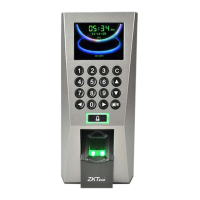
F18 Installation Guide
1. Equipment Installation
Wirin g Hole
Instru ction fo r the Mo unting P aper
Before t he devic e is fas tened, p leas e
stick th e paper to t he pla ce where y ou
want to in stall it , then m ake hole s and
lay cabl es accor ding t o the moun ting
paper.
F18 M ounti ng Pape r
10
11
12
13
(on ly for yo ur refe rence )
Fixin g Hole
Fixin g Hole
Fixin g Hole
Fixin g Hole
NC1
NC1
NC1
NC1
NC1
NO1
NO1
NO1
NO1
NO1
COM1
COM1
COM1
COM1
COM1
NO2
NO2
NO2
NO2
NO2
COM2
COM2
COM2
COM2
COM2
fix the device to the back plate.
(2) Door sensor will detect the on-off state If the door is
unexpected opened or improperly closed, the alarm signal
(digital value) will be triggered.
mounting paper.
on) is connected with ‘NC’ ‘and COM’ terminals.
reverse the polarities.
and the device is equal or less
the device is more than 10 meters.
than 10 meters.


 To Next Page