This document describes the SBTL300 Series Swing Barrier, a turnstile system designed for access control.
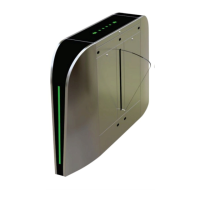
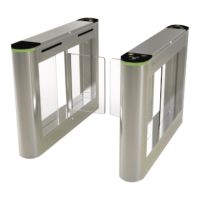
The SBTL300 Series features a chassis made of SUS304 stainless steel, providing a simple, beautiful, and corrosion-protected design. Its primary function is to regulate pedestrian access, restricting unauthorized entry while ensuring smooth evacuation in emergencies. The turnstile's appearance and dimensions are provided in Figure 1-1 of the manual.
Technical Specifications:
- Dimensions: L = 1200mm, W = 200mm, H = 981.50mm
- Communication: RS485
- Input Voltage: AC110~240V, 50-60Hz
- Input Control Signal: Switching signal
- Output Voltage: DC 24V
- Time of Opening/Closing: 0.8 seconds (adjustable)
- Relative Humidity: 20% - 95% (Non-condensing)
- Temperature: -28°C to 60°C
- Passage Rate: Maximum 30 people per minute
- Infrared Sensors: 4
- Working Environment: Indoor
Function Description:
The mechanical system of the swing barrier turnstile comprises the chassis and a core component. The chassis serves as a housing for the direction indicator, reader, infrared sensor, and door lock. The core component includes the motor, frame, belt, and swing arm.
The electronic control system is composed of a reader (optional), a master control panel, an infrared sensor, a direction indicator, and an alarm.
- Reader (optional): Reads card data and transmits it to the controller.
- Master control panel: Acts as the system's control center, processing signals from the reader and photoelectric switch, making logical judgments, and sending commands to the direction indicator, electric motor, and alarm.
- Infrared sensor: Detects pedestrian positions and provides safety protection.
- Direction indicator: Displays the pedestrian passage path, guiding users safely and orderly.
- Alarm: Activates an audible alarm if unauthorized entry is detected.
The system supports both single-lane and multi-lane management configurations. A single-lane system consists of two single-core swing barriers, while a multi-lane system uses two single-core barriers and multiple dual-core barriers.
Usage Features:
The SBTL300 Series offers multiple working modes for versatility, including normal working mode, normally open mode, normally close mode, and testing mode. The current work mode is displayed on the digital screen of the control board after power-up.
Key functions include:
- Clear Traffic Direction Indication: Intuitive LED light indicators show whether passage is allowed (requires an additional direction light board).
- Anti-Tailing Function: The system automatically alarms if it detects someone closely following another person without swiping a card.
- Multiple Working Modes: Supports one-way traffic, two-way traffic, infrared switch control, or pass control via the main board switch signal (can be set through the main board menu, compatible with additional control systems like access control or fingerprint readers).
- Automatic Reset Function: If a user fails to pass within a specified time after receiving an opening signal, the system automatically cancels their access authority. The restricted passage time is configurable in the main board menu.
- Voice Prompt Function: Provides audible prompts.
- Zero Position Self-Check: Facilitates maintenance and usage.
- Anti-Pinch Function: Prevents the swing arm from closing and injuring people if they are still passing through when the set passage time expires.
- Serial Port Communication: Features 485 and 232 serial port communication for gate opening control.
The device is operated via a keypad with four buttons: "MENU," "MODE," "ADD," and "DEC."
- MENU: Long press to enter menu options.
- MODE: Used to select menu functions within the menu.
- ADD/DEC: Adjust function parameters up and down.
- Saving Parameters: Long press the first key (MENU) to save adjusted parameters.
- Manual Brake Open: Short press the first or second key to manually open the brake.
The manual provides a detailed menu introduction, listing various items, their functions, and descriptions, such as:
- 01EXXX Display mode: Displays current barrier position, infrared input signal, control input signal, or test mode.
- 02EXXX Opening mode: Configures controlled/forbidden access for right/left sides, or free access.
- 03EXXX Speed of barrier opening: Adjustable from 0-30 (default: 15). Higher values mean faster speed.
- 04EXXX Opening brake stroke: Adjustable from 10-25 (default: 25). Larger values mean longer deceleration and smoother swing arm.
- 05EXXX Brake speed of opening: Adjustable from 0-30 (default: 10). Larger values mean slower deceleration and more stable swing arm.
- 06EXXX Speed of barrier closing: Adjustable from 0-30 (default: 15). Higher values mean faster speed.
- 07EXXX Closing brake stroke: Adjustable from 10-25 (default: 25). Larger values mean longer deceleration and smoother swing arm.
- 08EXXX Brake speed of closing: Adjustable from 0-30 (default: 10). Larger values mean slower deceleration and more stable swing arm.
- 09EXXX Master and vice machines Setting: Configures as master (default: 0) or vice (1).
- 10EXXX RS485 address: Adjustable from 0-250.
- 11EXXX Open duration: Adjustable from 0-60 seconds (default: 5).
- 12EXXX Gate closing delay time: Adjustable from 0-60 seconds (default: 0).
- 13EXXX Barrier positioning: Configures zero position (default), left opening, right opening, or vice opening position.
- 14EXXX Memory function: Enables/disables closing memory function or opening memory function.
- 15EXXX Swiping card mode: Allows/disallows card swiping in passage.
- 16EXXX Volume setting: Adjustable from 0-31 (default: 20). Higher values mean louder sound.
- 17EXXX Alarm mode: Configures opening alarm voice or closing alarm voice.
- 18EXXX Exchange entrance and exit voice: Configures right entrance/left exit (default) or left entrance/right exit.
- 19EXXX Traffic detention alarm time: Adjustable from 5-30 seconds (default: 10).
- 20EXXX Intensity adjustment: Adjustable from 10-60 (default: 40). Greater values mean greater force.
- 21EXXX Fire signal setting: Configures right opening (default) or left opening.
- 22EXXX Failure to pass infrared completely, delay closing time: Adjustable from 5-60 seconds (default: 15).
- 23EXXX Reset: Resets the device (default: 0).
Installation Notes:
- Installation on a horizontal solid platform with a height of 50mm to 100mm is recommended.
- Avoid using the turnstile in corrosive environments.
- Ensure the protective ground wire is reliably connected to prevent injuries or accidents.
- After installation, check all connections (ground wire, connector assemblies, wiring points) and movable parts. Tighten any loose nuts, screws, or fasteners to prevent failures.
- A 100mm distance from the wall should be reserved for maintenance access.
- Concealed cables should be laid 100mm under the ground, with the exposed part not exceeding 100mm. Conduit outlets should be bent back to prevent water ingress.
- The input voltage is AC100-120V/200-240V. Master and slave units connect via a 3-core signal cable and a 2-core power cable.
- Screw holes (M12) should be drilled according to the provided diagram, and screws installed.
- After placing the turnstile and connecting online cables, perform a power-on test. If successful, tighten the screws.
- A warning line on the ground is recommended to prompt pedestrians to stand behind it when swiping cards.
Maintenance Features:
- Chassis Maintenance: The SUS304 stainless steel chassis may develop rust stains over time. Regularly sand the surface gently along the grain and apply anti-rust oil, ensuring not to cover the infrared sensor.
- Movement Maintenance: Before maintenance, switch off the power supply. Open the door, clean dust, lubricate the transmission mechanism. Check the belt for looseness and adjust the motor position to tighten it if necessary. Check and tighten other connection parts.
- Power Maintenance: Switch off the power supply before maintenance. Check plug connections for looseness and fix them. Do not randomly change connection positions. Periodically check external power supply insulation and for any leakage. Verify technical parameters of interfaces and replace electronic components as needed based on their service life.
- Caution: All maintenance, especially for movement and electrical control parts, must be performed by professional personnel with the power supply switched off to ensure safety.


 To Next Page
 General