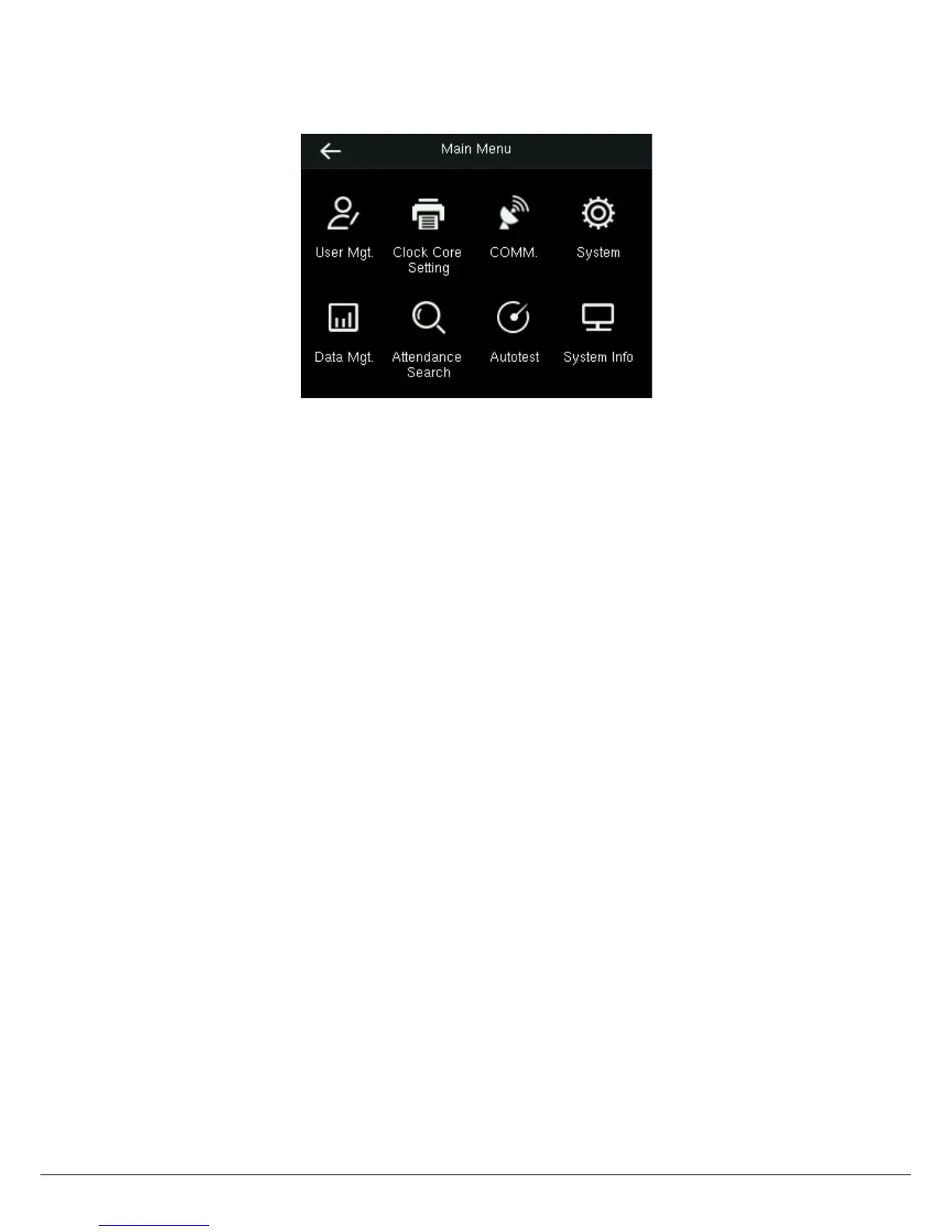
2 Main Menu
User Mgt.: Basic information of registered users, including user ID, name, user role, verification mode, fingerprint, badge
number and password.
Clock Core Setting: To set the needle printer, shifts, ribbon, paper card and print contents of smart time recorder.
Comm.: To set the related parameters of the communication between the device and PC, including PC connection and
Wireless Network.
System: To set related parameters of the system, including setting language, date & time, voice, bell schedule,
attendance and fingerprint parameters, USB upgrade and resetting to factory settings.
Data Mgt.: Delete all data, delete admin role, delete attendance data, delete backup data and backup, restore, download,
upload data.
Attendance Search: To search for the attendance records stored in the device.
Autotest: To automatically test different module’s functions, including the LCD, voice, fingerprint sensor and clock RTC
test.
System Info: To check device capacity, device and firmware information.
Note:
Some functions such as COMM. and Attendance Search that STP10 Smart Time Recorder may not have.


 To Next Page