8
Control Panel
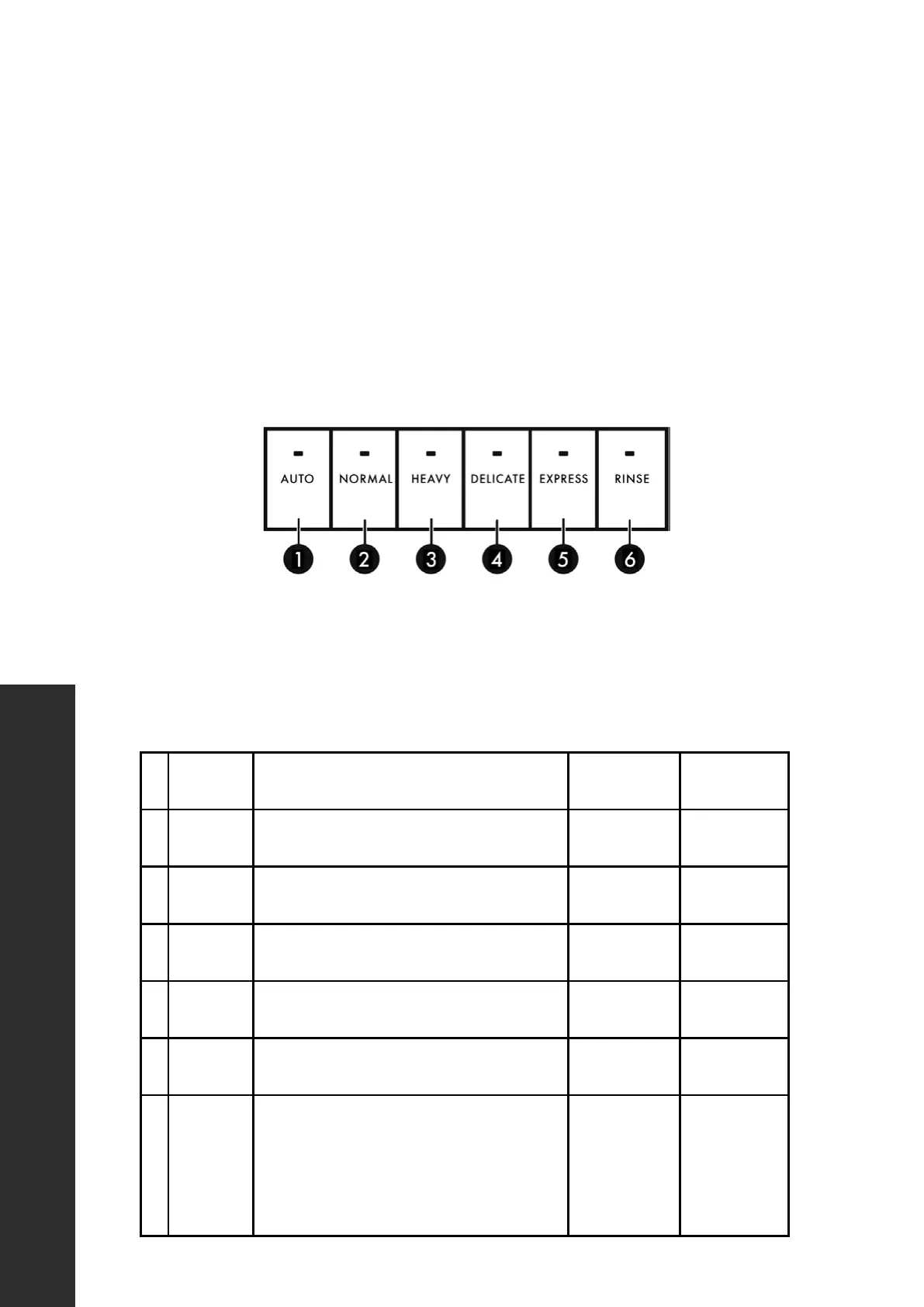
CONTROL PANEL
USING THE CONTROL PANEL
Your dishwasher’s control panel is located on the top edge of the door. The door must
be open to select wash cycle settings and operate the dishwasher.
POWER On/Off 3sec - Hold this button, located on the far left of the control panel,
down for three seconds to turn the unit’s power on or off.
CYCLES
Select a cleaning cycle based on the type of dishes to be washed and the level of
soil on the dishes. Cycle times are approximate and will vary with options selected.
The timer will be delayed to allow for the water to heat for the main wash of all cycles
if the sensor detects the water is not hot enough. Below is water use and cycle times
under standard conditions.
# CYCLE DESCRIPTION WATER USE
CYCLE TIME
(MINUTES)
1 AUTO
Auto sensing wash, lightly, or heavily soiled
dishes, with or with out dried-on food.
3.0 - 5.9 gal.
(11.4 - 22.5 l)
100 - 133
2 NORMAL
Use for regularly soiled dinner dishes
or silverware.
3.0 - 5.9 gal.
(11.4 - 22.5 l)
102 - 120
3 HEAVY
Use for hard-to-clean, heavily soiled dishes,
pots, and pans.
6.9 gal.
(26.2 l)
13 8
4 DELICATE Use for lightly soiled dishes and glass.
5.9 gal.
(22.5 l)
114
5 EXPRESS
Use for lightly soiled and pre-rinsed dishes
and silverware.
4.0 gal.
(15.1 l)
60
6 RINSE
Use for pre-rinsing dishes or glasses. This is
only a rinse that keeps food from drying on
your dishes and reduces odor buildup in your
dishwasher until you are ready to wash a full
load. Do not use detergent.
2.0 gal.
(7.7 l)
20
OPERATION



 To Next Page