USING YOUR ICE MAKER
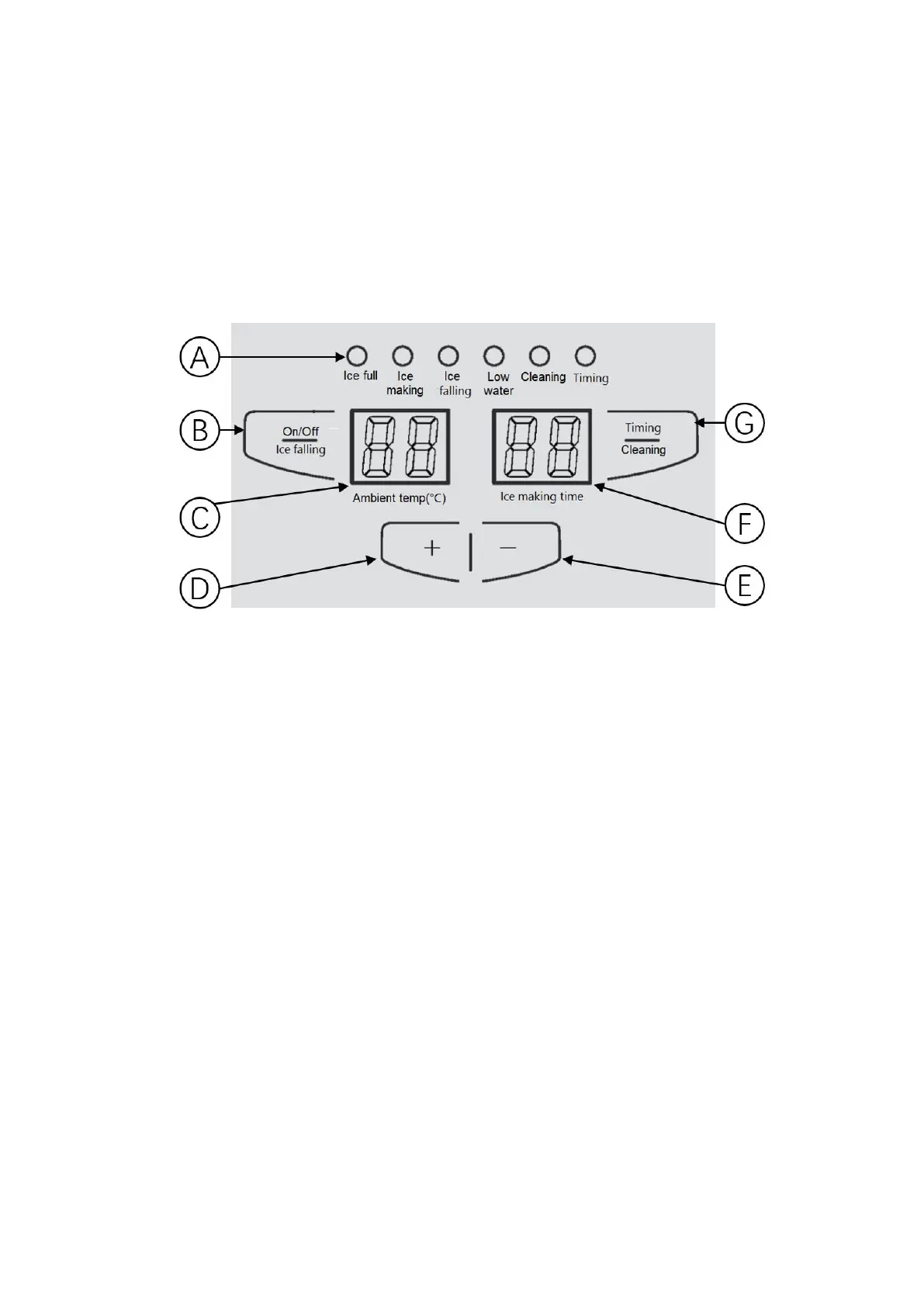
● Control panel introduction
A: LED indicator lights: Indicates the status of the ice maker during working.
B: On/Off & Ice falling button:
–
After power on, the unit enters the standby mode. Press this button to start the ice
making process.
–
During ice making, press this button to skip to “ice falling” mode.
–
During ice maker working, press this button for 3 seconds, unit will enter the standby
mode.
C: Displays the ambient temperature and return air temperature.
D: “+” button:
–
During ice maker working, press "+" button for 3 seconds to enter the mode of
adjusting the ice thickness, the display flash.
–
Press this button to increase the thickness of ice cubes.
–
Press this button to increase time when presetting the time of start/end ice making
(in hours).
E: “-” button:
–
Press "-" button for 3 seconds to turn on/off the light in the ice bucket.
–
Press this button to reduce the thickness of ice cubes.
–
Press this button to reduce time when presetting the time of start/end ice making.


 To Next Page