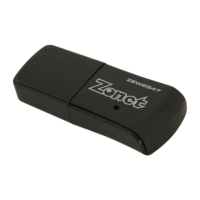
802.11n Wireless Nano USB Adapter
1
Table of Content
Chapter 1.
Introduction……………………………………………………………2
1.1 Welcome…………………………………………………………………………2
1.2 Product Feature…………………………………………………………………2
1.3 Content of Package……………………………………………………………2
1.4 Before You Begin………………………………………………………………3
1.4 Know Your ZEW2547…………………………………………………………3
Chapter 2. Installation…………………………………………………………………4
2.1 Windows 7………………………………………………………………………4
2.2 Windows 2000/XP/Vista……………………………………………………7
Chapter 3. Configuration…………………………………………
…………………10
3.1 Station Mode
…………………………………………………………………10
3.1.1 Site Survey
………………………………………………………………11
3.1.2
Profile……………………………………………………………………13
3.1.2.1 Add/Edit Profile
…………………………………………………14
3.1.2.2 Add WPS Profile
…………………………………………………15
3.1.3 Link Information
………………………………………………………17
3.1.4 Advanced
…………………………………………………………………
19
3.1.5 About
………………………………………………………………………2
1
3.2
AP Mode…………………………………………………………………………22
3.2.1
Windows 7………………………………………………………………23
3.2.1.1
Configuration……………………………………………………24
3.2.1.2
Switch to Working Station Mode
……………………………25
3.2.2
Windows 2000/XP/Vista
……………………………………………26
3.2.2.1
Config AP…………………………………………………………27
3.2.2.2
Advanced
…………………………………………………………29
3.2.2.3
Access Control List
………………………………………………30
3.2.2.4
Associate List
……………………………………………………31
3.2.2.5
Switch to Working Station Mode
……………………………32
3.3
Use Zero Configuration……………………………………………………33
Chapter 4. How to connect with PSP
……………………………………………36
4
.1 Configure PSP with Ad-Hoc mode
………………………………………36
4.2 Configure XLink Kai
…………………………………………………………38
Chapter 5. Product Specifications
………………………………………………39
Chapter 6. TroubleShooting
………………………………………………………40


 To Next Page