17
④
EFX RTN knob
This adjusts the internal effect volume.
█
Output section
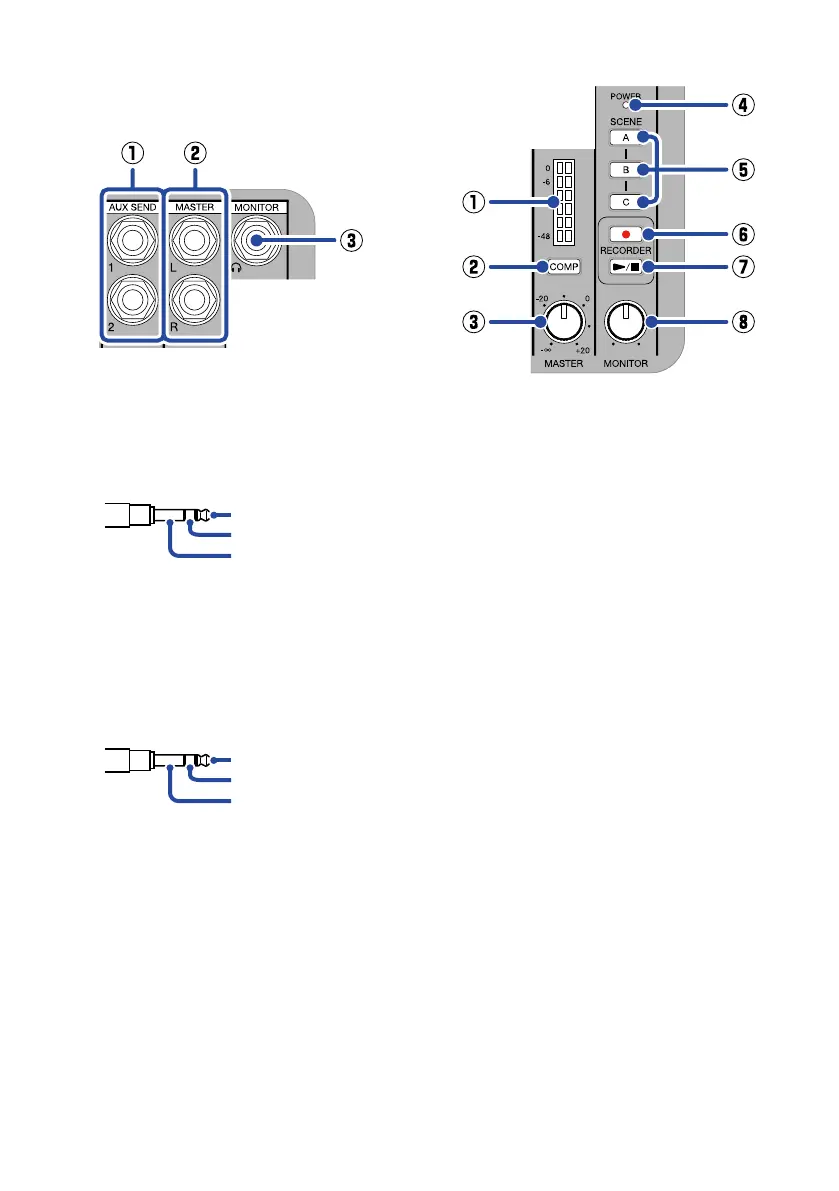
①
AUX SEND 1/2 jacks
External effects, for example, can be
connected here. This supports TRS
plugs.
TRS
TIP: HOT
RING: COLD
SLEEVE: GND
②
MASTER L/R output jacks
Connect these to a PA system or pow-
ered monitors, for example, to output the
stereo sound mixed on the L6. This sup-
ports TRS plugs.
TRS
TIP: HOT
RING: COLD
SLEEVE: GND
③
MONITOR output jack
Connect headphones here to monitor the
stereo sound mixed on the L6.
█
Master section
①
Master level meters
These show the levels output from the
MASTER L/R output jacks in a range
from −48 dB to 0 dB.
②
COMP button
Press this to light it, increasing the sound
pressure output from the MASTER L/R
output jacks while preventing clipping.
③
MASTER knob
This adjusts the audio levels output from
the MASTER L/R output jacks in a range
from −∞ to +20 dB.
④
Power indicator
This lights when the power is on. If using
batteries, this shows the remaining bat-
tery charge.
⑤
Scene selection buttons
Use these to save and recall L6 mixer
settings.
⑥
REC button
This starts and stops recording.
⑦
PLAY/STOP button
This starts/stops playback of the most
recently recorded le.
⑧
MONITOR knob
Use this to adjust the volume of the
audio output from the MONITOR output
jack.


 To Next Page