16
⑪
PAN button
Press this to light it, enabling adjustment
of the left-right stereo position of the
channel.
⑫
LEVEL button
Press this to light it, enabling adjustment
of the channel level.
█
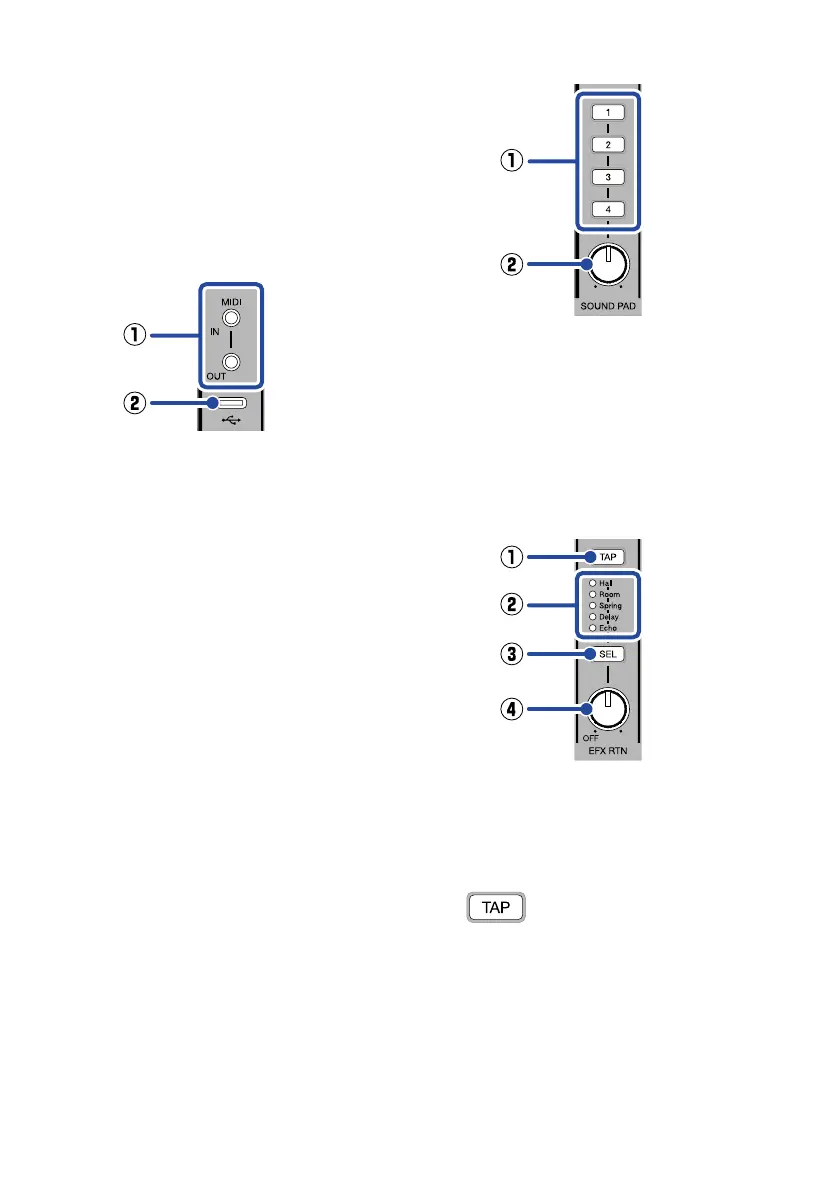
MIDI/USB section
①
MIDI IN/OUT connection jacks
Use 3.5mm TRS cables to connect MIDI
devices.
The L6 can be used as a USB MIDI inter-
face for a computer, smartphone or
tablet, enabling control of a MIDI device.
Moreover, a MIDI device can be used to
control the L6.
②
USB port (Type-C)
Connected to a computer, smartphone
or tablet, the following uses are possible.
•
The L6 Editor computer application
can be used to make detailed L6 set-
tings and transfer les.
•
The L6 can be used as an audio
interface.
•
The L6 can be used as a USB MIDI
interface.
•
MIDI functions can be used to control
the L6.
This supports operation with USB bus
power.
█
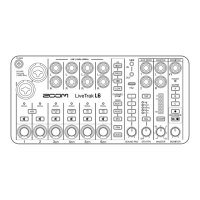
SOUND PAD section
①
SOUND PAD 1 – 4 buttons
Audio les can be assigned to the pads
and played back by pressing them.
②
SOUND PAD knob
Use this to adjust the volume of SOUND PAD
1 – 4.
█
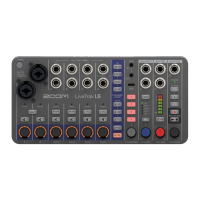
EFX section
①
TAP button
When the “Delay” or “Echo” internal effect
is selected, tapping this sets the delay
time to the tapped tempo.
blinks at the set delay time
tempo.
②
Internal effect indicators
The indicator lights for the selected inter-
nal effect.
③
SEL button
Use this to select the internal effect.
Pressing this cycles through the internal
effects.


 To Next Page