10
Using the MENU
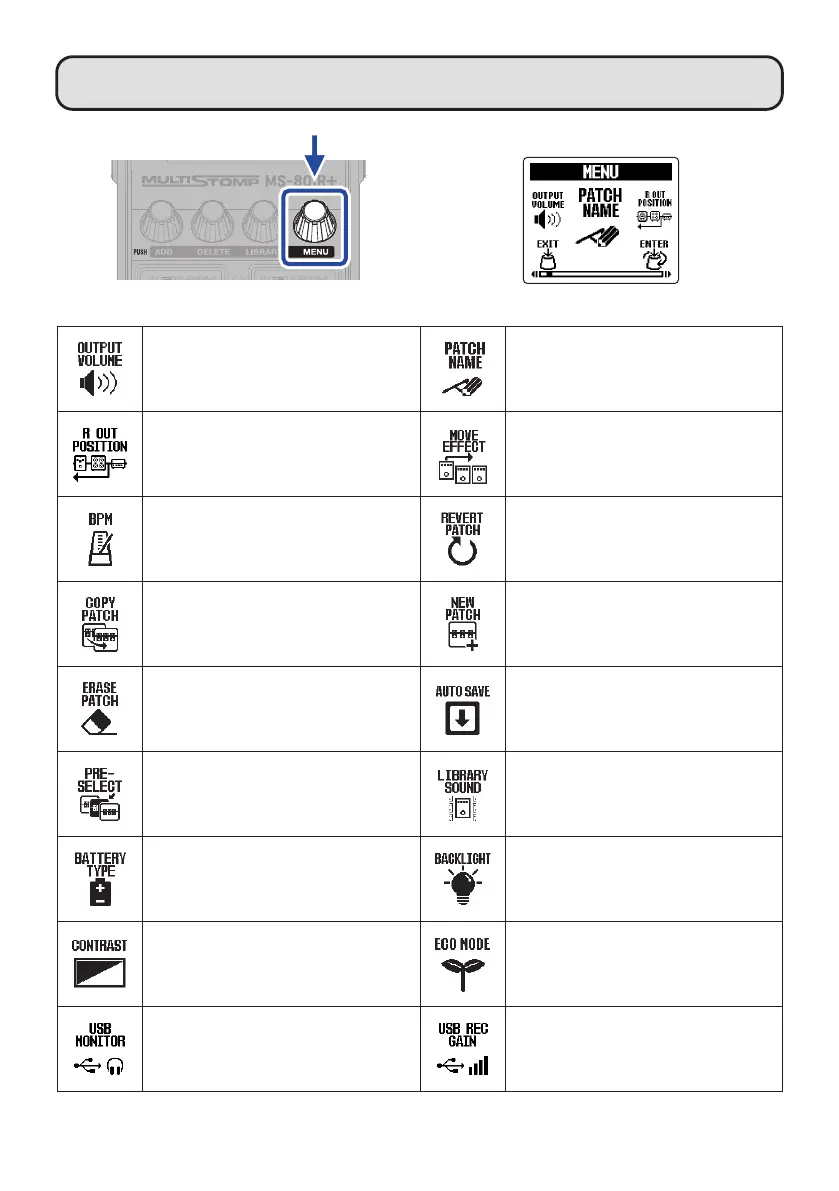
MENU Screen
Adjust the overall volume. Change the patch memory name.
Change the position in the patch memory
from which the R channel signal is output.
Change the effect order.
The BPM, which is used for the tempo
synchronization of delay time, for example,
can be set separately for each patch
memory.
This restores a changed patch memory
to the state it was in immediately after
selection or to its factory default settings.
Copy a patch memory and save it in a
different location.
Create a new patch memory.
Delete a patch memory. Turn the automatic saving function on/off.
Turn the preselect function on/off.
The output sound on the LIBRARY Screen
(when changing effects) can be set to
either just the selected effect or the entire
patch memory.
Set the type of batteries. Set the backlight brightness.
Adjust the display contrast.
Turn the ECO mode on/off.
Adjust the monitoring balance for USB
AUDIO.
Adjust the volume (recording level) sent to
the computer, smartphone or tablet using
USB AUDIO.



 To Next Page