08
Turning the Power On and Off
Turning the Power On
1.
Minimize the volume of output devices connected to
the
.
2.
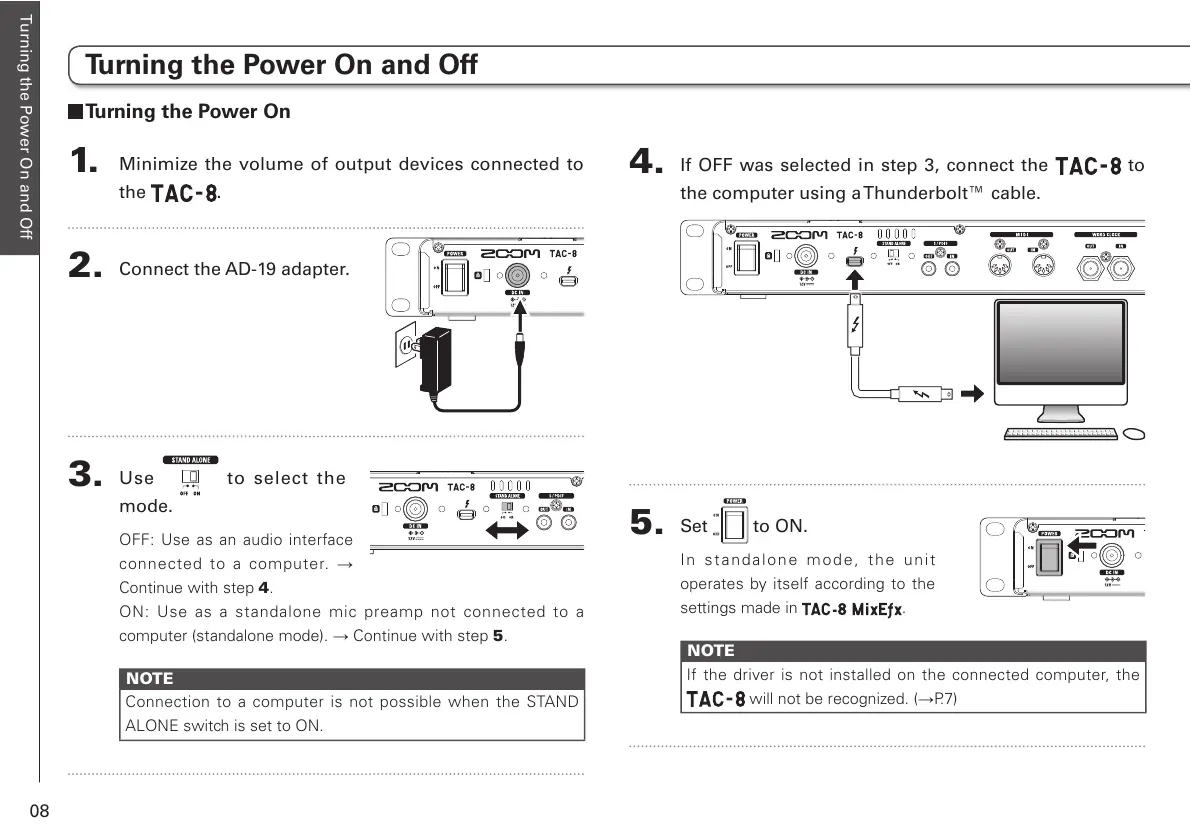
Connect the AD-19 adapter.
3.
Use to select the
mode.
OFF: Use as an audio interface
connected to a computer. ĺ
Continue with step 4.
ON: Use as a standalone mic preamp not connected to a
computer (standalone mode). ĺ Continue with step 5.
NOTE
Connection to a computer is not possible when the STAND
ALONE switch is set to ON.
4.
If OFF was selected in step 3, connect the to
the computer using a Thunderbolt™ cable.
5.
Set to ON.
In st a n d a l o ne mode, the unit
operates by itself according to the
settings made in .
NOTE
If the driver is not installed on the connected computer, the
will not be recognized. (ĺP.7)
Turning the Power On and Off



 To Next Page