23
$POOFDUJOH;00.)4FSJFT.JD$BQTVMFT(continued)
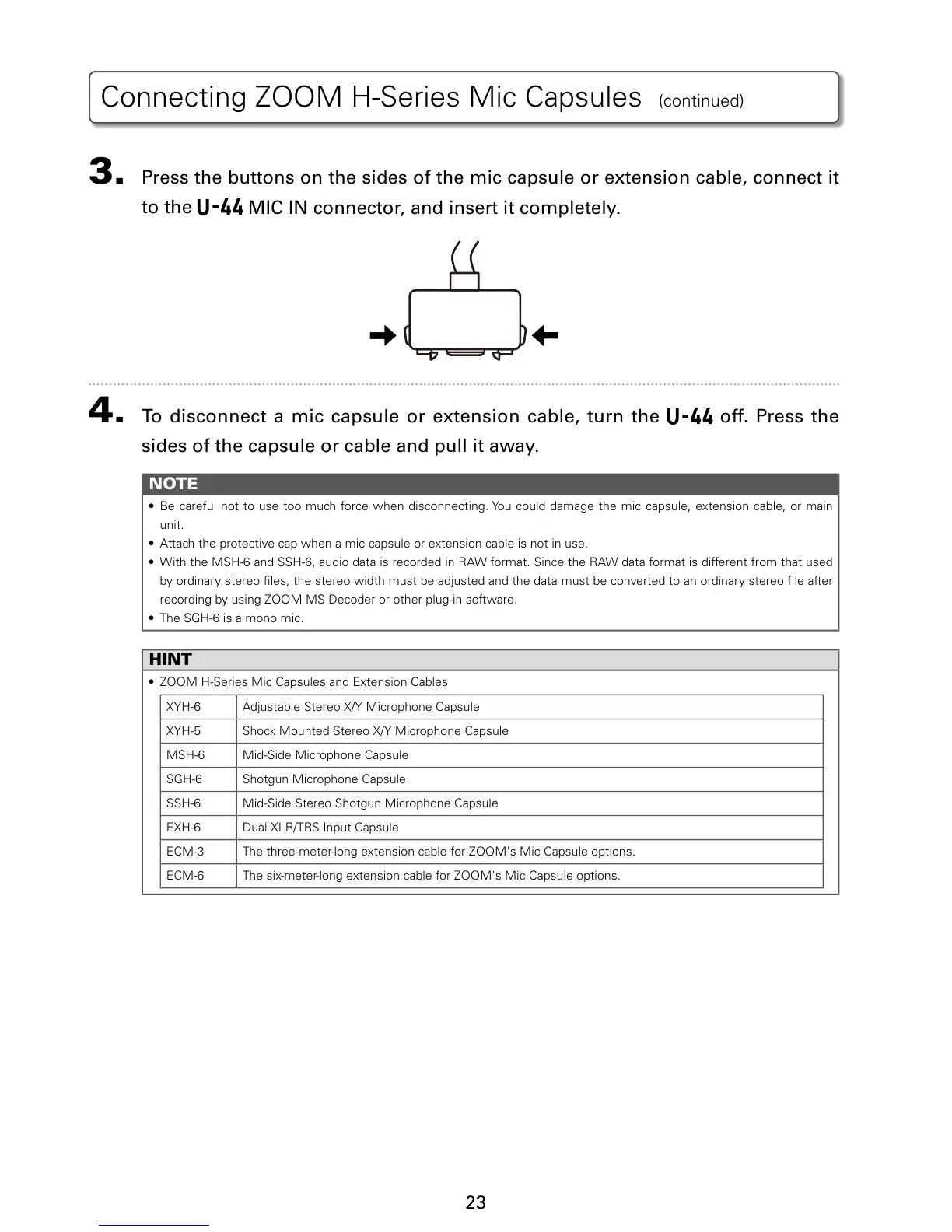
3. Press the buttons on the sides of the mic capsule or extension cable, connect it
to the
MIC IN connector, and insert it completely.
4. To discon n e c t a mic c a p s u l e or e x t e n s i o n ca b l e , t u r n t h e off. Press the
sides of the capsule or cable and pull it away.
NOTE
t #FDBSFGVMOPUUPVTFUPPNVDIGPSDFXIFOEJTDPOOFDUJOH:PVDPVMEEBNBHFUIFNJDDBQTVMFFYUFOTJPODBCMFPSNBJO
unit.
t "UUBDIUIFQSPUFDUJWFDBQXIFOBNJDDBQTVMFPSFYUFOTJPODBCMFJTOPUJOVTF
t 8JUIUIF.4)BOE44)BVEJPEBUBJTSFDPSEFEJO3"8GPSNBU4JODFUIF3"8EBUBGPSNBUJTEJGGFSFOUGSPNUIBUVTFE
by ordinary stereo les, the stereo width must be adjusted and the data must be converted to an ordinary stereo le after
recording by using ZOOM MS Decoder or other plug-in software.
t 5IF4()JTBNPOPNJD
HINT
t ;00.)4FSJFT.JD$BQTVMFTBOE&YUFOTJPO$BCMFT
9:) "EKVTUBCMF4UFSFP9:.JDSPQIPOF$BQTVMF
9:) 4IPDL.PVOUFE4UFSFP9:.JDSPQIPOF$BQTVMF
.4) Mid-Side Microphone Capsule
4() Shotgun Microphone Capsule
44) Mid-Side Stereo Shotgun Microphone Capsule
&9) %VBM9-3534*OQVU$BQTVMF
&$. 5IFUISFFNFUFSMPOHFYUFOTJPODBCMFGPS;00.hT.JD$BQTVMFPQUJPOT
&$. 5IFTJYNFUFSMPOHFYUFOTJPODBCMFGPS;00.hT.JD$BQTVMFPQUJPOT


 To Next Page