24
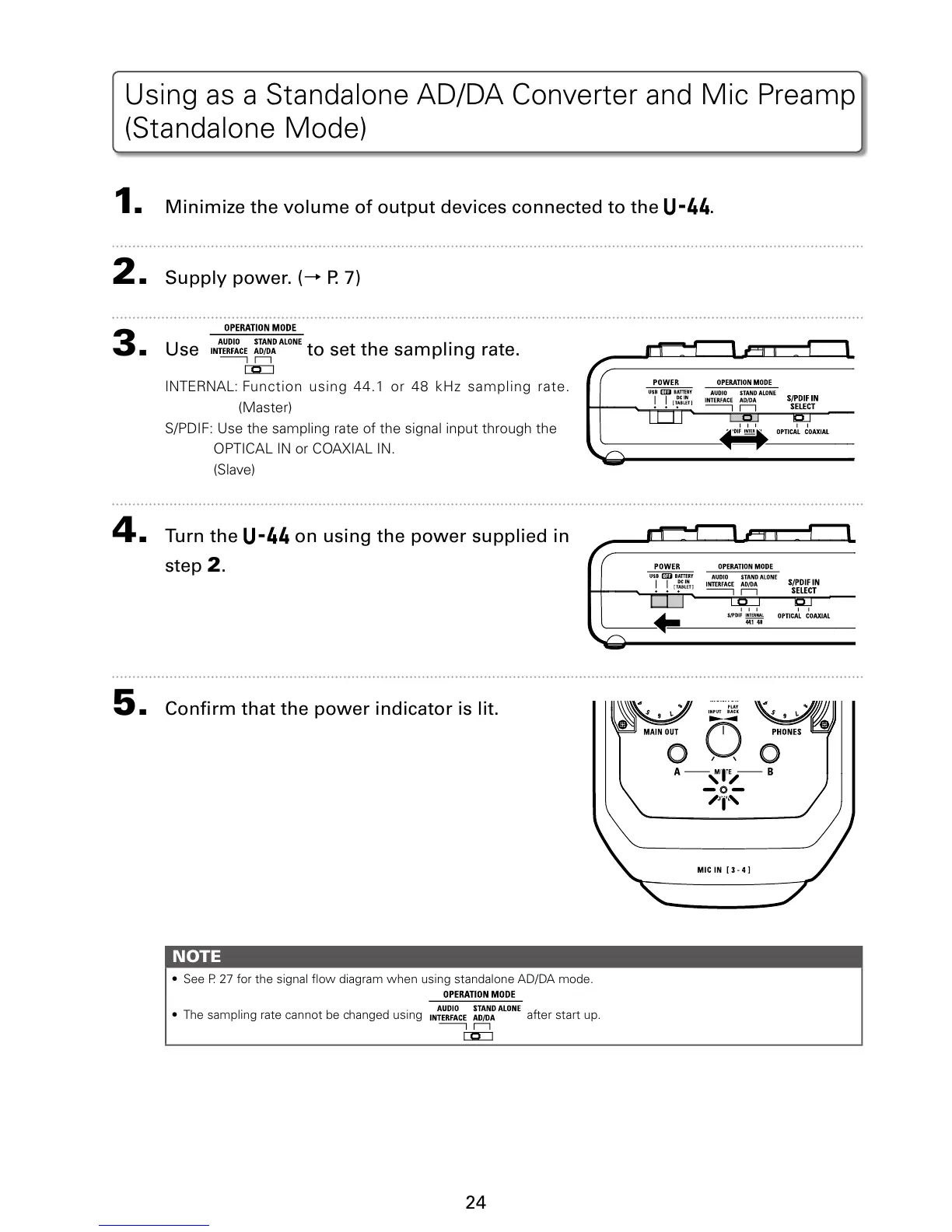
1. Minimize the volume of output devices connected to the .
2. Supply power. (
→
P. 7)
3. Use to set the sampling rate.
*/5&3/"-'VODUJPO VTJOH PS L)[ TBNQMJOH SBUF
(Master)
41%*'6TFUIFTBNQMJOHSBUFPGUIFTJHOBMJOQVUUISPVHIUIF
015*$"-*/PS$0"9*"-*/
(Slave)
4. Turn the on using the power supplied in
step
2.
5. Conrm that the power indicator is lit.
NOTE
t 4FF1 GPSUIFTJHOBMýPXEJBHSBNXIFOVTJOHTUBOEBMPOF"%%"NPEF
t 5IFTBNQMJOHSBUFDBOOPUCFDIBOHFEVTJOH after start up.
Using as a Standalone AD/DA Converter and Mic Preamp
(Standalone Mode)


 To Next Page