

EasyManua.ls Logo

zoskvee KW52 - User Manual

zoskvee KW52
10 pages
Print Icon
To Next Page IconTo Next Page
Loading...
KW52SmartWatchManual
If you need a detailed opera tion guide, please find the user guide and user manual under the
productguideanddocumentationontheAmazonpage.
Ifyouhaveanyproductquestions,pleasefeelfreetocontactusviaAmazonorders.
Appearancedescription
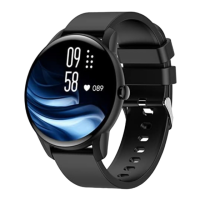
Fullscreentoucharea(supportup,down,left,andrightslidingandlongpresstoselect)
Sidebutton(longpressfor3secondstoturnonandoff)
Greenlightsensor
Chargingthimblecontactpoint
Chargingdiagram
z   Pleaseusethemagneticchargerprovidedwiththeproducttoaimatthecontactsonthe
backofthehost
z   Pleaseinsertthe USBportintothecomputer,chargingbaseor powerbankforcharging
Question and Answer IconNeed help?

Do you have a question about the zoskvee KW52 and is the answer not in the manual?

Summary

Product Appearance and Charging

Device Description and Sensors

Details the watch's touch area, side button, sensors, and charging contacts.

Charging Instructions

Provides a diagram and steps for charging the smartwatch using the magnetic charger.

App Integration and Connection

App Installation and Compatibility

Guide to downloading and installing the V Band app, listing system requirements.

Device Pairing Procedure

Step-by-step instructions for connecting the watch to a mobile phone via the V Band app.

Watch Operation and Customization

Operating Instructions and Gestures

Explains side button functions and swipe gestures for navigation.

Watch Face Customization

Instructions on how to change watch faces directly or via the app.

Health Monitoring Features

Notification Display

How the watch displays message notifications, calls, and app alerts.

Heart Rate and Blood Pressure Monitoring

Guides on using and interpreting heart rate and blood pressure readings.

Advanced Health and Activity Tracking

Blood Oxygen and Sleep Monitoring

Details on monitoring blood oxygen levels and sleep patterns.

Female Cycle and Sport Records

Features for tracking female physiological states and recording sports activities.

Additional Watch Functions

Sport Modes and Music Control

Overview of supported sport modes and controlling music playback via Bluetooth.

Find Phone and Settings

Functionality for locating a phone and customizing watch settings.

Alarm Clock Functionality

How to set and manage alarms on the watch and via the app.

App Usage and Timers

Timer and Additional Features

Instructions for using the timer, weather, and other included features.

V Band App Operations Guide

Detailed steps for synchronizing data and navigating the V Band application.

Product Specifications and Safety

Technical Specifications

Lists key technical details of the KW52 Smart watch, including battery and display.

Safety Warnings

Important safety precautions regarding device usage, temperature, and materials.

FAQ: Connection and App Usage

Answers common questions about connecting the watch, app compatibility, and initial setup.

Troubleshooting and Usage Tips

FAQ: Notifications, Language, and Accuracy

Addresses queries on message display, language settings, and measurement accuracy.

FAQ: Step Counting Accuracy

Explains factors affecting step count accuracy and how to improve it.

System Information and Compliance

FAQ: Time Sync, Weather, and Alarms

FAQs on synchronizing time, getting weather updates, and setting alarms.

FCC Compliance Statement

Information regarding FCC rules, interference, and device operation compliance.

Overview

The KW52 Smart Watch is a versatile wearable device designed for daily health monitoring and convenient smart functionalities. It features a full-screen touch area, supporting intuitive navigation through up, down, left, and right sliding, as well as long-press selection. A side button allows for power on/off with a 3-second long press.

Function Description:

The watch offers a comprehensive suite of features, many of which require connection to the "V Band" app for full functionality. These include:
  • Time Synchronization: Automatically synchronizes with the phone's system time upon connection.
  • Notifications: Displays text messages, incoming calls, and application notifications (e.g., Facebook, WhatsApp, Twitter) when connected to the app and notification functions are enabled. It can store up to 15 messages, which can be deleted independently.
  • Health Monitoring:
    • Heart Rate Monitoring: Detects and displays current heart rate. Regular heart rate detection can be enabled via the app.
    • Blood Pressure Monitoring: Detects and displays current blood pressure status.
    • Blood Oxygen Monitoring: Detects and displays current blood oxygen status.
    • Sleep Monitoring: Records sleep status, including total sleep duration, deep sleep, and light sleep duration, when worn correctly during sleep.
    • Female Cycle Tracking: Features three built-in physiological states (safe period, menstrual period, and ovulation period) with corresponding reminders. Requires setting gender as female in the personal profile.
  • Activity Tracking:
    • Sport Record: Records and displays daily exercise steps, mileage, and calories burned.
    • Sport Modes: Supports 9 sports modes: running, walking, climbing, yoga, elliptical machine, badminton, cycling, treadmill, and skipping rope. Each mode records exercise time and calories.
  • Smart Features:
    • Bluetooth Music Control: Controls volume, play/pause, and track selection for mobile music players when connected to the app.
    • Find Phone: Triggers the connected phone to vibrate and ring (if not muted) to help locate it.
    • Weather Display: Shows current weather conditions.
    • Stopwatch: A timing function.
    • Remote Camera: Controls the phone's camera remotely.
    • Sedentary Reminder: Reminds the user to move after periods of inactivity.
    • Drinking Reminder: Prompts the user to drink water.
    • Alarm Clock: Three alarms can be set via the app with repeat times. Alarms can be manually switched on/off on the watch.
    • Timer: Allows setting a countdown time directly on the watch.
  • Settings: Includes options for language switching, rest screen time, brightness adjustment, factory reset, restart, shutdown, and viewing the version number.
  • Watch Faces: Offers a selection of watch faces, including local and cloud dials, and allows for custom watch faces using personal pictures via the app.

Important Technical Specifications:

  • Device Model: KW52 Smart watch
  • Display: 1.28 inch IPS color screen
  • Touch Screen: Full touch
  • CPU: XC2806
  • Battery Type: Polymer battery
  • Battery Model: 351726
  • Battery Capacity: 140mAh
  • Watch Length: 26.0cm
  • Product Weight: 40.5g
  • Waterproof Grade: IP67
  • Wristband Material: Silicone
  • Use Time: About 5-7 days
  • Standby Time: About 20 days
  • Packing List: Host, Manual, Charging cable
  • App Compatibility: V Band app, compatible with iOS 9.0 and above, Android 5.0 and above, and Bluetooth 5.0 and above. (Note: Only for mobile phones, not iPads, tablets, or personal computers).

Usage Features:

  • Charging: Use the provided magnetic charger, aligning it with the contacts on the back of the watch. Insert the USB port into a computer, charging base, or power bank. A full charge takes about 2 hours.
  • Wearing: Wear the watch about one finger away from the wrist bone, adjusting for comfortable tightness. Wearing it too loose or too tight may affect measurement accuracy.
  • App Connection:
    • Download and install the "V Band" app from the App Store (iOS) or Google Play (Android), or by scanning the QR code in the manual.
    • Ensure phone Bluetooth and GPS are turned on.
    • Open the "V Band" app, go to "Device" -> "Add Device" -> "KW52" to connect.
    • Do not connect the watch directly through the phone's Bluetooth list for Android phones.
    • If multiple devices are nearby, use the watch's MAC address (found in "Settings" -> "About") to identify your device.
    • Keep the phone and watch within 1 meter during connection.
    • If the device cannot be found, check if it's already connected in the Bluetooth list and ignore it if so. If issues persist, uninstall/reinstall the app and reset the watch to factory settings.
  • Message Notifications (iOS Specific): If notifications were not allowed during the initial connection, find KW52 in the Bluetooth list, tap "!" to open shared system notifications, then enable "Enable all" in the app's message push interface.
  • Language Setting: The watch automatically synchronizes with the phone's system language after the first connection. Language can also be manually selected in "Settings" -> "Language."
  • Data Synchronization: Enter the app's sports interface, press and hold the screen, and pull down to refresh to synchronize watch data.
  • Detailed Data View: Click on modules like steps, sleep, heart rate, blood pressure, or blood oxygen in the app to view current or recent data status. The app also allows for real-time training and querying historical records.

Maintenance Features:

  • Accuracy of Health Monitoring: For more accurate heart rate, blood pressure, and blood oxygen readings, ensure the light-emitting position of the watch is close to the skin, avoiding significant position shifts during exercise. Avoid wearing it too loose or too tight to prevent light leakage. The light-emitting position should not be near protruding bones (radius and ulna) on the wrist. For even greater accuracy, wear the watch higher on the arm.
  • Accuracy of Step Counting:
    • Ensure accurate entry of gender, age, height, and weight information during initial setup, as these affect the accelerometer algorithm.
    • Ensure the watch remains stable on the wrist (no left, right, up, or down movement) during exercise.
    • Be aware that arm swing posture, stride length, body shape, road surface flatness, uphill/downhill movement, and even body movements during sleep or while driving can affect step count accuracy.
  • Safety Warnings:
    • The equipment and data are for exercise detection only, not for medical purposes.
    • Do not expose the watch to heat sources or high-temperature environments to prevent damage.
    • The watch and accessories do not contain nickel to avoid allergic reactions.

zoskvee KW52 Specifications

General IconGeneral
Brandzoskvee
ModelKW52
CategoryWatch
LanguageEnglish