3
Setting Up Your Phone
The nano-SIM cards can be installed or removed
while the phone is turned on.
WARNING!
To avoid damage to the phone, do not use any other
kind of SIM cards, or any non-standard nano-SIM
card cut from a SIM card. You can get a standard
nano-SIM card from your service provider.
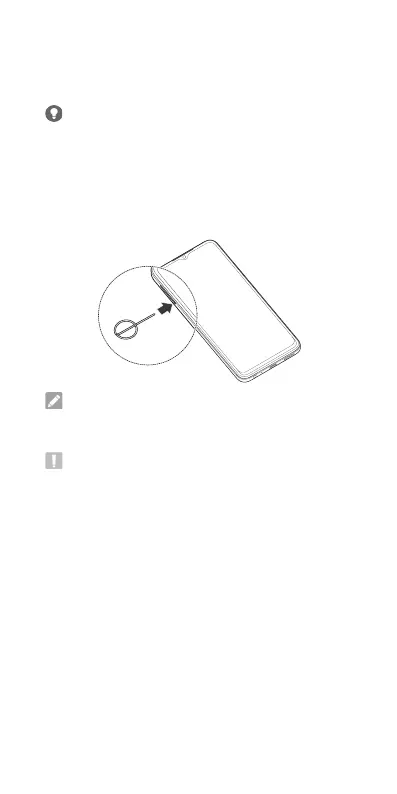
1. Insert the tip of the tray eject tool into the hole on
the card tray.
NOTE:
Please use the tray eject tool included in the box.
Otherwise the card tray may not be ejected.
CAUTION:
Never replace the included tray eject tool with
sharp objects. Ensure that the tray eject tool is
perpendicular to the hole. Otherwise, the phone may
be damaged.
2. Pull out the card tray and place the nano-SIM
cards and the microSDXC card (optional) on the
tray, as shown. Carefully slide the tray back into
place.



 To Next Page