
 To Next Page
A
Anthony PierceJul 27, 2025
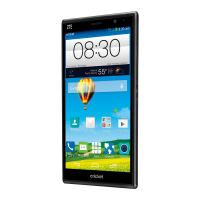
How to fix a Zte cricket Grand X Max that cannot turn on?
- MMario WilliamsJul 27, 2025
If your Zte Cell Phone cannot be turned on, the battery power has likely been depleted. Recharge the phone’s battery to resolve this.

How to fix a Zte cricket Grand X Max that cannot turn on?
If your Zte Cell Phone cannot be turned on, the battery power has likely been depleted. Recharge the phone’s battery to resolve this.
Why does my Zte Cell Phone have poor reception?
Poor reception on your Zte Cell Phone can occur if the network signal is weak at your location, such as in a basement or near a tall building. Wireless transmissions may not effectively reach these areas. Try moving to a location where the network signal can be properly received. Alternatively, the network may be busy, especially during peak times. Avoid using the phone at such times, or try again after a short wait. Finally, you might be too far from a base station. You can request a service area map from your provider.
Why does my Zte cricket Grand X Max battery have shortened standby time?
The standby time of your Zte Cell Phone can be affected by your service provider's system configuration. Also, depleted battery or high temperature environments will shorten battery life – consider using a new battery. Battery power is also consumed when the phone sends signals to locate a base station, especially when a network connection isn't available. If you are located in an area where signaling is weak, temporarily power off the phone. In addition, turn off Wi-Fi, GPS, and Bluetooth when not in use and adjust screen brightness and timeout duration in Settings > Display.
What to do if my Zte Cell Phone battery is not charging?
If your Zte Cell Phone battery isn't charging, it could be due to a damaged battery or charger – in this case, contact the dealer. Another reason could be that the phone’s temperature is too low (below 0°C) or too high (above 45°C); adjust the environment to avoid temperature extremes. Lastly, check that all connectors are properly connected to ensure good contact between the battery and charger.
What causes a micro-SIM card error on a Zte cricket Grand X Max?
A micro-SIM card error on your Zte Cell Phone may be caused by a malfunctioning or damaged micro-SIM card. In this case, take the micro-SIM card to your service provider for testing. It could also be due to improper insertion of the micro-SIM card; ensure it is correctly inserted. Another potential cause is debris on the micro-SIM card contacts; clean the contacts with a soft, dry cloth.
Why do I hear echo or noise on my Zte cricket Grand X Max Cell Phone during calls?
Echo or noise during calls on your Zte Cell Phone can be due to poor network link quality from your service provider or poor local telephone line quality. End the call and dial again; this may switch you to a better-quality network link or phone line.
Why am I unable to select certain features on my Zte Cell Phone?
You might be unable to select certain features on your Zte Cell Phone if your service provider does not support these features, or if you have not applied for services that provide these features. Contact your service provider to resolve this.
Details about the Google keyboard layout, features, and landscape mode.
Step-by-step guide to composing and sending a text or multimedia message.
Guide to configuring the initial email account on the device.
Instructions on how to view incoming emails and load older messages.
Instructions on how to enable the Wi-Fi feature on the phone.
Steps to connect to available Wi-Fi networks.
Steps to navigate to websites or perform web searches.
How to save files encountered while browsing the internet.
Steps to establish a direct connection between devices using Wi-Fi Direct.
Steps to enable or disable the Bluetooth feature on the phone.
Guide to establishing a connection with a new Bluetooth device.
Instructions on how to take pictures using the phone's camera.
Steps to record videos using the phone's camera.
Organizing and viewing media content within albums.
Editing and enhancing photos using the built-in editor.
Steps to capture and save audio recordings.
How to play back recorded voice memos.
Overview of Gmail as a web-based email service.
Using Google Calendar for scheduling and time management.
Enabling location services for Google Maps and other apps.
How to obtain travel directions via various modes of transport.
Performing searches using typed keywords on the web or phone.
Using voice commands for web searches and phone tasks.
Creating and managing custom music playlists.
Backing up and restoring phone data and applications.
Navigating and managing files stored on the phone and SD card.
Overview of general configuration options for the phone.
Settings related to screen brightness, wallpaper, auto-rotate, and font size.
Managing internal and external storage, including unmounting SD cards.
Checking battery status and usage by applications.
Setting up screen locks, encryption, and SIM card security.
Backing up data to Google and resetting the phone to factory defaults.
Configuring accessibility features for users with special needs.
Methods for updating the phone's operating system and software.
Solutions for weak network signal issues.
Solutions when the phone's battery fails to charge.
Solutions for phone instability and power issues.
Important safety precautions for using the phone.
Safety guidelines regarding phone use while driving.
Tips to minimize RSI risks from phone usage.
Recommendations for maintaining distance from pacemakers.
Information on hearing aid compatibility and potential interference.
Safety rules for using phones in potentially explosive areas.
Detailed technical specifications of the phone.
Details of the limited warranty period and coverage.
Information on obtaining warranty support and required details.
 General
| Brand | Zte |
|---|---|
| Model | cricket Grand X Max |
| Category | Cell Phone |
| Language | English |