EasyManua.ls Logo

Zte Grand X Max+ - User Manual

Zte Grand X Max+
60 pages
Print Icon
To Next Page IconTo Next Page
Loading...
ZTE Grand
X Max
+
User Guide

Table of Contents

Other manuals for Zte Grand X Max+

Questions and Answers

  • D
    denisewhiteSep 10, 2025
    Why can't I make outgoing calls on my Zte Grand X Max+ Cell Phone?
    • H
      Harold SellersSep 10, 2025
      If you cannot make outgoing calls on your Zte Cell Phone, you may have activated the Call Barring feature. To resolve this, go to Call Barring Settings and select Deactivate All. Alternatively, you might have activated Fixed Dialing Numbers; go to Fixed Dialing Numbers and disable it.
  • S
    Stephanie MooreAug 22, 2025
    How to extend standby time on Zte Grand X Max+?
    • K
      Kristen Proctor DDSAug 22, 2025
      Several factors can shorten the standby time of your Zte Cell Phone. The standby time depends on your service provider's system configuration. Also, depleted batteries and high temperatures reduce battery life, so use a new battery. Power consumption also increases when the phone sends signals to locate a base station without a network connection. To conserve power, turn off Wi-Fi, GPS, and Bluetooth when not in use, and adjust screen brightness and timeout in Settings > Display. If you are in an area with a weak signal, temporarily power off the phone.
  • H
    hannataraAug 25, 2025
    Why is my Zte Cell Phone battery not charging?
    • R
      Ruth HarveyAug 25, 2025
      If your Zte Cell Phone battery is not charging, it could be due to a damaged battery or charger, so contact the dealer. Temperature extremes can also prevent charging; avoid temperatures below 0°C or above 45°C. Also, check all connectors to ensure they are properly connected, as poor contact between the battery and charger can be the issue.
  • J
    Jamie AliAug 26, 2025
    What to do if Zte Grand X Max+ Cell Phone crashes, reboots, or freezes?
    • S
      Shirley HallAug 26, 2025
      If your Zte Cell Phone crashes, reboots, freezes, or won't power on, it could be due to incompatible third-party software, so uninstall any recently added apps. Consider upgrading the phone software. As a last resort, you can reset the phone to its factory status.
  • K
    Kevin HallAug 27, 2025
    Why is my Zte Cell Phone sluggish?
    • M
      Michael BaileyAug 28, 2025
      If your Zte Cell Phone is sluggish, it may be due to too many apps running simultaneously. To resolve this, go to Task Manager and close any apps that are not currently in use.
  • W
    William ScottAug 29, 2025
    Why can't I answer incoming calls on my Zte Cell Phone?
    • T
      tracynguyenAug 29, 2025
      If you cannot answer incoming calls on your Zte Cell Phone, check if you have activated the Call Barring feature. If so, go to Call Barring Settings and select Deactivate All.
  • K
    Kari PetersonSep 18, 2025
    Why can't I select certain features on my Zte Cell Phone?
    • A
      aliciamullinsSep 18, 2025
      If you are unable to select certain features on your Zte Cell Phone, your service provider may not support these features, or you have not applied for services that provide these features. Contact your service provider.
  • F
    Fred LewisSep 12, 2025
    Why can't I enter information into the phonebook on my Zte Cell Phone?
    • J
      Jeremiah PayneSep 12, 2025
      If you are unable to enter information into the phonebook of your Zte Cell Phone, it is likely that the phonebook's memory is full. Delete unnecessary data from the contacts to free up space.
  • R
    Rebecca ShawSep 8, 2025
    Why do I hear echo or noise on my Zte Grand X Max+ calls?
    • S
      Sandra HodgesSep 8, 2025
      Echo or noise during calls on your Zte Cell Phone can be caused by poor network link quality or poor local telephone line quality. End the call and dial again, which may switch you to a better-quality network link or phone line.
  • W
    williamwattsSep 5, 2025
    What to do if Zte Grand X Max+ Cell Phone is unable to connect to the network?
    • A
      Angela MunozSep 5, 2025
      If your Zte Cell Phone is unable to connect to the network, the micro-SIM card might be invalid, so contact your service provider. You might also be outside the network's service area; check with your provider. Poor signal strength can also be a factor; move to an open space or closer to a window.

Summary

Getting Started with Your Phone

Initial Phone Setup

Steps to configure the phone for first use, including language and accounts.

Battery Life Optimization

Tips to extend phone battery usage by managing features like brightness and connectivity.

Basic Navigation and Controls

Understanding touch controls, gestures, and interface navigation.

Text Input and Communication

Email Account Configuration and Use

Setting up, checking, and managing email accounts.

Internet and Web Browsing

Wireless Connectivity Features

Bluetooth Pairing and Data Transfer

Setting up, pairing, and transferring data via Bluetooth.

Entertainment and Media

Camera Features and Modes

Taking photos, using different camera modes, and front camera.

Google Services Integration

Google Maps and Search Functionality

Navigation, location services, and web/voice search.

Phone Management and Personalization

Software Updates and Troubleshooting

Safety, Compliance, and Precautions

General Safety and FCC Regulations

Basic safety rules for phone use and FCC compliance information.

RF Exposure and Hearing Aid Compatibility

SAR information and Hearing Aid Compatibility regulations.

Device Specifications and Warranty

Limited Warranty and Service Information

Warranty terms, coverage exclusions, and how to obtain service.

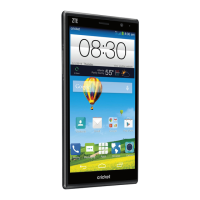
Zte Grand X Max+ Specifications

General IconGeneral
Announced2014, September
SIMMicro-SIM
TypeIPS LCD
Resolution720 x 1280 pixels, 16:9 ratio (~245 ppi density)
OSAndroid 4.4.2 (KitKat)
CPUQuad-core 1.2 GHz Cortex-A7
GPUAdreno 305
Internal Memory16 GB
RAM2 GB
Video1080p@30fps
Selfie camera5 MP
LoudspeakerYes
3.5mm jackYes
WLANWi-Fi 802.11 b/g/n, hotspot
Bluetooth4.0, A2DP
GPSYes, with A-GPS
NFCNo
RadioFM radio
USBmicroUSB 2.0
Size6.0 inches
ChipsetQualcomm MSM8926 Snapdragon 400
Memory Card slotmicroSD
FeaturesLED flash
SensorsAccelerometer, proximity
BatteryLi-Ion 3200 mAh, non-removable
Main Camera13 MP

Related product manuals