EasyManua.ls Logo

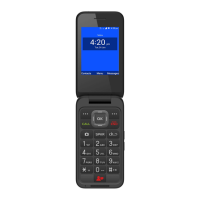
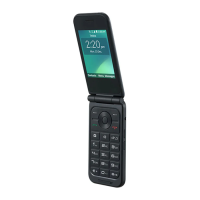
Zte Fanfare - User Manual

Zte Fanfare
68 pages
Print Icon
To Next Page IconTo Next Page
Loading...
ZTE Fanfare
User Guide

Table of Contents

Questions and Answers

  • R
    Richard BennettAug 18, 2025
    How to improve poor reception on Zte Cell Phone?
    • M
      Marc KellyAug 18, 2025
      If you are experiencing poor reception on your Zte Cell Phone, it could be due to a weak network signal at your location. For example, being in a basement or near a tall building can obstruct wireless transmissions. To resolve this, move to a location where the network signal can be properly received. Alternatively, the network might be busy. Avoid using the phone during peak times, or try again after a short wait. It's also possible you're too far from your service provider's base station; in that case, request a service area map from them.
  • A
    Alexander RodriguezAug 21, 2025
    What to do if Zte Cell Phone battery is not charging?
    • B
      Bryan MillerAug 21, 2025
      If your Zte Cell Phone battery is not charging, it could be due to several reasons. First, the battery or charger might be damaged, in which case you should contact the dealer. Second, the phone's temperature may be outside the optimal range (below 0°C or above 45°C); adjust the environment to avoid these extremes. Finally, check all connectors to ensure they are properly connected, as poor contact between the battery and charger can also prevent charging.
  • A
    Andrea MartinezAug 23, 2025
    What to do if Zte Fanfare Cell Phone crashes or freezes?
    • K
      Kim RobinsonAug 23, 2025
      If your Zte Cell Phone crashes, reboots, freezes, or cannot be powered on, it may be due to incompatible third-party software. To resolve this, reset the phone to its factory status. Also, you can enter safety mode and uninstall the software that may be causing the problem. Alternatively, try upgrading the phone software.
  • C
    Cassandra WattsAug 26, 2025
    Why Zte Fanfare Cell Phone cannot power on?
    • L
      Laura HartAug 26, 2025
      If your Zte Cell Phone cannot be powered on, it is likely that the battery power has been depleted. To resolve this, recharge the phone’s battery.
  • J
    Jason HudsonAug 28, 2025
    Why is my Zte Fanfare unable to connect to the network?
    • C
      Christine BlackburnAug 28, 2025
      If your Zte Cell Phone is unable to connect to the network, the micro-SIM card might be invalid, so you should contact your service provider. Another reason could be that you are not within the network’s service area; check the service area with your service provider. Poor signal strength can also cause this issue; try moving to an open space or closer to a window if you are inside a building.
  • G
    Gregory MooreAug 30, 2025
    Why does my Zte Fanfare Cell Phone have shortened standby time?
    • S
      Steven AdamsAug 30, 2025
      Several factors can shorten the standby time of your Zte Cell Phone. The standby time depends on your service provider's system configuration, and the same phone can have different standby times on different networks. If you are in an area with a weak signal, temporarily power off the phone. A depleted battery or high temperatures can also shorten battery life, so consider using a new battery. Battery power is also consumed when the phone searches for a base station without a network connection and by other features. Turn off Wi-Fi, GPS, and Bluetooth when not in use, and adjust screen brightness and timeout duration in Settings > Display.
  • K
    Kimberly JohnsonSep 1, 2025
    Why is there echo or noise on my Zte Fanfare calls?
    • M
      Michael MurphySep 1, 2025
      Echo or noise during calls on your Zte Cell Phone can be due to poor network link quality on the part of your service provider or poor local telephone line quality. To attempt to fix this, end the call and dial again, as you may be switched to a better-quality network link or phone line.
  • E
    Ethan RussellSep 3, 2025
    How to fix a sluggish Zte Fanfare?
    • R
      Randy StarkSep 4, 2025
      If your Zte Cell Phone is sluggish or responds slowly, it might be allocating memory to a large number of apps running simultaneously. To improve performance, go to the Task Manager and close any apps that are not currently in use.
  • F
    flloydSep 5, 2025
    Why can't I make outgoing calls on my Zte Fanfare Cell Phone?
    • B
      Brian LambertSep 6, 2025
      If you cannot make outgoing calls on your Zte Cell Phone, it could be because you have activated the Call Barring feature. To resolve this, go to Call Barring Settings and select Deactivate All. Alternatively, you might have activated Fixed Dialing Numbers; go to Fixed Dialing Numbers and disable it.
  • P
    Peter GarciaSep 8, 2025
    What to do if Zte Cell Phone cannot answer incoming calls?
    • A
      Amy PowersSep 8, 2025
      If your Zte Cell Phone cannot answer incoming calls, it is possible that you have activated the Call Barring feature. To deactivate it, go to Call Barring Settings, and then select Deactivate All.

Summary

Getting Started

Phone Setup and Battery Charging

Instructions for initial phone setup, including SIM, microSDHC cards, and battery charging.

Getting Started

Battery Life and Power Management

Tips to extend battery life and instructions for powering the phone on/off and restarting.

Initial Phone Setup

Steps for setting up the phone for the first time after purchase or reset.

Getting Started

Screen and Key Locking

How to lock and unlock the phone's screen and keys.

Touch Screen Gestures

Explanation of touch gestures like tap, press and hold, swipe, and pinch.

Getting to Know Your Phone

Phone Hardware Overview and Key Functions

Identifies phone components and explains the function of key buttons.

Personalizing

Customizing System Language, Date, Time, and Sounds

How to customize language, date, time, ringtones, and touch sounds.

Personalizing

Adjusting Volumes, Silent Mode, Wallpapers, and Brightness

Customizing audio, visuals, and screen brightness.

Protecting Your Phone with Screen Locks

How to set up screen locks like pattern, PIN, or password.

Personalizing

Protecting Your Phone with Encryption

How to encrypt phone data for added security.

Knowing the Basics

Monitoring Phone Status and Managing Notifications

Understanding status icons and managing notifications.

Knowing the Basics

Using Notifications Panel and Quick Settings

Accessing and using notifications and quick settings.

Knowing the Basics

Managing Home Screen Shortcuts, Widgets, Folders, and Favorites

Customizing the home screen with shortcuts, widgets, folders, and favorites.

Entering Text

Changing Input Methods and Using Google Keyboard

Selecting input methods and using the Google Keyboard.

Entering Text

TouchPal Keyboard, Input Settings, and Text Editing

Using TouchPal keyboard, input settings, and text editing features.

Entering Text

TouchPal Keyboard Layouts and Features

Explanation of TouchPal keyboard layouts and the Curve gesture feature.

Connecting to Networks and Devices

Mobile Networks and Data Access Settings

Managing mobile data, networks, and enabling roaming.

Connecting to Networks and Devices

Wi-Fi Connection and Network Settings

Connecting to Wi-Fi networks and managing settings.

Connecting to Networks and Devices

Advanced Wi-Fi, Wi-Fi Direct, and Bluetooth Devices

Advanced Wi-Fi, direct device connections, and Bluetooth pairing.

Connecting to Networks and Devices

Turning Bluetooth On;Off and Changing Device Name

Steps to manage Bluetooth connections and rename the device.

Pairing with Bluetooth Devices

How to pair the phone with other Bluetooth devices.

Connecting to Networks and Devices

USB Connection, SD Card Removal, and VPN Setup

Connecting to PC via USB, managing SD card, and VPN setup.

Connecting to Networks and Devices

VPN Connection, Modification, and Phone Call Overview

Connecting to VPNs and an introduction to phone calls.

Phone Calls

Answering Calls, Call Log, and Calling Contacts

Handling incoming calls, using the call log, and calling contacts.

Phone Calls

Call Options, Multi-Party Calls, and Conference Calls

Using call options, managing multi-party calls, and conference calls.

Adjusting Call Settings

Ringtones, Vibration, Voicemail, and Dialpad Tones

Customizing ringtones, vibration, voicemail, and dialpad sounds.

People

Contact Details, Adding Contacts, and Importing SIM Contacts

Viewing, adding, and importing contacts from SIM.

People

Exporting Contacts, Sharing, Favorites, and Groups

Exporting contacts, sharing, managing favorites, and groups.

People

Editing Groups, Searching, and Managing Contacts

Managing groups, searching contacts, and editing/deleting contacts.

Accounts

Managing Accounts and Synchronization Settings

Managing accounts and their synchronization settings.

System Settings: Accessibility, Printing, and About Phone

System settings for accessibility, printing, and phone info.

Email

Email Account Setup, Checking, and Responding

Managing email accounts, checking emails, and responding.

Email

Adding, Editing Email Accounts, and General Settings

Managing multiple email accounts and general email settings.

Gmail

Gmail Inbox, Account Switching, and Message Management

Managing Gmail inbox, accounts, and messages.

Gmail

Working with Labels and Changing Gmail Settings

Organizing emails with labels and changing Gmail settings.

Messaging

Messaging: Opening, Sending, Replying, and Forwarding

Using the Messaging app to send and manage messages.

Messaging

Message Copying, Settings, and Calendar Introduction

Managing messages and an introduction to the Calendar app.

Calendar

Event Details, Creation, Editing, and Settings

Managing calendar events and settings.

Google+

Getting Started with Google+

Introduction and initial setup for the Google+ app.

Google+

Changing Google+ Settings

How to adjust settings for the Google+ application.

Browser

Using Google Chrome and the Browser

Browsing the web with Chrome and the default browser.

Browser

Downloading Files and Changing Browser Settings

Managing file downloads and customizing browser settings.

Maps

Activating Location Services and Getting Your Location

Enabling location services and finding your current location.

Maps

Searching for Locations and Getting Directions

Finding locations and obtaining travel directions.

Google Now and Search

Using Google Now, Text Search, and Voice Search

Using Google Now, text search, and voice search features.

Camera

Capturing Photos, Recording Videos, and Customizing Settings

Taking photos, recording videos, and adjusting camera settings.

Camera

Advanced Camera Settings and Gallery Album Management

Advanced camera settings and managing photo albums in Gallery.

Gallery

Viewing Album Contents, Sharing, and Deleting Albums

Viewing album contents, sharing, and deleting albums.

Gallery

Working With Pictures and Retouching Photos

Viewing, editing, and retouching pictures in Gallery.

Playing Videos

How to play videos from the Gallery.

Music

Copying Music, Viewing Library, and Setting Ringtones

Copying music, browsing library, and setting songs as ringtones.

Music

Playing Music and Managing Playlists

Playing music and organizing songs into playlists.

Play Music

Playing Your Music

How to play music using the Play Music application.

Play Music

Managing Playlists

Creating and managing playlists within Play Music.

Video Player

Video Library, Playback, and File Management

Accessing the video library, playing videos, and managing files.

Video Player

Renaming and Viewing Video Details

Renaming videos and viewing their details.

Sound Recorder

Recording and Playing Voice Memos

Recording and playing voice memos using the sound recorder.

More Apps

Backup & Restore, Clock Functions, and Calculator

Using backup, clock functions, and calculator.

More Apps

File Manager, Notes, Task Manager, and Various Apps

Using file manager, notes, task manager, and various apps.

Google Play Store

Browsing, Downloading Apps, and Google Wallet Account

Finding, installing apps, and setting up Google Wallet.

Google Play Store

Managing Downloads and Uninstalling Apps

Managing downloaded apps and uninstalling them.

Settings

General Settings: Connectivity and Sound

General phone settings including connectivity and audio.

Settings

Display, Time, Language, Input, and Voice Search Settings

Display, time, language, input, and voice search settings.

Settings

Network, App, Connection, Call, Personal, and Security Settings

Network, app, connection, call, personal, and security settings.

Settings

SIM Locks, Backup;Reset, Accounts, System, and About Phone

SIM locks, backup/reset, accounts, system, and about phone settings.

Upgrading the Phone Software

Methods for Upgrading Phone Software

Various ways to upgrade the phone's software.

Troubleshooting

Resolving Reception and Call Quality Issues

Solutions for poor reception and call quality problems.

Troubleshooting

Battery, Connectivity, PIN, and Performance Issues

Solutions for battery, network, PIN, and performance problems.

For Your Safety

General Safety Guidelines and FCC Regulations

Important safety precautions and FCC compliance information.

For Your Safety

RF Exposure Information (SAR) and Hearing Aid Compatibility (HAC)

Information on RF exposure and hearing aid compatibility.

For Your Safety

CTIA Guidelines for Safe Usage

CTIA guidelines for safe battery and phone usage.

For Your Safety

Distraction, Handling, Demagnetization, and ESD Precautions

Safety regarding distraction, handling, demagnetization, and ESD.

For Your Safety

Normal Use, Airbags, Health, Emergency Calls, and Electrical Safety

Safety for normal use, airbags, health, emergency calls, and electrical safety.

For Your Safety

Faulty Products, Interference, Medical Devices, and Environments

Safety for faulty products, interference, medical devices, and environments.

Specifications

Detailed Technical Specifications of the Handset

Detailed technical specifications of the phone hardware and features.

Warranty

Limited Warranty Terms and Exclusions

Terms and conditions of the limited warranty.

Warranty

Obtaining Warranty Service and Other Programs

Procedures for obtaining warranty service and other programs.

Notes

General Notes and Important Reminders

General notes and important reminders.

Zte Fanfare Specifications

General IconGeneral
Resolution480 x 854 pixels
RAM1 GB
Storage8 GB
Rear Camera5 MP
Battery2000 mAh
Expandable StoragemicroSD, up to 32 GB
Display4.5 inches
Bluetooth4.0
Wi-FiWi-Fi 802.11 b/g/n
GPSYes
Display TypeTFT

Related product manuals