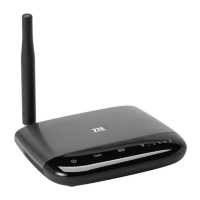
The ZTE WP659+ is a GSM Wireless Phone designed for communication, offering a range of features for both personal and professional use. This user guide provides comprehensive instructions on its operation, maintenance, and troubleshooting.
Function Description
The ZTE WP659+ serves as a primary communication device, enabling users to make and receive calls over a GSM network. It supports basic telephony functions such as dialing, answering, and managing calls. The device also includes messaging capabilities, allowing users to send and receive SMS messages. For convenience, it integrates a phonebook to store contacts and a call history feature to track recent calls. Beyond core communication, the phone offers organizational tools like an alarm clock and a calculator, enhancing its utility for daily tasks. An FM radio is also included for entertainment.
Usage Features
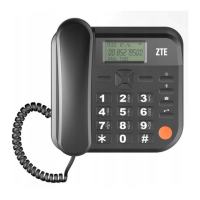
The phone's interface is designed for ease of use, featuring an LCD screen for displaying information and a set of clearly labeled keys for navigation and input.
- Making Calls: Users can initiate calls by picking up the handset or pressing the HANDS-FREE key, then entering the desired number and pressing the CALL/REDIAL key. Alternatively, calls can be made by selecting a contact from the phonebook or choosing a number from the dialed calls list. For international calls, the guide emphasizes the importance of adding the international prefix, country code, and area code (without the leading 0).
- Answering Calls: Incoming calls can be answered by picking up the handset or pressing the CALL/REDIAL key.
- Hands-Free Functionality: The HANDS-FREE key allows users to transfer an ongoing call from the handset to the speakerphone, providing flexibility during conversations. Pressing this key also ends a hands-free call.
- Messaging: The phone supports SMS messaging. Users can compose new messages, view received messages in the Inbox, check failed messages in the Outbox, access draft messages, and review successfully sent messages. Pre-defined SMS templates are available for quick communication. Message settings can be customized, and memory status for messages can be viewed.
- Phonebook: The phonebook allows users to save and manage contact information, including phone numbers. A speed dial list can also be set up for quick access to frequently called numbers.
- Call Management:
- Call History: The device keeps a record of missed, dialed, and received calls, allowing users to review and redial numbers easily. Call duration can also be checked.
- Call Divert: Users can specify conditions under which incoming calls should be diverted to another number.
- Call Waiting: This feature allows users to put a current call on hold to answer another incoming call.
- Call Barring: The phone offers the option to restrict dialing or receiving certain calls, providing a level of control over communication.
- Advanced Call Settings: Additional settings include a black list, call time reminder, answer mode, and delay dial.
- Text Input: The phone supports various text input methods for entering digits, letters, and symbols. Users can switch between input modes (e.g., "Abc," "abc," "ABC") and use scrolling keys to select symbols. The NAMES/BACK key is used to erase characters, and the "0" key adds a space.
- Security Features:
- Security Setting: The phone includes a security setting to prevent unauthorized use. The default phone code is 1122, which users are advised to change.
- PIN Code: The SIM card is protected by a PIN code to prevent illegal use. If enabled, the PIN code must be entered when powering on the phone.
- PUK Code: If an incorrect PIN code is entered three times consecutively, the SIM card will be locked, requiring a PUK code to unlock it. Users are advised to contact their service provider if they do not have the PUK code.
- Screen Auto Lock: The keypad can be set to lock automatically, requiring a combination of '#' and '*' keys to unlock.
- Personalization:
- Time and Date: Users can set the date, time, and their preferred format.
- Language: The display language of the phone can be changed.
- Dedicated Keys: Scrolling keys can be assigned as shortcuts to specific menu functions.
- Backlight: The backlight time for the LCD screen can be adjusted.
- Profiles: Different profiles can be set up to customize phone settings according to user preferences.
- Network Settings: The phone allows users to configure how it searches for a network.
- Organizer: Includes an alarm clock for setting reminders and a calculator for basic mathematical operations.
- FM Radio: Provides entertainment through listening to FM radio broadcasts.
Maintenance Features
Proper maintenance is crucial for the longevity and optimal performance of the ZTE WP659+. The manual provides several guidelines:
- Power Management:
- It is strongly recommended to connect the phone to an external power outlet. The internal battery should primarily be used when external power is unavailable. The phone automatically charges the internal battery when connected to an external power source.
- To power on, connect the phone to an external power outlet and hold the EXIT key. To power off, hold the EXIT key in standby mode.
- The battery should be charged before initial use, as it may have discharged during storage.
- Avoid unplugging the data cable connector or removing/installing the battery while the power is on.
- Unplug the external power adapter or remove the battery when the phone is not in use for extended periods.
- SIM Card Installation: Always switch off the phone before inserting or removing the SIM card. The SIM card should be slid into the slot with the contact area facing down and the beveled corner matching the slot.
- Cleaning: Use a clean, slightly wet, or anti-static fabric to clean the phone. Avoid harsh chemical cleaning solvents, strong detergents, alcohol, dilution agents, or benzene. Always power off the phone before cleaning.
- Environmental Care:
- The phone is not waterproof; keep it dry and store it in a shady, cool place.
- Avoid exposing the phone to direct sunlight or storing it in hot areas, as high temperatures can shorten the life of electronic devices.
- Prevent liquid from leaking into the phone.
- Do not put other objects on the terminal to avoid overlaying the radiator.
- Antenna Care:
- Avoid touching the antenna during calls to maintain call quality and conserve battery energy. A damaged antenna can cause slight burns.
- Keep the antenna free from obstructions and position it straight up for the best call quality.
- General Handling:
- Do not attempt to disassemble the phone yourself, as non-expert handling can damage the device.
- Keep the phone out of reach of small children to prevent injury if used as a toy.
- As the phone generates an electromagnetic field, avoid placing it near magnetic items like computer disks.
- Accessory Use: Only use original or manufacturer-authorized accessories. Unauthorized accessories may affect performance, violate regulations, or endanger the user.
- Electromagnetic Interference:
- Be aware that some electronic devices are susceptible to electromagnetic interference. Maintain a distance of at least 20 cm from TV sets, radios, and other automated office equipment.
- Operating the phone may interfere with medical devices such as hearing aids and pacemakers. Consult a physician or medical device manufacturer before use.
- Exercise caution in places like oil warehouses or chemical factories where explosive gases or products are present, as the phone transmits radio frequency energy even in idle state. Power off the phone if required in such environments.
The ZTE WP659+ is a robust communication device designed for reliable performance and user convenience, with clear guidelines for its operation and care.


 To Next Page
 General