Need help?
Do you have a question about the Zte Consumer Cellular and is the answer not in the manual?
Details the meaning of different LED lights on the device.
Instructions for inserting the battery and connecting the power cord.
Guidance on checking and optimizing wireless signal strength.
Steps for connecting a phone and initiating device activation.
Instructions for setting up and accessing voicemail messages.
Guides on listening to and managing voicemail messages locally and remotely.
Information on 911 support and device operation during power failures.
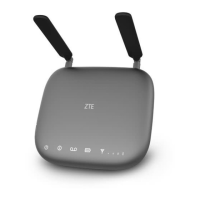
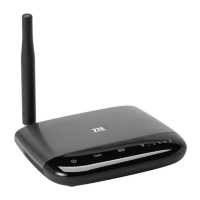
The ZTE Wireless Home Phone Base is a device designed to provide home phone service using Consumer Cellular's wireless network, eliminating the need for traditional home phone wall jacks. It functions as a base station that connects to your existing cordless or corded home phones, allowing you to make and receive calls as you normally would.
The primary function of the ZTE Wireless Home Phone Base is to convert cellular signals into a dial tone for your home phones. It acts as a bridge between your home phone system and the Consumer Cellular wireless network. This means you can place your home phone anywhere in your house where you have a strong cellular signal, typically near a window or outside wall, as long as it's also near an electrical wall outlet. The device supports both cordless and corded phone dialing methods. It's important to note that the device works exclusively with Consumer Cellular service and does not utilize home phone wall jacks. It does not support rotary or pulse-dialing phones, home security systems, fax machines, dial-up or DSL internet service, DVR services, media alert services, or credit card machines. It also does not support data services like texting, multimedia message services (MMS), or data tethering.
To begin using the device, you first need to insert the battery and then connect the power cord to an electrical wall outlet. The battery must be installed at all times for proper operation, even when plugged into a power source, and it can take up to 5 hours to fully charge. Once powered on, you raise the antenna to an upright position and check the signal strength indicators on the device; more green bars signify a stronger signal. The device can be relocated within your home to achieve optimal performance.
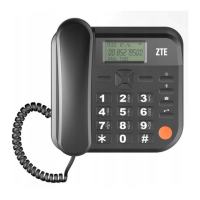
Connecting your phone to the Wireless Home Phone Base is straightforward: unplug your phone from any home phone wall jack and plug it into the "Phone 1 Port" on the back of the base using your existing phone cable or the included cable. If you're using a cordless phone, it's recommended to place its base approximately 12 inches from the Wireless Home Phone Base for best results. After connecting, you'll need to activate the device by calling Consumer Cellular. If you're not transferring your home phone number, activation is not required. A test call line is available to ensure your device is working correctly.
Making calls is similar to using a traditional phone. You will always need to dial full 10-digit phone numbers, even for local calls. The device includes a Call Waiting feature, indicated by two tones if someone calls while you're on another call. You can switch between calls by pressing the "Flash (Phone/Talk)" key on your phone. To clear the current call and accept the waiting call, you can enter '1' and press the "Flash (Phone/Talk)" key. To reject a waiting call, enter '0' and press the "Flash (Phone/Talk)" key.
Three-Way Calling is also supported. While on an existing call, pressing the "Flash (Phone/Talk)" key puts the first party on hold. After hearing a dial tone, you can dial the second party's number. Once the second party answers, pressing the "Flash (Phone/Talk)" key again completes the three-way connection. If the second party doesn't answer, pressing the "Flash (Phone/Talk)" key ends the connection and returns you to the first party. If your phone lacks a "Flash (Phone/Talk)" key, you can use the off-hook mechanism it supports instead.
The device comes with a free voicemail service, acting as a virtual answering machine. To set up voicemail, press '1' on any connected home phone and wait 4 seconds to connect to your Consumer Cellular voicemail box. Follow the voice prompts to complete the setup, including creating a password for remote retrieval and added security. You'll know you have new voicemail messages when the "Voicemail" icon on the Wireless Home Phone Base blinks, or when you hear an intermittent dial tone on any connected phone handset before placing a call. To retrieve messages, press '1' on a connected home phone or dial your 10-digit home phone number. For remote retrieval from a phone not connected to the base, dial your Wireless Home Phone Base number, and when voicemail picks up, press the Star key (*) and enter your password.
While the use of home answering machine systems is not recommended due to potential compatibility issues, if you choose not to use the provided voicemail, you can connect your answering machine to the "Phone 2 Port" on the back of the Wireless Home Phone Base. In this case, you should set your answering machine to pick up calls in fewer rings than the default 4 rings for the voicemail service.
The volume of the Wireless Home Phone Base can be adjusted if needed, in addition to your home phone's volume controls. While on a call, pressing the Star key () twice or the Pound key (#) twice enters Volume Setting Mode. The Star key () decreases volume, and the Pound key (#) increases it. There are four volume levels, with level 4 being the loudest by default. To exit Volume Setting Mode, press any other key or wait 5 seconds.
The device also supports 911 services, similar to any wireless device. In an emergency, you should be prepared to provide your home address to the emergency response center. In case of a power outage, the Wireless Home Phone Base has a back-up battery with up to 3.5 hours of talk time. During a power outage, you will need a standard corded phone that does not require external power to function for all calling, including 911.
For international calls, you can dial a specific access number and follow the prompts. International rates apply in addition to standard usage fees.
The device's battery charges while connected to a power supply. The "Battery Charge" LED indicators provide information on the battery status: solid green for high charge, solid yellow for medium, solid red for low, blinking light (any color) for battery in use, and rapid blinking red if no battery is installed. The "Signal Strength" LED indicators (1-5 bars) show the strength of the cellular signal, with solid green bars indicating good strength and blinking red indicating a need to check the SIM card.
The On/Off Switch allows you to power the device on or off. When powered off but still connected to a wall outlet, the device will continue to charge the back-up battery. It's recommended to disconnect the charger during a thunderstorm as a precaution against voltage fluctuations.
The product comes with a 12-month warranty from the date of purchase, covering faults not caused by accidents, liquid ingress, negligence, abnormal usage, non-maintenance, or other user-induced circumstances. Batteries are considered consumables and are not included in the warranty. For returns, the Wireless Home Phone Base, accessories, user manuals, original packaging, and a copy of the sales receipt must be included, and all items must be in new condition.
 General
| Brand | ZTE |
|---|---|
| Model | Consumer Cellular |
| Network Technology | GSM / HSPA / LTE |
| 2G bands | GSM 850 / 900 / 1800 / 1900 |
| GPRS | Yes |
| EDGE | Yes |
| SIM | Micro-SIM |
| Resolution | 720 x 1280 pixels (~294 ppi pixel density) |
| Multitouch | Yes |
| Internal | 8 GB, 1 GB RAM |
| Features | Geo-tagging, touch focus, face detection, HDR |
| Secondary | 2 MP |
| Alert types | Vibration; MP3, WAV ringtones |
| Loudspeaker | Yes |
| 3.5mm jack | Yes |
| WLAN | Wi-Fi 802.11 b/g/n, hotspot |
| Bluetooth | 4.0, A2DP |
| GPS | Yes, with A-GPS |
| Radio | FM radio |
| USB | microUSB 2.0 |
| Sensors | Accelerometer, proximity |
| Messaging | SMS(threaded view), MMS, Email, Push Email, IM |
| Browser | HTML5 |
| Java | No |
| Colors | Black |
| 3G bands | HSDPA 850 / 1900 |
| 4G bands | LTE band 2(1900), 4(1700/2100) |
| Speed | HSPA, LTE |
| Announced | 2016 |
| Status | Available. Released 2016 |
| Type | IPS LCD capacitive touchscreen |
| Size | 5.0 inches (~67.1% screen-to-body ratio) |
| Card slot | microSD |
| Primary | autofocus, LED flash |
| Battery | Removable Li-Ion battery |
| Talk time | Up to 12 h (3G) |

 To Next Page