Need help?
Do you have a question about the Zte ZXDSL 831C and is the answer not in the manual?
Lists the key capabilities, supported standards, and functionalities of the ZXDSL 831C ADSL modem.
Details the specific items included in the ZXDSL 831C ADSL modem's shipping carton.
Outlines the necessary prerequisites, including ADSL service subscription and computer hardware, for using the ZXDSL 831C.
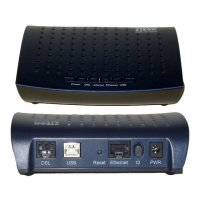
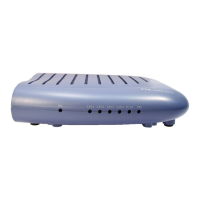
Explains the function and status of each LED indicator on the front panel, such as PWR, DIAG, LAN, and DSL.
Describes the purpose and connection type for each port on the rear panel, including DSL, LAN, RESET, and PWR.
Provides step-by-step instructions for physically connecting the ZXDSL 831C modem to telephone lines and computers.
Details the factory default IP address, subnet mask, VPI/VCI values, and line code for the ZXDSL 831C.
Guides users through configuring PC network settings for Windows 95/98/ME/XP and Windows 2000 for ADSL connection.
Demonstrates setting up an internet connection using PPPoE dial-up software, EnterNet300 v1.60, with username and password.
Lists technical hardware specifications including LAN, ADSL interfaces, management methods, power adapter, and environmental conditions.
Details the software features covering ATM, Bridging, Routing options, and Network Management protocols like WEB and Telnet.
Provides essential safety instructions to prevent danger and damage from fire, electricity, and improper handling of the device.
The ZXDSL 831C ADSL Modem is an access device designed to provide high-speed broadband connectivity to the Internet or an Intranet over ordinary telephone lines. It offers a 10/100BaseT Ethernet interface for user-end connections, making it suitable for both residential and corporate network environments. This modem supports multiple line modes and is compatible and interoperable with various central office (CO) DSLAM equipment.
The primary function of the ZXDSL 831C is to establish an ADSL high-speed connection. It supports key ADSL standards including G.992.1, G.992.2, and T1.413, ensuring broad compatibility with ADSL services. The modem can operate in either Bridge or Router mode, offering flexibility in network deployment.
In Router mode, it supports IPoA (IP over ATM) and PPPoA/PPPoE (Point-to-Point Protocol over ATM/Ethernet) routing features, which are often optional depending on the service provider. This allows the modem to manage IP addresses and routing functions directly. For network security and management, it includes features like IP filtering and NAT (Network Address Translation), capable of supporting up to 253 networks. The NAT function allows for IP address translation, providing a firewall protection function, which can be an optional feature. Additionally, it supports DMZ (Demilitarized Zone) and virtual server functionalities, enabling users to host services or applications that require direct Internet access while maintaining a degree of network security. The modem also supports UPnP (Universal Plug and Play), simplifying the configuration of network devices and applications.
For local area network (LAN) connectivity, the ZXDSL 831C is equipped with four 10/100BaseT Ethernet interfaces, supporting MDI/MDIX (Medium Dependent Interface/Medium Dependent Interface Crossover) for flexible cable connections. It can also support DHCP (Dynamic Host Configuration Protocol) for automatic network configuration, which is an optional feature.
The ZXDSL 831C is designed for ease of use and high reliability. Its hardware connection is straightforward. Users connect the modem's DSL port to an ADSL telephone jack or splitter using an RJ-11 telephone line. The LAN ports connect to a PC's Ethernet port or a hub/switch using an RJ-45 cable. Power is supplied via an AC adapter, and an on-off button controls the device.
The modem features several LED indicators on its front panel to provide status updates:
The rear panel includes:
For initial setup, the modem comes with factory default settings, including a default IP address (192.168.1.1) and subnet mask (255.255.255.0). It also has several pre-configured VPI/VCI sets and an auto line code. Local PC configuration involves setting the PC's IP address, subnet mask, and gateway to match the modem's network, with detailed instructions provided for Windows 95, 98, ME, XP, and Windows 2000.
Once the hardware is connected and the PC configured, users can establish an Internet connection using dial-up software, such as PPPoE dial-up software like EnterNet300. This involves creating a new dial-up connection and entering the username and password provided by the ADSL service provider.
The ZXDSL 831C supports OAM&P (Operations, Administration, Maintenance, and Provisioning) via Telnet, allowing for remote management and troubleshooting. It also features a web-based interface for configuration, making it accessible and easy to manage through a standard web browser (e.g., Internet Explorer v5.0 or later, or Netscape v6.0 or later). This graphical interface simplifies the process of adjusting network settings, enabling or disabling features, and monitoring the modem's status.
Troubleshooting guidance is provided for common issues. For instance, if the Power LED is off, users are advised to check the AC adapter and power connections. If the DSL LED does not illuminate or blinks rapidly, it suggests an issue with the ADSL line connection to the CO, prompting users to verify the telephone line connection and splitter installation. The manual emphasizes the importance of correctly installing a MicroFilter if a splitter is used near the modem, to avoid connection failures or slow speeds.
For LAN connectivity problems, users are guided to check Ethernet cable connections and ensure the PC/hub is powered on. If a PC cannot access the Internet, troubleshooting steps include using the ping utility to check communication with the modem's LAN IP address, verifying the gateway IP address, and confirming the validity of the DNS server settings with the ISP. If NAT rules are in place, users should ensure their PC's IP address falls within the specified range. The device's low power consumption also contributes to its overall reliability and reduced operational costs.
 General
| Modem Type | ADSL2+ |
|---|---|
| Device Type | Modem |
| Ports | 1 x RJ-11, 4 x RJ-45 |
| Max Downstream Speed | 24 Mbps |
| Max Upstream Speed | 1 Mbps |
| Operating Temperature | 0°C to 40°C |
| Storage Temperature | -20°C to 70°C |
| Weight | 200 g |
| Standards | ITU G.992.1 (G.dmt), ITU G.992.2 (G.lite), ITU G.992.3 (ADSL2), ITU G.992.5 (ADSL2+) |
| Data Rate | 24 Mbps downstream, 1 Mbps upstream |
| Humidity | 10% to 90% (non-condensing) |

 To Next Page