-9-
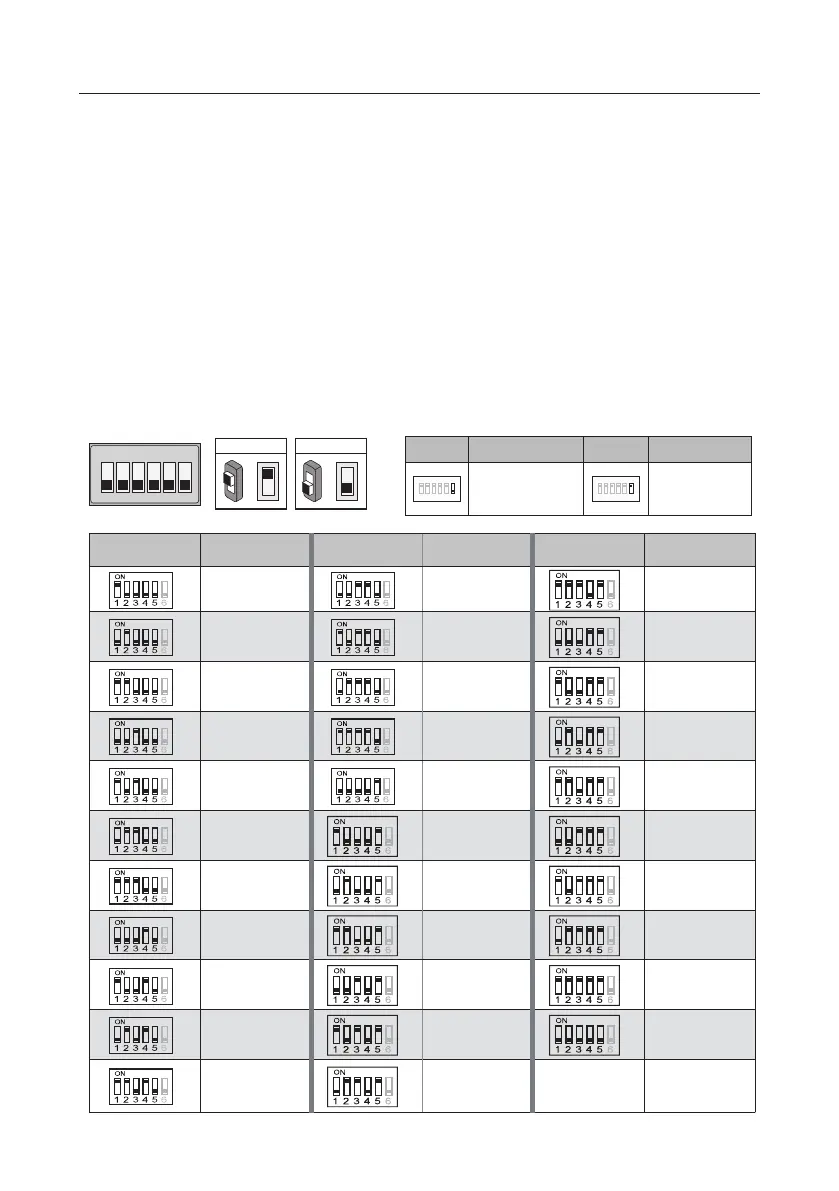
DIP Switches Settings Of Indoor Unit
TheDIPswitchesareusedtosettheusercodeforeachmonitor.Total6bitscanbecong-
ured.
• Bit-1 to Bit-5 are used for user code setting. The value range is from 1 to 32, which have 32
different codes for 32 apartments.
• When multi monitors need to be installed in one apartment, these monitors should use the
same user code, and the master/slave mode should be set on the monitor.
• Bit-6 is bus line terminal switch, which should be set to “ON” if the monitor is at the end of
bus line, otherwise be set to “OFF”.
ON(1)
=
OFF(0)
=
ON
ON
ON DIP
1 2 3 4 5 6
Bit state Setting Bit state Setting
1 2 3 4 5
6
ON DIP
1 2 3 4 5
6
ON DIP
When monitor is not
at the end of bus line.
When monitor is at
the end of bus line.
Bit-6 switch setting
Bit state User Code Bit state User Code Bit state User Code
Code=1 Code=12 Code=23
Code=2 Code=13 Code=24
Code=3 Code=14 Code=25
Code=4 Code=15 Code=26
Code=5 Code=16 Code=27
Code=6 Code=17 Code=28
Code=7 Code=18 Code=29
Code=8 Code=19 Code=30
Code=9 Code=20 Code=31
Code=10 Code=21 Code=32
Code=11 Code=22



 To Next Page