-7-
ON(1)
=
OFF(0)
=
ON
ON
ON
1 2 3 4 5 6
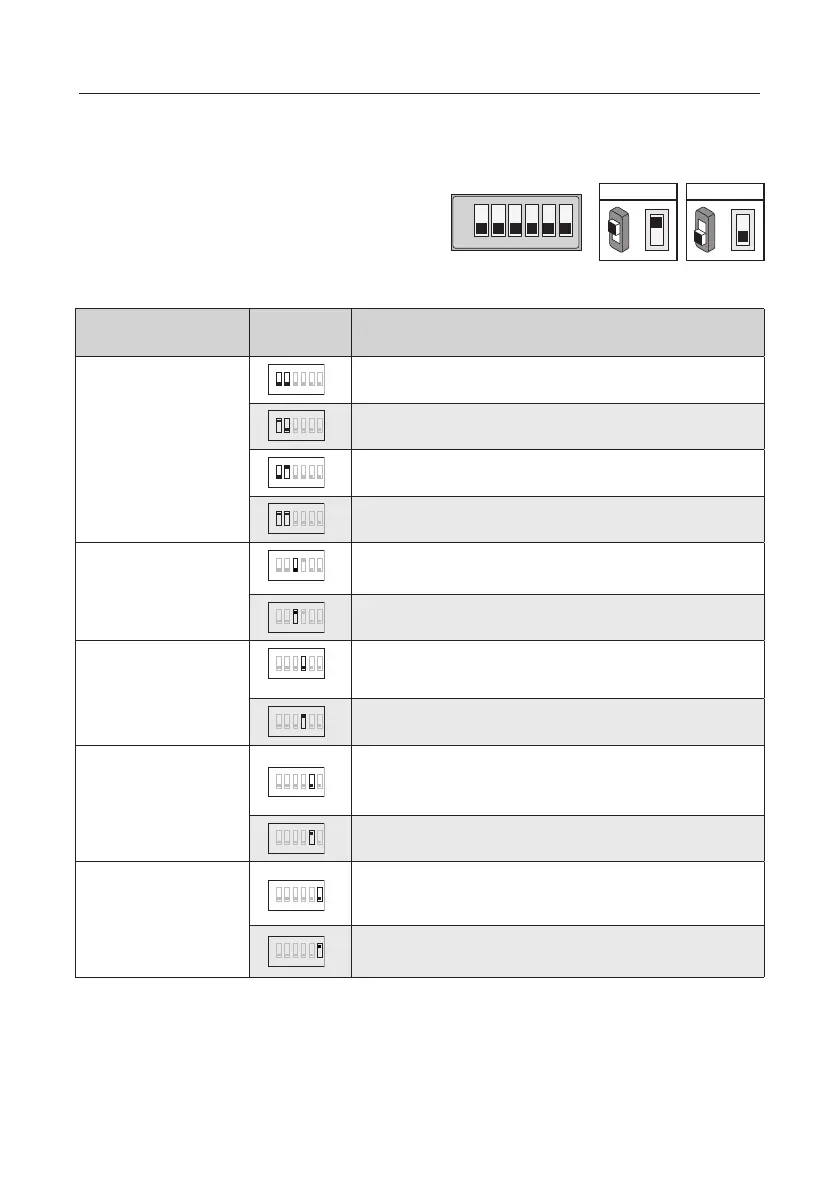
Bit denition Bit state Function Descriptions
Bit-1 and Bit-2
(door station ID setting)
1 2 3 4 5 6
ON
Default setting, ID = 0, setting for the rst door station
1 2 3 4 5 6
ID = 1, setting for the second door station
1 2 3 4 5 6
ID = 2, setting for the third door station
ON
ID = 3, setting for the fourth door station
Bit-3
(single or double row
button setting)
1 2 3 4 5 6
ON
Default setting ,set "OFF " when using a double row button door
station
ON
Set "ON" when using a single row button door station
Bit-4
(button code select)
1 2 3 4 5 6
ON
Default setting, set "OFF " when using the default codes of the
button
1 2 3 4 5 6
ON
Set " ON " when using the programmed codes of the button.
Bit-5
(unlock time quick setting)
1 2 3 4 5 6
Unlocking time = 1second. (can be changed by door station or
software)
1 2 3 4 5 6
Default setting, unlocking time = 5 seconds.
Bit-6
(cryptic key setting)
ON
Default setting, normally key A and key B is not useful(about the
position of key A and key B,please refer to part 2)
ON
Activating the key A and key B is allowed.
Totally 6 bits can be congured by dip-switch. All
switches can be modified either before or after
installation, please restarting the power whenever
the switches have been modied.
5. DIP Switches Settings Of Outdoor Station



 To Next Page