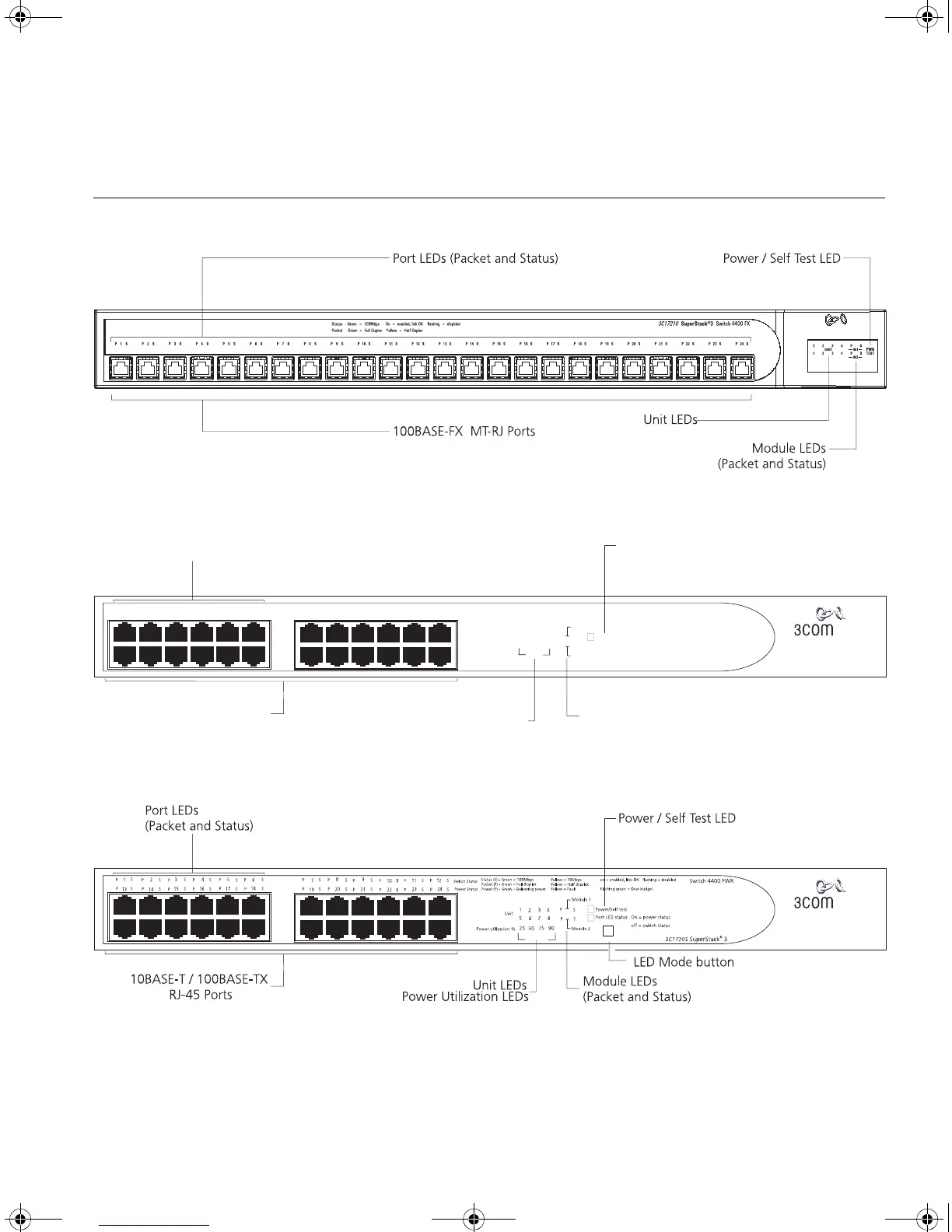
Switch 4400 — Front View Detail 15
Switch 4400 —
Front View Detail
Figure 1 Switch 4400 FX — front view
Figure 2 Switch 4400 (24-port) / Switch 4400 SE — front view
Figure 3 Switch 4400 PWR — front view
3
5
4
7
6
8
11 12
3
4
6
5
7
8
9
10
1
2
13
14
15 16
17
18
19
20
21
22
23
24
3C17203 SuperStack 3
©
Power/Self test
Module 1
Module 2
Switch 4400
1
3
2
4
on = enabled, link OK
Yellow = 10Mbps
Status Green =- 100Mbps
Packet -
Full Duplex
Green =
Unit LEDs
Power / Self Test LED
Yellow =
Half Duplex
Unit
P
P
S
S
S
S
S
S
S
S
S
S
S
S
S
S
S
S
S
S
S
S
S
S
S
S
S
S
S
S
P
P
P
P
P
P
P
P
P
P
P
P
P
P
P
P
P
P
P
P
P
P
P
P
10BASE-T / 100BASE-TX
RJ-45 Ports
Port LEDs
(Packet and Status)
Module LEDs
(Packet and Status)
flashing = disabled
5
7
6
8
DUA1720-3AAA09.book Page 15 Wednesday, July 6, 2005 4:33 PM














 To Next Page