2
EN11/2023
SECTION 2: GETTING STARTEDSECTION 2: GETTING STARTED
How it Works:
The 3Doodler Flow melts plastic filament and uses a motor and gears to push it through the
pen’s nozzle in a thin line. This process is called extruding or extrusion, and we will refer to it
throughout this user manual. Once extruded, the filament cools and hardens quickly, allowing
you to draw on surfaces and in the air. This user manual will show you how!
We created this User
Manual as a step-by-
step guide to get you
comfortable with your
3Doodler Flow and its
features. Once you are
familiar with these steps,
you will be able to Doodle
with confidence.
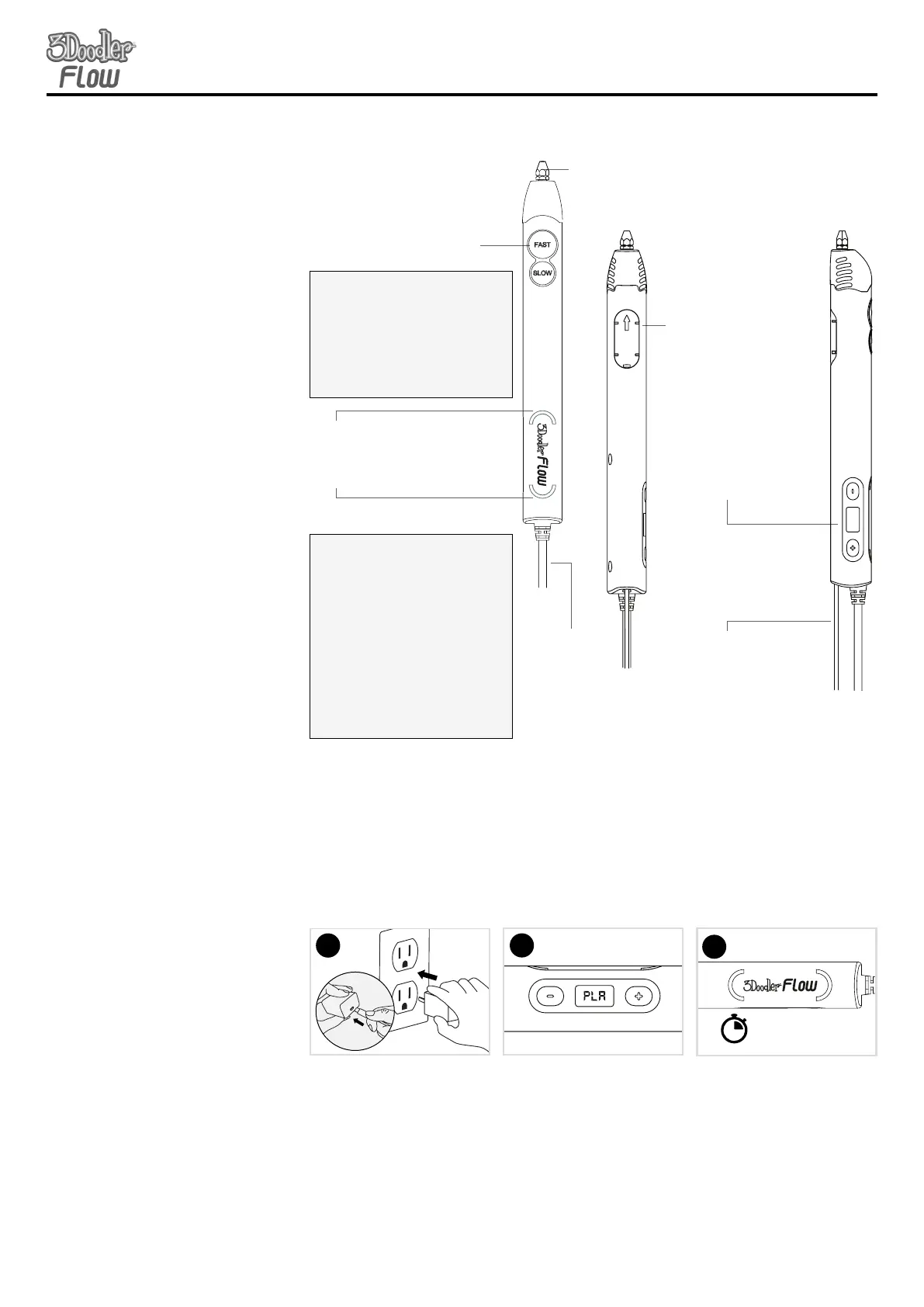
LIGHT LEGEND:LIGHT LEGEND:
SOLID RED:
Pen is heating up
GREEN:
Ready to Doodle with PLA
BLUE:
Ready to Doodle with ABS
FLASHING GREEN/BLUE:
Flashing towards the tip of the pen
indicates the filament is moving forward.
Flashing towards the back of the pen
indicates the filament is in reverse.
SPEED/ DRIVESPEED/ DRIVE BUTTONBUTTON LEGENDLEGEND::
• Click once to start
• Click once to stop
• Double click to reverse
• Press and hold to drive “manually”
and then when you release the
pen stops.
Speed/ Drive
Controls
Plastic Loading Port
Insert your filament
spool here
LCD Screen
For selecting PLA
or ABS and setting
extrusion temperatures
Nozzle
Hot tip where
filament is extruded
LED Light
Communicates when the pen is
ready, the direction the filament is
traveling, and temperature state.
Power
Cord
Maintenance Cover
Allows you to look
inside your pen to see
filament
Both LED lights will glow RED
while the pen is reaching the
desired temperature. Once the
light has turned GREEN/BLUE,
your pen is ready to extrude.
STEP 1:
Turn on your
3Doodler Flow
and wait for it
to heat up
Plug the power cord into
the power adapter. Plug the
power adapter into the wall.
Use either +/- to select the
desired filament. The back LED
light will glow red while the
front LED light will flash BLUE/
GREEN based on the selected
filament.
Click either FAST/SLOW to
lock in your selection. Note: your
pen comes with PLA spools.
Light to GREEN
60-90
secs
3
2
SECTION 2: GETTING STARTEDSECTION 2: GETTING STARTED
1


 To Next Page
 Loading...