8
EN11/2023
Switching
between
filament types
• If you’re going from ABS to PLA, after clearing as much of the ABS as you can,
insert a spool of PLA and begin extruding while still on the ABS setting. As
soon as you see your new material extruding out, set the temperature to the
proper PLA setting.
Do not forget
to snip your
Plastic ends
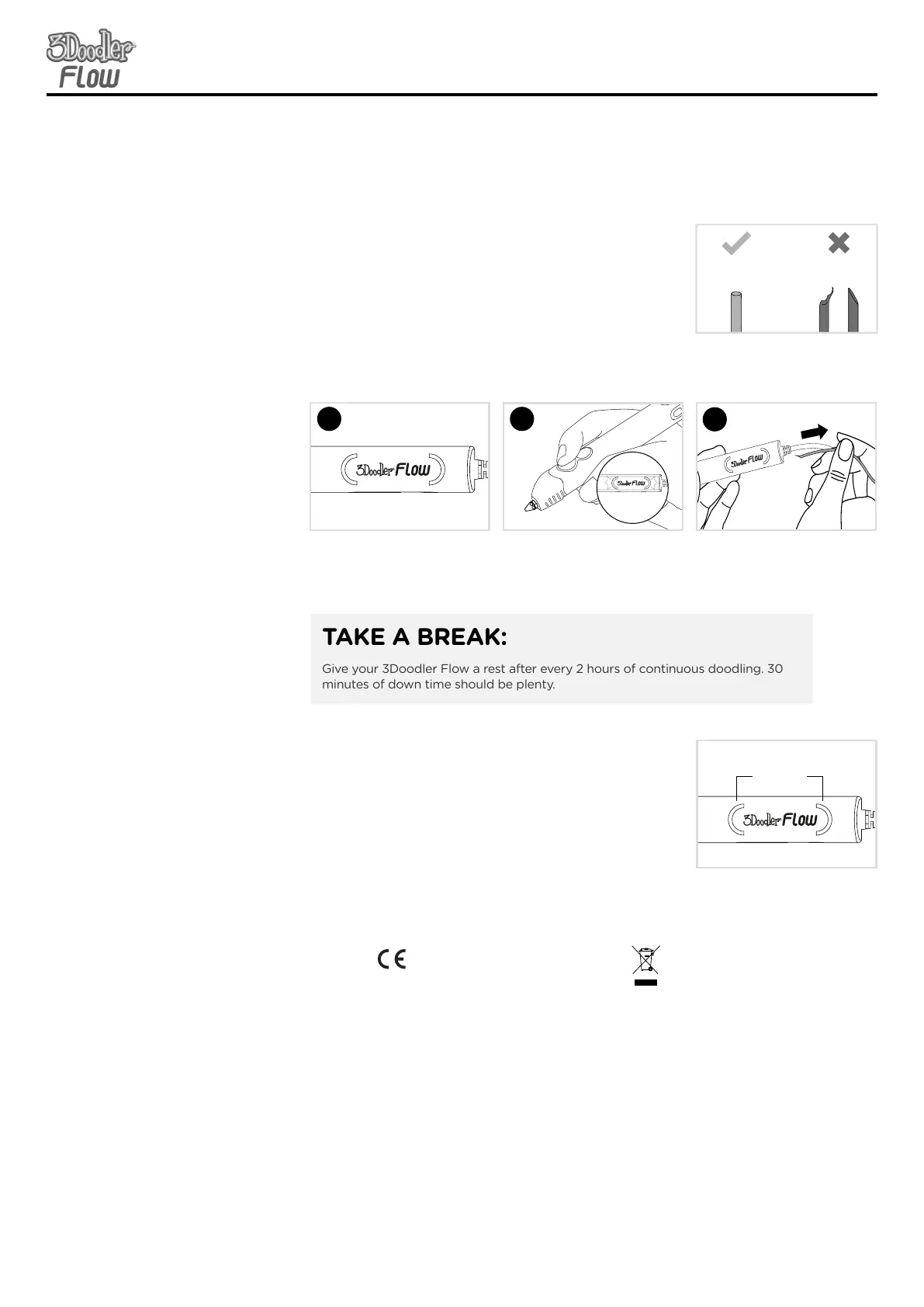
• After removing a spool of plastic from the 3Doodler
Flow, cut and discard any partially melted material at the
end of the spool. This will reduce blockages or clogging
issues. Make sure your cut is flat and not angled to
reduce plastic from overlapping in the feed tube.
Unsnipped Ends
VS
Snipped Ends
SECTION 4: TIPS & BEST PRACTICESSECTION 4: TIPS & BEST PRACTICES
Reverse and
remove plastic
correctly
• DO NOT pull plastic from the back of the 3Doodler Flow
other than as directed.
1
3
Once Plastic stops reversing,
it is safe to remove it from the
pen by gently pulling on the
back of the spool.
Make sure the pen is heated
up and ready to extrude.
Double click either speed
button. The back LED light
will flash to signal plastic is
reversing.
• If you ever remove your nozzle, ONLY remove the
nozzle when your pen is heated and a GREEN/BLUE
light is showing. DO NOT remove it when your 3Doodler
Flow is cold.
• If you ever need to tighten your Nozzle, DO NOT force
the Nozzle or overtighten it, as you could break the
Nozzle and permanently damage your 3Doodler Flow.
Specifications are subject to change and improvement without notice.
SPECIFICATIONS
Output Power: 6W
Output Voltage: 5V
Input Voltage: 5V
CARE & MAINTENANCE
For care and maintenance information, and more advice on how to use your
3Doodler, please refer to our website: the3Doodler.com
To troubleshoot, please visit: the3Doodler.com/troubleshooting
This marking indicates that this product should not be disposed of with
other household wastes. To prevent possible harm to the environment or
human health from uncontrolled waste disposal, recycle it responsibly to
promote the sustainable reuse of material resources.
LIMITED WARRANTY
For more details on your limited warranty, pleae visit:
the3Doodler.com/warranty
For 3DoodlerÕs Terms and Conditions and other notices please refer to our
website: the3Doodler.com/terms-and-conditions
This device complies with part 15 of the FCC Rules. Operation is subject to the
following two conditions: (1) This device may not cause harmful interference, and
(2) this device must accept any interference received, including interference that
may cause undesired operation.
Treat your
Nozzle right
SPECIFICATION OF POWER ADAPTER
Input: 100-240V AC, 0.5A MAX, 50-60Hz
Output: +5V DC, 1.2A
CARE & MAINTENANCE
For care and maintenance information, and
more advice on how to use your 3Doodler
Flow, please refer to our website:
the3Doodler.com To troubleshoot, please
visit: the3Doodler.com/troubleshooting
LIMITED WARRANTY
For more details on your limited
warranty, please visit:
the3Doodler.com/warranty
For 3Doodler’s Terms and Condi-
tions and other notices please refer
to our website: the3Doodler.com/
terms-and-conditions
This marking indicates that this
product should not be disposed
of with other household wastes.
To prevent possible harm to the
environment or human health
from uncontrolled waste disposal,
recycle it responsibly to promote
the sustainable reuse of material
resources.
This device complies with Part 15 of the FCC Rules. Operation is subject to the follow-
ing two conditions: (1) this device may not cause harmful interference, and (2) this
device must accept any interference received, including interference that may cause
undesired operation.
Warning: Changes or modifications to this unit not expressly approved by the party
responsible for compliance could void the user’s authority to operate the equipment.
NOTE: This equipment has been tested and found to comply with the limits for a
Class B digital device, pursuant to Part 15 of the FCC Rules. These limits are designed
to provide reasonable protection against harmful interference in a residential
installation. This equipment generates, uses and can radiate radio frequency energy
and, if not installed and used in accordance with the instructions, may cause harmful
interference to radio communications. However, there is no guarantee that interfer-
ence will not occur in a particular installation. If this equipment does cause harmful
interference to radio or television reception, which can be determined by turning the
equipment o and on, the user is encouraged to try to correct the interference by one
or more of the following measures:
- Reorient or relocate the receiving antenna.
- Increase the separation between the equipment and receiver.
- Connect the equipment into an outlet on a circuit dierent from that to
which the receiver is connected.
- Consult the dealer or an experienced radio/ TV technician for help.
CAN ICES-3 (B)/NMB-3(B)
GREEN/BLUE
Light
TAKE A BREAK:
Give your 3Doodler Flow a rest after every 2 hours of continuous doodling. 30
minutes of down time should be plenty.
2
Light to GREEN/BLUE
x2
Flashing
GREEN/BLUE


 To Previous Page
 Loading...