12
Questions? Call 888-888-7985
儀錶操作
COMPUTER OPERATIONS
12
6. Set GO to start programs
7. Run the program: When the time setting is 0:00, if you would like to keep running, the
speed matrix will display different picture in Custom 1; the incline matrix will display
different picture in Custom 2. The program will stop after run out all the setting.
Custom(For user to set his own workout program):
1. Set Custom to custom programs.
2.Set ︽/︾ to adjust custom1 or custom 2,next Enter.
3.Set ︽/︾ to set exercise age,next Enter.
4. Set ︽/︾ to set e
xercise weight,next Enter.
5.1-24 BAR control panel on the console overlay for user to reach the ideal time,speed,
incline;
Set Enter adjust 1-24 bar; Set “Speed”+ / - to adjust speed;
Set “Incline”︽/︾ to set exercise Incline; Set ︽/︾ to set exercise time
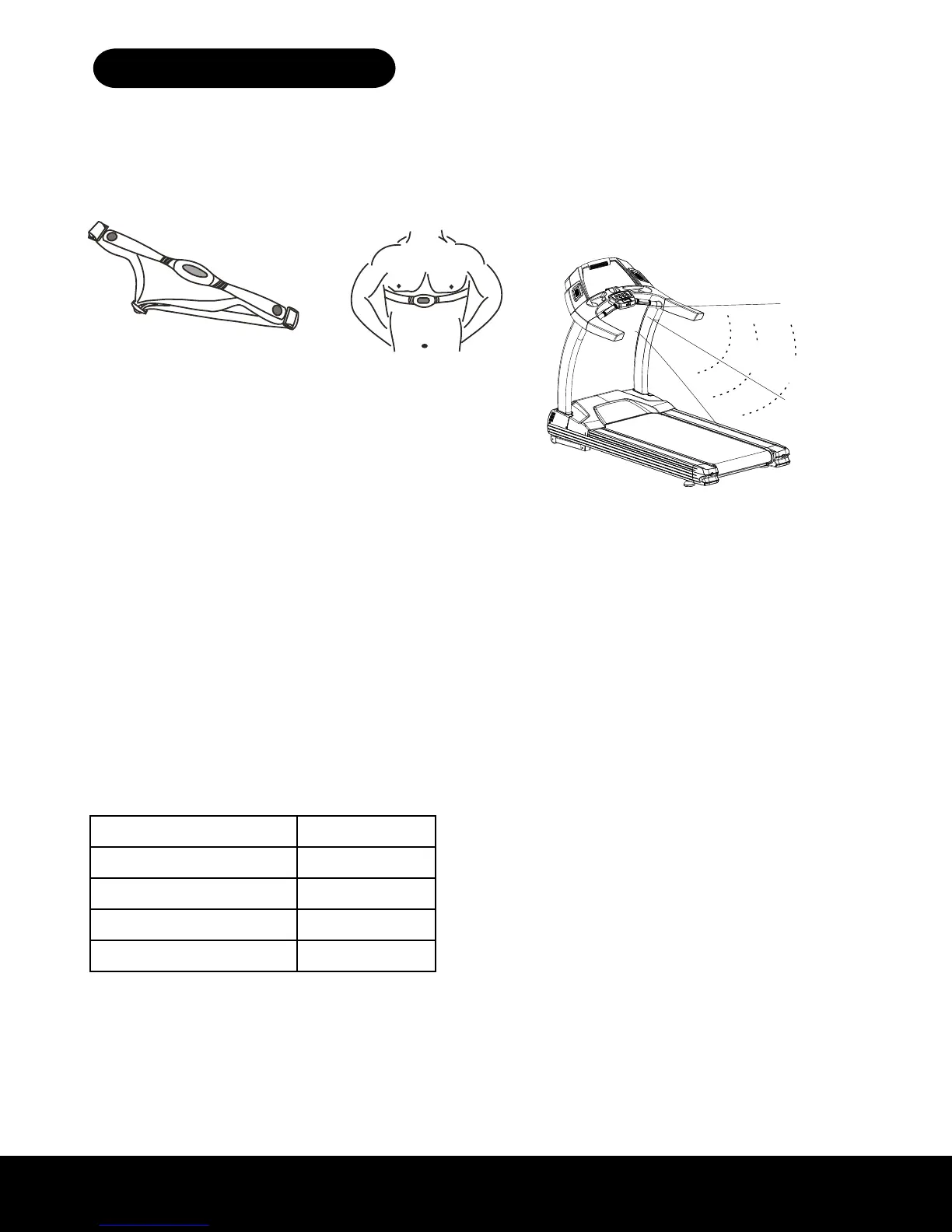
CHEST STRAP (TRANSMITTER)
CHEST STRAP TRANSMITTER
To operate HRC, the user needs to wear a chest
strap transmitter
CHEST STRAP is not standard specification. It
is optional, please contact your dealer for more
details.
ATTENTION: Please use Polar belt compatible
chest strap.
1meter
TRANSMITTING AREA
The transmitting area is around 1 meter on
straight line. Please see the below drawing for
more detail for transmitting area.
Body index operation:
Body
3 feet
COMPUTER OPERATIONS
CHEST STRAP TRANSMITTER (Not Included)
To operate HRC (Heart Rate Control), the user
needs to either wear an optional wireless chest strap
transmitter or hold onto the built-in heart rate grips.
Custom designing your own personal workout:
Two custom programs are available for you to design, save
and reuse. Choose the settings for speed, incline, and time
of each segment and the duration of the overall workout.
To Use: Press CUSTOM button. Use SET - + to select
Custom 1 or Custom 2. Select age and weight. When “b-01” or segment 1 of the workout displays use
incline +/- to change incline, speed +/- to change speed, and SET - + to adjust the time for that segment
of the workout. Press ENTER. Repeat with “b-02” or segment 2. There are 24 segments in the custom
program. This program will be saved, simply choose custom 1 or 2 to access your saved workout and
press START.
Body Index
Uses information to provide your BMI (Body Mass Index), BMR (Basal Metabolic Rate), and BFR (Body
fat ratio).
To Use: SET - + to select male or female, press ENTER. Select age, weight, and height. Press START.
The display will alternate between BMI, BMR, and BFR numbers.
BMI (Body Mass Index) Result
< 18 Underweight
18 - 25 Normal Range
26 - 30 Overweight
> 30 Obese
BMR (Basal Metabolic Rate) Calories burned per day under non-exercise conditions
BFR (Body fat ratio) Normal Range: Males 15-25%, Females 20-30%
RECEIVING AREA
Your 3G Cardio Pro Runner Treadmill has a built
in Heart Rate Receiver Chip which can receive a
signal from a universal wireless heart rate strap.


 To Next Page