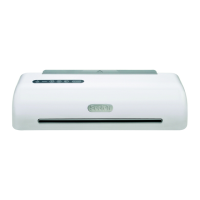
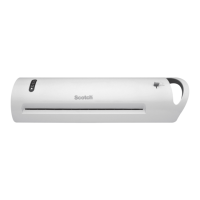
The Scotch TL902 Thermal Laminator is a device designed for home, home office, small office, and school use, intended for laminating paper or flat paper-like items between two film layers using thermal laminating pouches.
Important Technical Specifications:
- Size: 15.5 x 6.75 x 3.75 inches
- Laminating Speed: 11.8 inches per minute
- Nominal Weight: 2.5 lb.
- Number of Rollers: 2
- Entry Width: 9.37 inches
- Power Requirements: 120VAC 60Hz 400W / 2.5A
- Maximum Thickness: 0.015 inches
- Ready Time: 5 to 7 minutes
Usage Features:
The laminator is straightforward to operate, following a four-step process: Prep, Place, Insert, and Seal.
Step 1: Prep
Before starting, ensure the machine is warm and ready.
- Place the laminator on a flat, secure, stable surface.
- The on/off button is located on the top of the machine. It glows red when turned on.
- Choose your pouch setting by pressing either the 3 mil or 5 mil buttons, depending on the thickness of the pouch you are using.
- The warm-up time is approximately 4-5 minutes. The machine is ready to laminate once the "Ready Indication Light" illuminates.
Step 2: Place
Prepare your project inside the laminating pouch.
- Center your item(s) inside the pouch, ensuring you leave a 1/8-inch laminate margin around the edges on each side for optimal sealing.
- Tip: For best results, trim your project after lamination.
Step 3: Insert
Feed the pouch into the machine.
- Place the sealed end of the pouch into the input tray first, with the open end following.
- Verify that the pouch aligns with the opening to prevent uneven or angled feeding.
- Remove any obstructions that could hinder the project as it exits the machine.
Step 4: Seal
The laminator automatically processes the item.
- The laminated item will exit the outlet of the machine automatically. Do not pull the pouch through the laminator.
- If the pouch does not feed correctly or jams, push the "Jam Release Lever" (located on the top panel) to reverse the pouch back out of the laminator.
- Once the pouch has stopped moving, remove it and allow it to cool on a flat surface. Be cautious, as the project may be hot when exiting.
- For thicker items, it may be necessary to laminate them twice to achieve a complete seal.
- When finished, press the power button to turn off the laminator.
Parts Function:
- Body: Made of ABS plastic housing.
- Ready Indication Light: Illuminates when the machine is ready for use.
- Input Tray: The entry point for the object to be laminated.
- Outlet: The exit point for the laminated object.
- Jam Release Lever: Used to reverse a jammed pouch.
- On/Off Button: Glows red when the machine is turned on.
- 3 Mil Heat Setting: Button for selecting 3 mil pouch thickness.
- 5 Mil Heat Setting: Button for selecting 5 mil pouch thickness.
- Carrying Handle: For easy transport of the laminator.
Safety Warnings and Cautions:
- Hazardous Voltage and Fire: Plug into a grounded 120V outlet near the laminator. Do not use with voltage converters. Do not operate with a damaged power cord or if dropped. Keep the cord away from hot surfaces. Do not use in wet environments. Unplug before storage or when not in use. Unplug by pulling straight on the plug, not the cord. Do not remove the outer housing or attempt repairs; the laminator contains no user-serviceable parts.
- Fire and Hot Surfaces: Do not place laminating film or other items on top of the laminator.
- Hot Surfaces (Minor/Moderate Injury): Not intended for use by children. Place on a flat, secure, stable surface. Do not cover vent holes. The machine and laminated items become hot; allow items to cool before handling. Do not leave unattended when on. Unplug and allow to cool before moving or storing.
- Environmental Contamination: Dispose of electronic waste according to local and government regulations.
Maintenance Features:
- Cleaning: Unplug the laminator and allow it to cool down before cleaning. Wipe the exterior with a dry cloth to remove dust.
- Handling: DO NOT DROP the machine or subject it to impact.
- Storage: Store the laminator in a cool, dry location.
Limitations and Warranty:
- Not for Use: This laminator is not intended for use by children. Do not laminate currency, Social Security cards, thermal papers, stamps, credit cards, cards with magnetic strips, sharp objects, heat-sensitive materials, historically significant papers, or one-of-a-kind items.
- Geographic Use: This product is designed and intended for use in the US and Canada only. Use outside these regions has not been evaluated by 3M and may not meet regulatory requirements.
- Limited Warranty: The product is free from defects in material and manufacture for one year from the purchase date. 3M's exclusive remedy for a defective product is replacement, repair, or refund. This warranty does not cover normal wear and tear, accident, misuse, alteration, or lack of reasonable care.
- Limitation of Liability: 3M is not liable for any direct, indirect, special, incidental, or consequential loss or damage arising from this product.
For further assistance or project ideas, contact the 3M Help Line at 1-800-772-4337 or visit www.scotchbrand.com/laminating.

 Need help?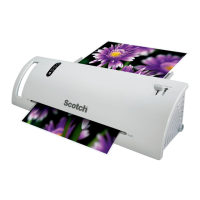

 To Next Page
 General