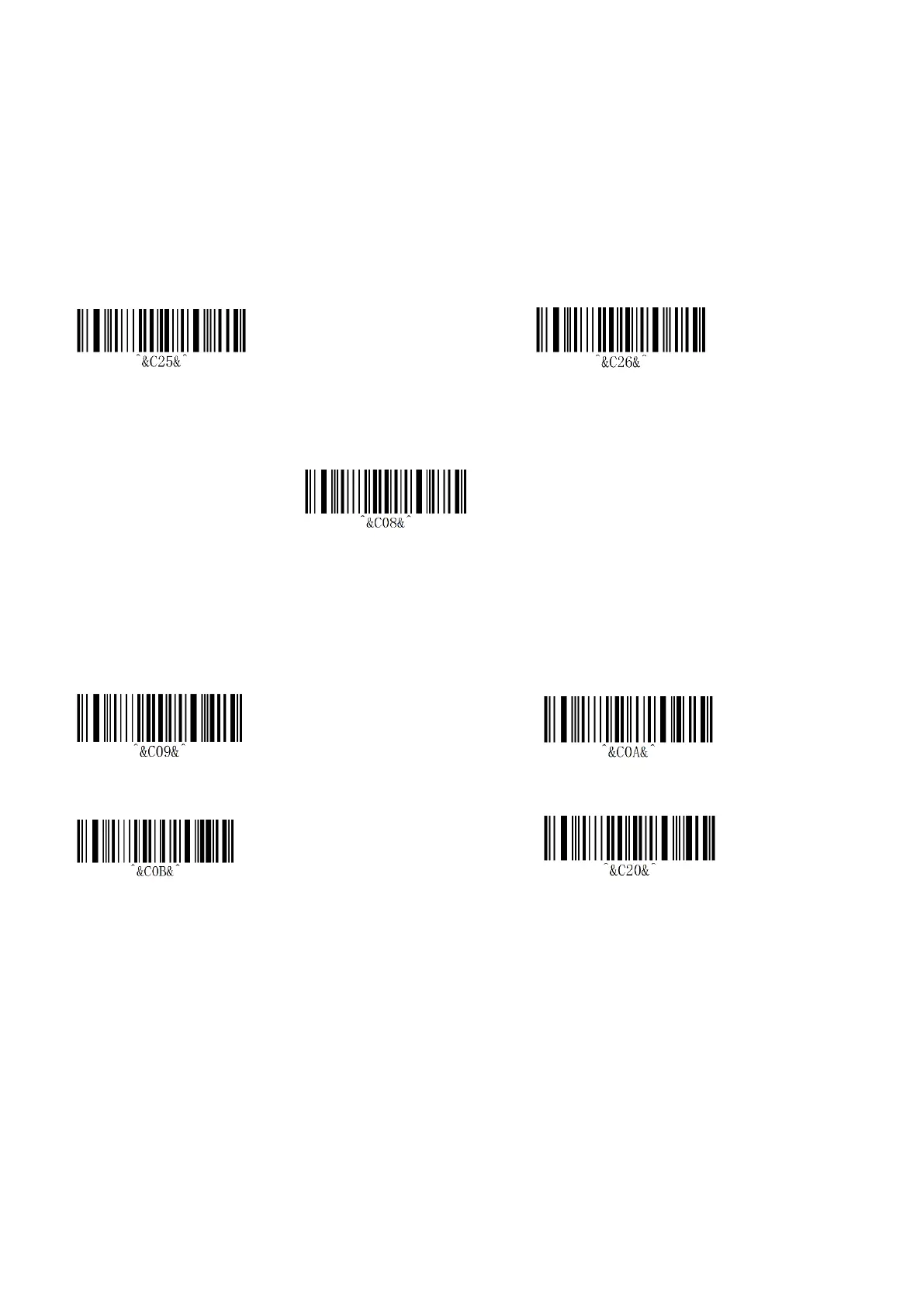
(2) After scan the “Bluetooth HID Pairing” bar-code, then Double-click the button, it will prompt once.
(3) If the Bluetooth is not matched within 1 minute, it will exit automatically and with 3 beeps.
*Remarks:
When exiting pairing, if the new device is not connected, will connect to the device which is matched last time
automatically by default.
8.3 Long press 8s to enter Bluetooth HID pairing setting
Enable(*) Disable
8.4 Show & Hide the HID Virtual Keyboard in IOS
Show & Hide the HID Virtual Keyboard in IOS
*Remarks:
Quick press 3 times to enable show or hide IOS virtual keyboard function.
8.5 Bluetooth HID Transfer Rate Setting
Fast Medium(*)
Low Ultra-low speed
*Remarks:
◆Fast speed uploading is recommended in IOS.
◆Set the corresponding speed according to the response speed of the phone under Android system.
◆When the uploaded data is messed up & lost, try to turn down the speed.


 To Next Page