EasyManua.ls Logo

3nStar SC440 - 10. Hide Character Function Settings; 10.1 Hide First Character

3nStar SC440
28 pages
Print Icon
To Next Page IconTo Next Page
To Previous Page IconTo Previous Page
Loading...
10. Hide Character Function Settings
10.1 Hide the First Character
Hide the First Character
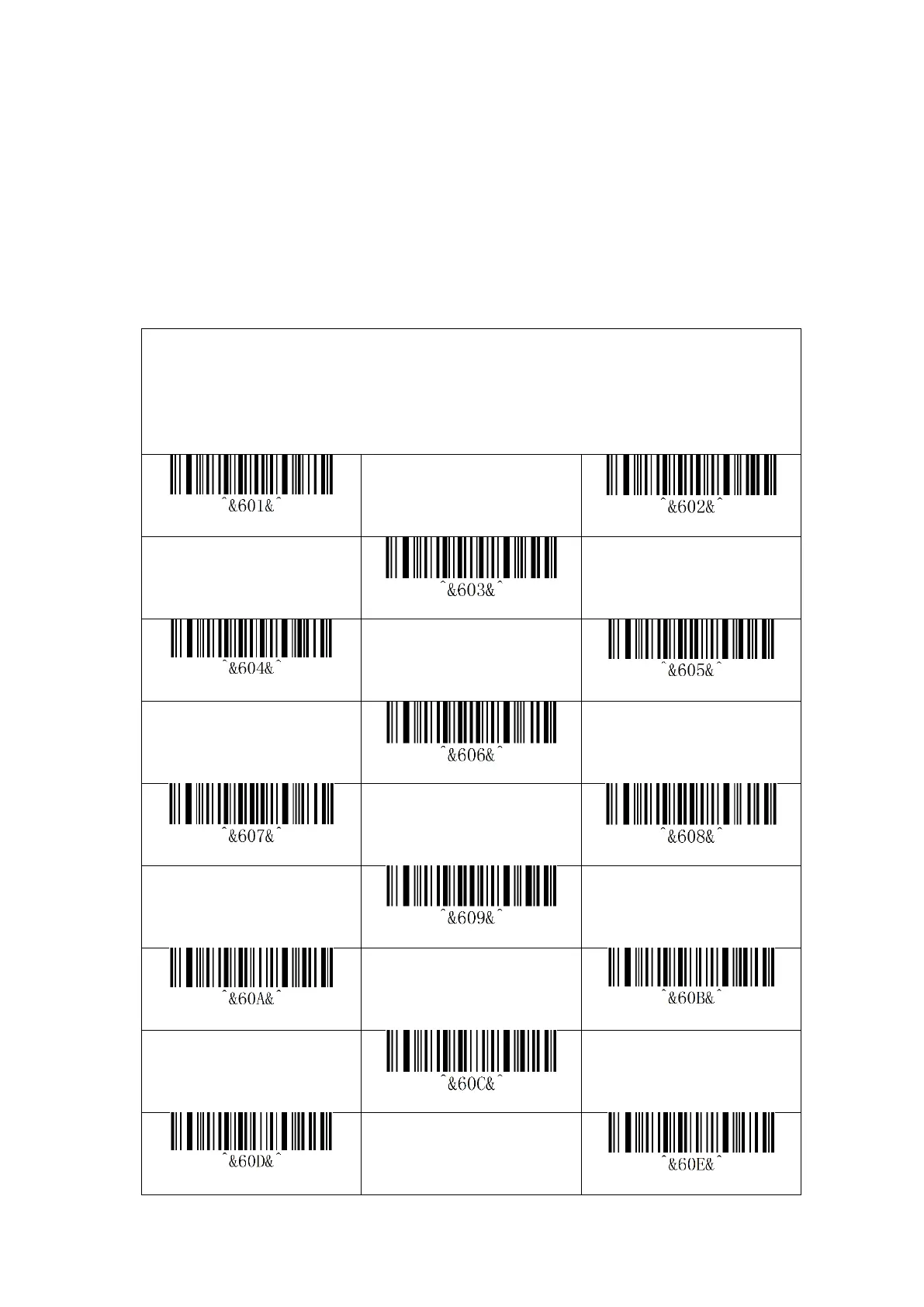
Shortcut Settings for Hiding the digit from the beginning
Note: How many digits are hidden from the beginning by default
The format is as follows: ^&600&^ to ^&6FF&^,00~FF are hidden digits
Hide the first 1 digit
Hide the first 2 digit
Hide the first 3 digit
Hide the first 4 digit
Hide the first 5 digit
Hide the first 6 digit
Hide the first 7 digit
Hide the first 8 digit
Hide the first 9 digit
Hide the first 10 digit
Hide the first 11 digit
Hide the first 12 digit
Hide the first 13 digit
Hide the first 14 digit

Related product manuals