USB4485 User Manual
Page
5
of
9
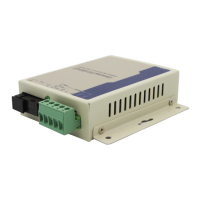
Power input jack: 5VDC power supply
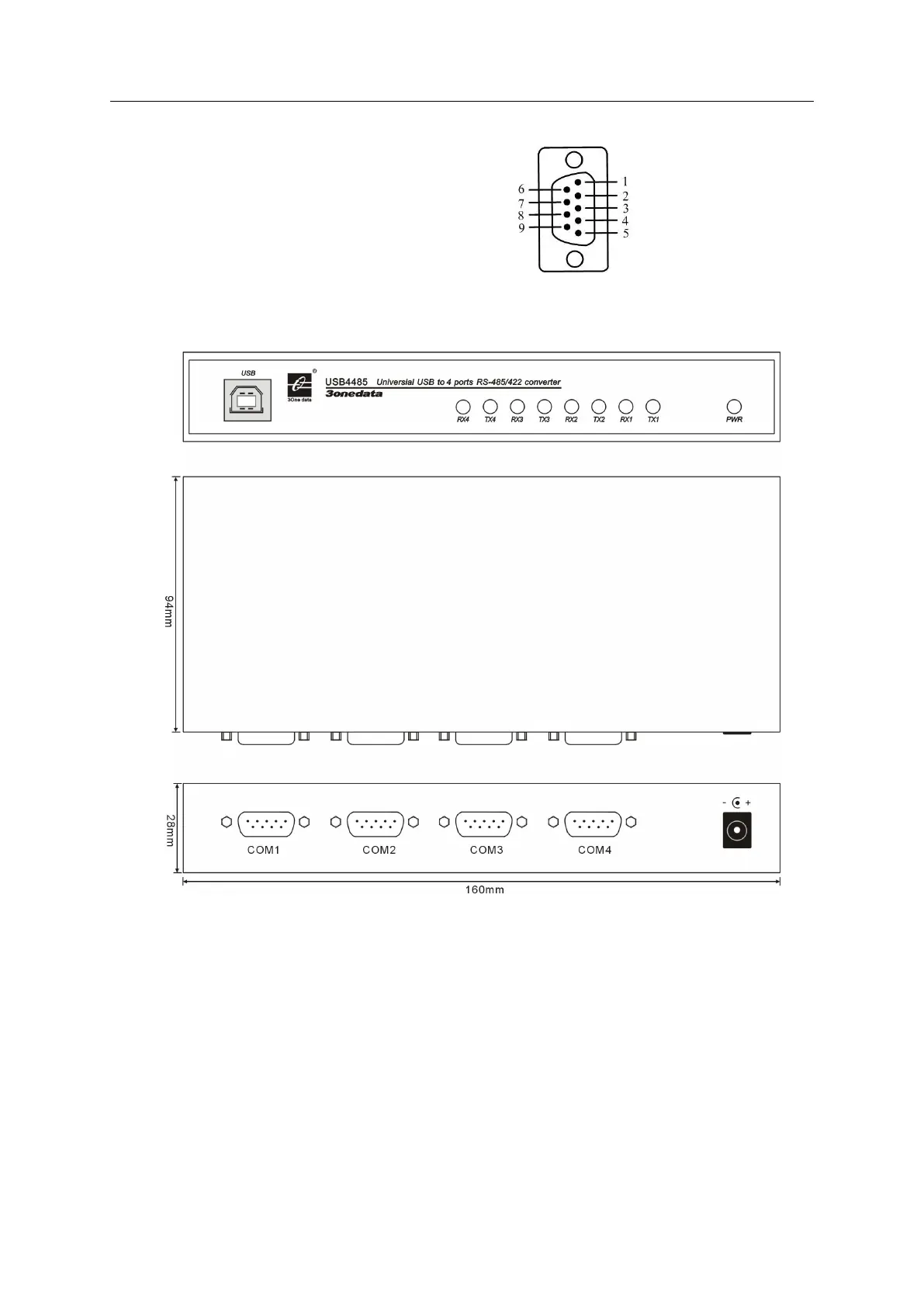
5.3 RS-485/422 Pinout
RS-485: 1 D-(B) 2 D+(A)
RS-422: 1 TX-(B) 2 TX+(A)
3 RX+(A) 4 RX-(B)
DB9M
6. Dimension
7. Driver Installation
7.1 Installing the Driver for the Converter(first time use the USB4232)
The operating system will automatically detect the USB232. when you plug it into one of your computer’s
USB ports. If you have installed the latest USB4232 driver, the USB4232’s serial port will be installed
automatically. If the USB4232 and the serial ports are not installed automatically, follow the instructions
below.
I. After connecting the USB cable from the USB4232 to the host PC, Windows XP will automatically
detect the new USB4232, and the Found New Hardware balloon will open in the bottom right corner of the
Windows desktop.


 To Next Page