N9071 Mini Dome Network Camera 2 Megapixel + H.264
- 44 -
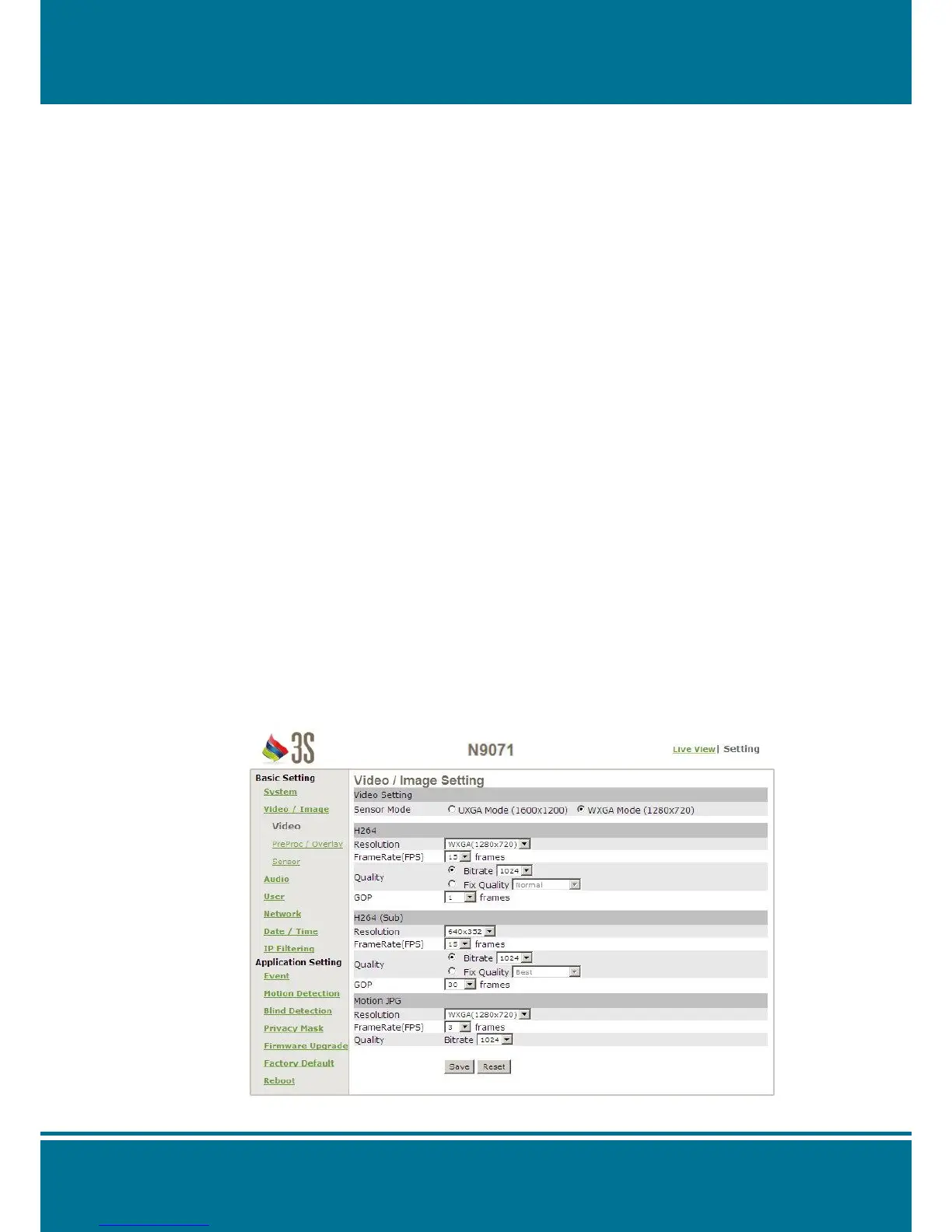
Video/Image
Video
Video Setting
Sensor Mode: Set the mode of the sensor from UXGA Mode (1600x1200) and WXGA
Mode (1280x720).
H264
Resolution: Set the resolution of the image from 1600x1200, 1280x720,
640x480, 640x352, 320x240 and 320x176.
Frame Rate (FPS): Set the frame rate from 1, 3, 5, 10, 15, 20, 25 and 30.
Quality: It provides two kinds of the quality as below:
Bitrate: 384, 512, 640, 768, 1024, 1280, 1536, 2048, 2560,
3072, 3584 and 4096.
Fix Quality: Best, Better, Normal, Fast and Fastest.
GOP: Set the frames for GOP from 1, 5, 10, 15, 30, 60, 120 and 150.
H264 (Sub)
Resolution: Set the resolution of the image from 640x480, 640x352, 320x240,
320x176, 160x168 and 192x112.
Frame Rate (FPS): Set the frame rate from 1, 3, 5, 10, 15, 20, 25 and 30.
Quality: It provides two kinds of the quality as below:
Bitrate: 128, 256, 384, 512, 640, 768, 1024, 1280, 1536, 2048,
2560 and 3072
Fix Quality: Best, Better, Normal, Fast and Fastest.
GOP: Set the frames for GOP from 1, 5, 10, 15, 30, 60, 120 and 150.
Motion JPG
Resolution: Set the resolution of the image from 1600x1200, 1280x720,
640x480, 640x352, 320x240 and 320x176.
Frame Rate (FPS): Set the frame rate from 1, 3, 5, 10 and 15.
Quality: Set the quality from 256, 384, 512, 640, 768, 1024, 1280, 1536,
2048, 2560, 3072, 3584 and 4096.


 To Next Page