N9071 Mini Dome Network Camera 2 Megapixel + H.264
- 94 -
Step4: View limit Setting
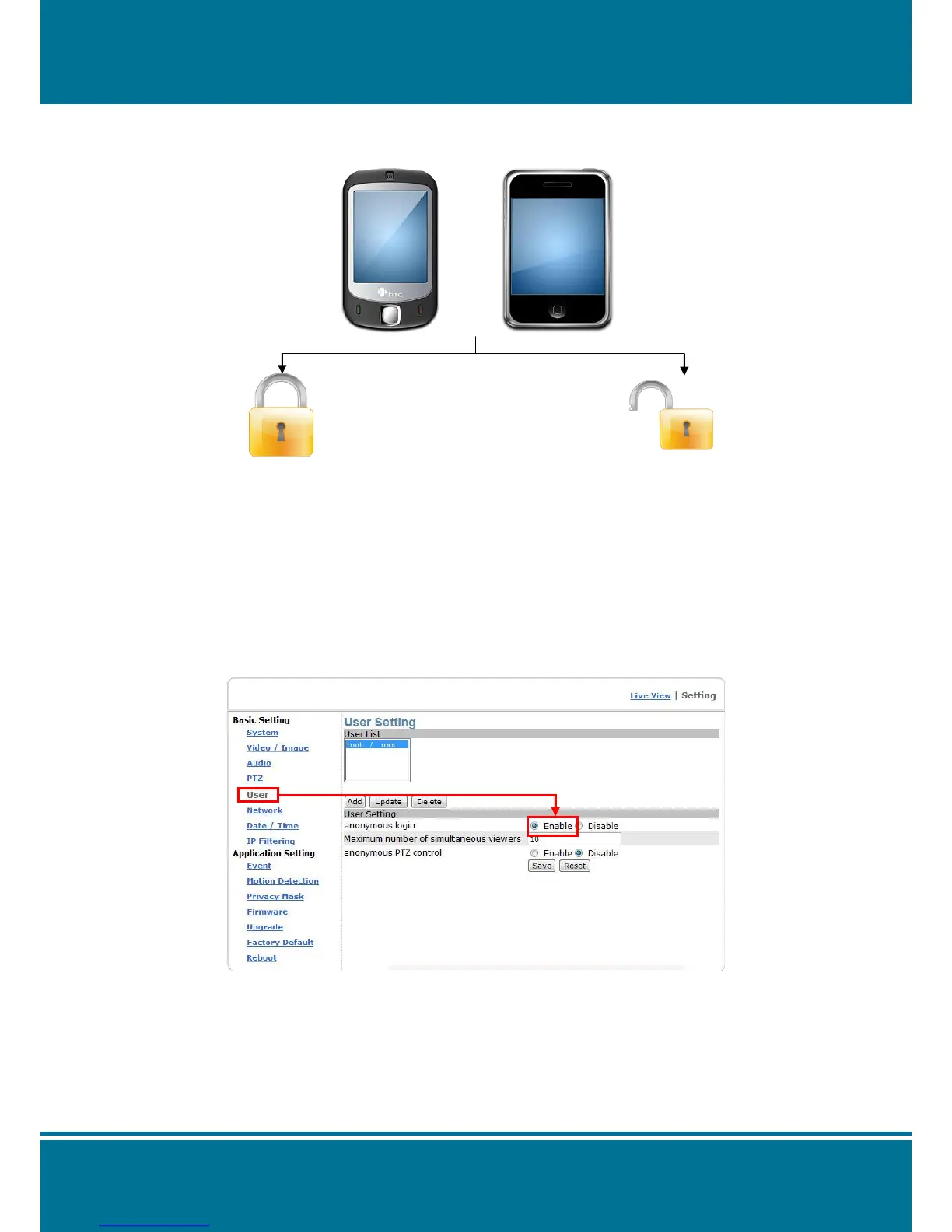
According to the requirement, you can pass the live view limit.
Please see the illustration as below.
With password
Don’t need to enable the “anonymous login” function, but you need to input the account
information every login. The application can keep the video server privacy.
e.g. Input rtsp://xxx.xxx.xxx.xxx:554/cam1/3gpp?user=root&pwd=root in mobile phone.
The “-2” mean the sub stream.
Without password:
Enable anonymous login.
Click the “User“ of Basic Setting
Click the “Enable“ from anonymous login of User Setting
Click the Save to finish the setting.
e.g. Input rtsp://xxx.xxx.xxx.xxx:554/cam1/h.264-2 in mobile phone.
NOTE:
The video server can support 4 channels streaming to use it. Modify the cam number of
URI link to change the channel. E.g. Channel 2: rtsp://xxx.xxx.xxx.xxx:554/cam2/h264-1


 To Next Page