Chapter 8. Configuring Units
98 3ware Serial ATA RAID Controller User Guide
2 After all drives for the unit are selected, Tab to the Create Unit button
and press
Enter.
3On the
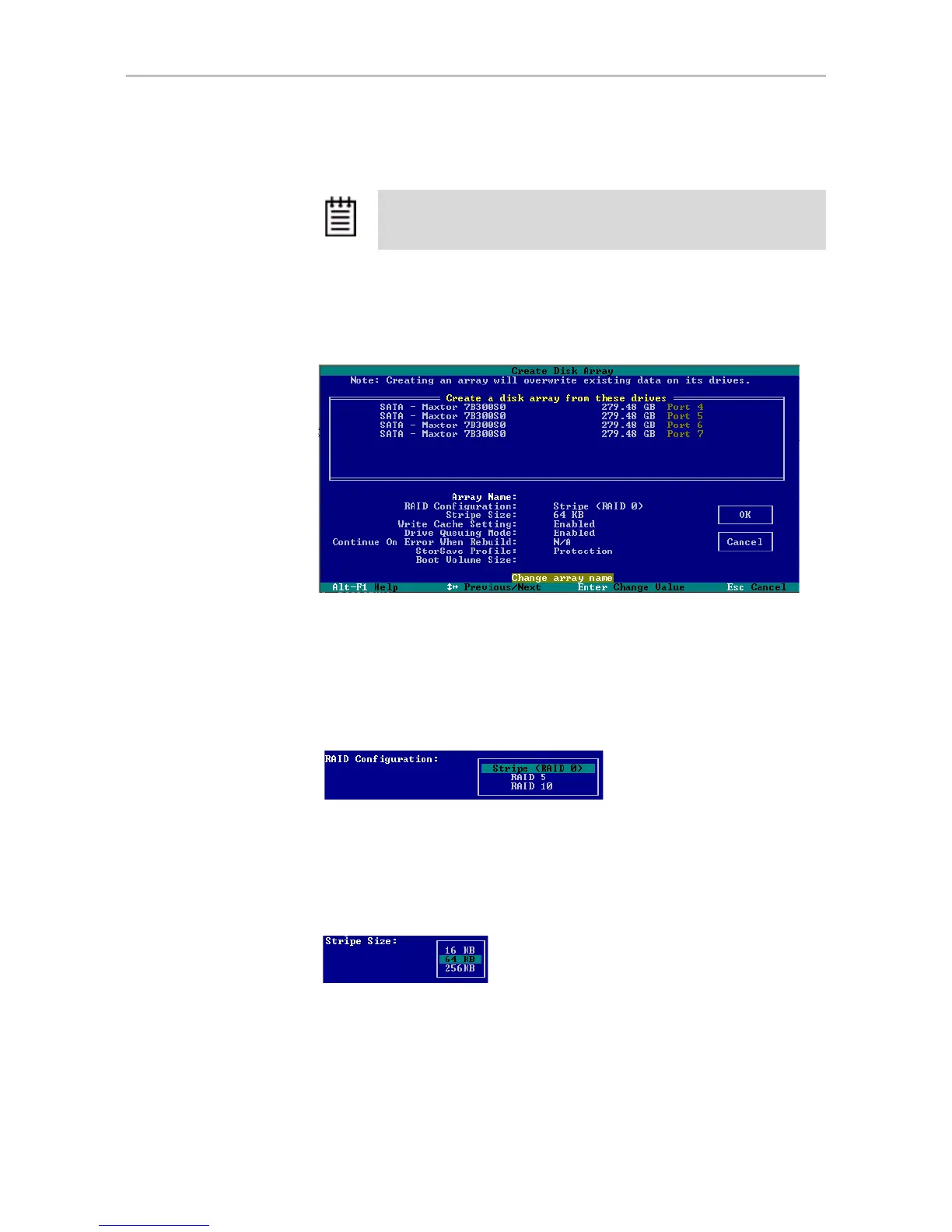
3ware Disk Array screen, make sure that the proper drives are
listed.
Figure 47. Create Disk Array Display
4 (Optional) Press Enter and type a name for the unit; then press Enter
again to set the name.
5
Tab to the RAID Configuration field and press Enter to display a list of
available configurations for the number of drives you selected.
Figure 48. Configuration Choices for Four Drives
6 Use the arrow keys to select the configuration you want and press Enter.
7
Tab to the field Stripe Size and select the desired striping size (16, 64, or
256 KB).
Figure 49. Stripe Sizes for a RAID 5
Tip: You can also press Alt-C to choose Create Unit.



 To Next Page