6
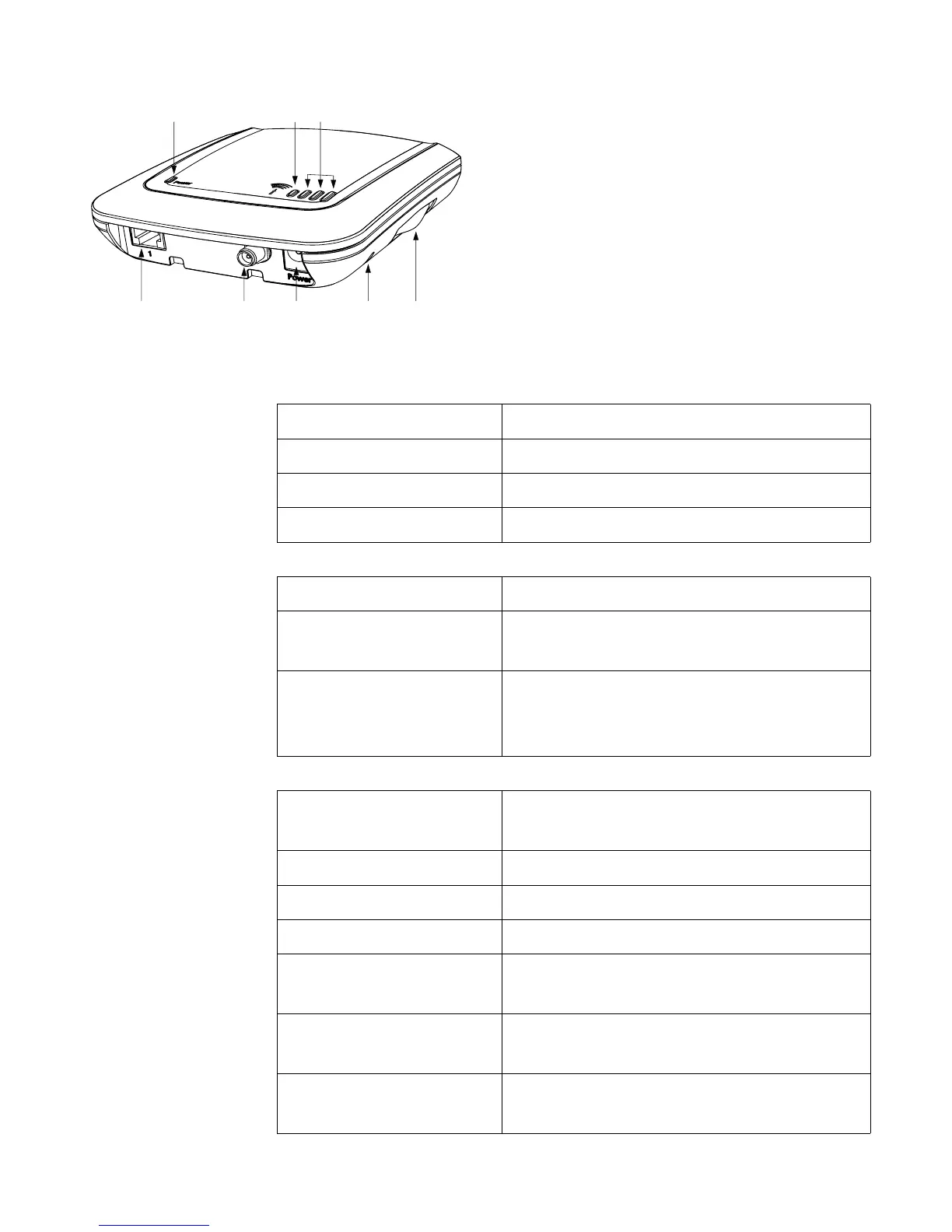
Getting to know your XSJackT3
A RJ11 jack to connect
telephone and/or fax
machine
B Connector for external
antenna (XSJackT3e only)
C Connector for power supply
D Reset button
E SIM card drawer
F Power LED
(green)
Off No power
On Device is powered up
Regular flashing An error has occurred
Irregular flashing Fax memory is full (page 15)
G Status LED
(red)
Off Idle mode
On Ongoing voice or fax connec-
tion to GSM network
Flashing There are received faxes and/or
SMS in the memory ready for
delivery (page 15 and 17)
H 3 LEDs for
signal
strength and
SIM requests
(green)
All 3 LEDs off Not yet logged into a GSM net-
work
1 LED on Low GSM signal strength
2 LEDs on Medium GSM signal strength
3 LEDs on High GSM signal strength
Left LED flashing The SIM card is blocked, defect
or not available
Middle LED
flashing
SIM PUK entry is required
(page 19)
Right LED flashing SIM PIN entry is required
(page 9)
ABCDE
FGH



 To Next Page