8
Step 3: Connecting a telephone, a fax machine, or
both
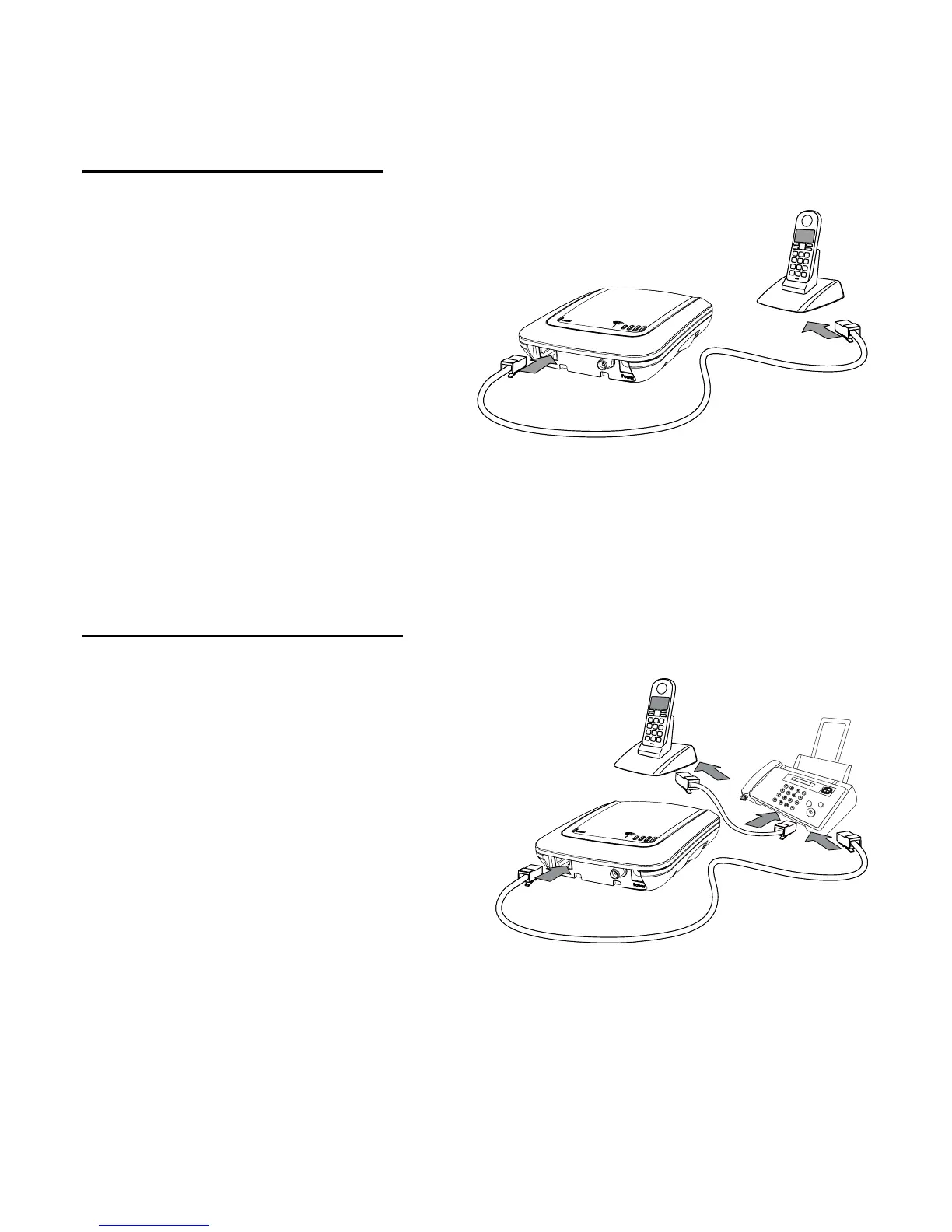
Telephone or fax machine:
Connect one end of your RJ-11
telephone cable to the telephone
or fax machine and the other end
into the RJ-11 jack of the
XSJackT3. If you want to use the
XSJackT3 for fax only, it is
nevertheless recommended to
carry out this initial setup proce-
dure with a telephone, as it could
be difficult to enter the required service codes on a fax machine due to
the absence of a telephone receiver or dedicated button to go off hook.
If you do not have an analogue telephone available, refer to page 10.
Telephone and fax machine:
If both a telephone and a fax
machine are to be connected, first
connect the fax machine to the
XSJackT3 as described above.
Afterwards, connect the telephone
to an available RJ-11 jack of the fax
machine. You may want to refer to
the fax machine's user manual for
more information. Please note that
in certain countries the fax machi-
nes may not have this option. In these cases, a country specific adap-
ter cable is needed.
Note: All connected end devices must support dual tone multiple fre-
quency dialling (DTMF). Modems for data connections cannot be
connected to the XSJackT3.



 To Next Page