EasyManua.ls Logo

4IPNET EAP220 - System Overview; Front Panel Layout; Front Panel LED Indicators

4IPNET EAP220
17 pages
Print Icon
To Next Page IconTo Next Page
To Previous Page IconTo Previous Page
Loading...
Quick Installation Guide
EAP220 Enterprise Access Point ENGLISH
Copyright © 4IPNET, INC. All rights reserved.
2
System Overview
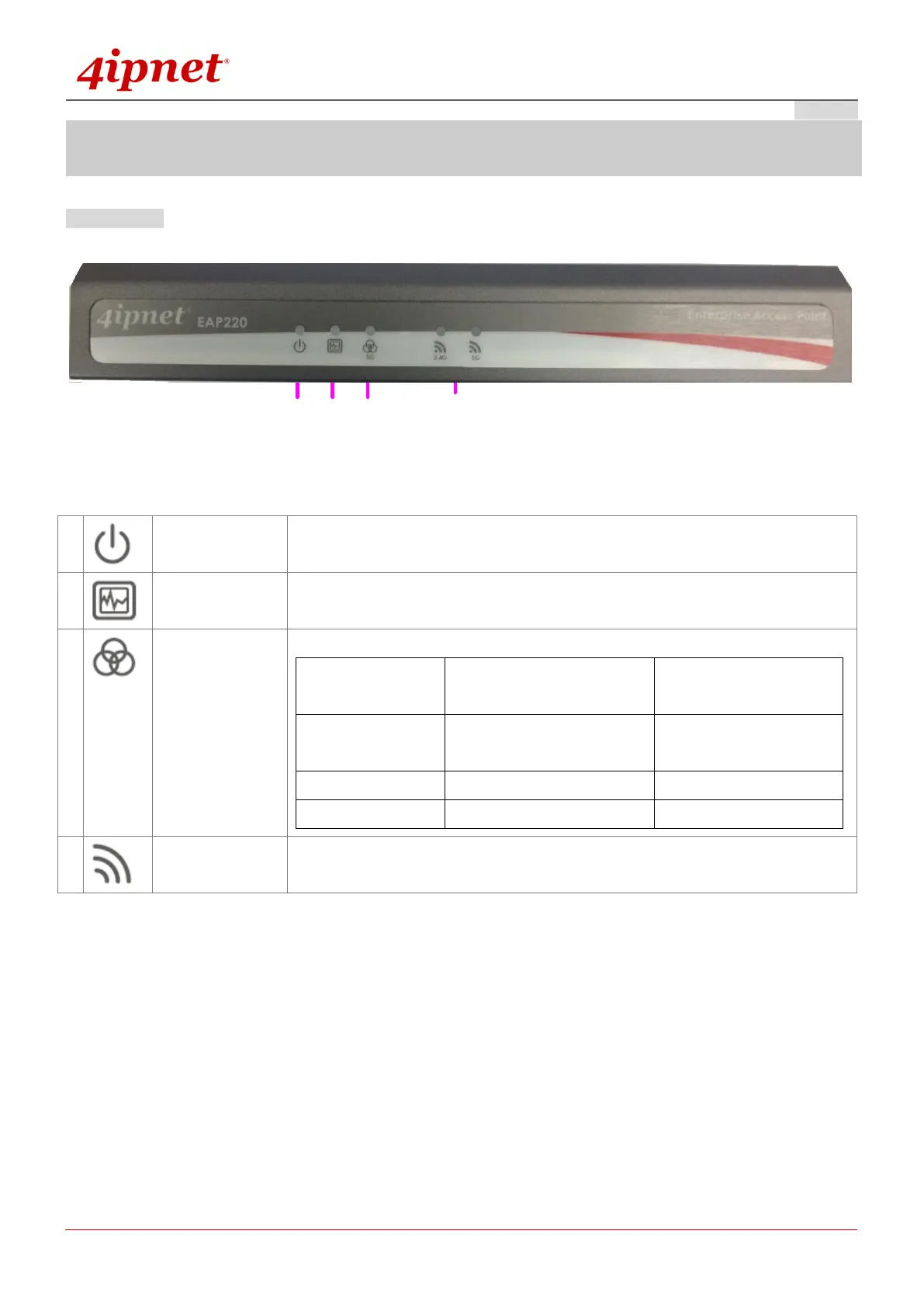
Front Panel
1 2 3 4
Figure 1 EAP220 Front Panel
1
Power LED
On indicates power on.
2
Status LED
On indicates the system is ready.
3
WES LED
For indicating WDS connection status.
Master (Press for more than
3 seconds)
Slave (Press once and
then release right away)
WES Negotiate
BLINKING SLOWLY
(Green)
BLINKING RAPIDLY
(Green)
WES Success
LED (Green) ON
LED (Green) ON
WES Fail/Timeout
LED (Green) OFF
LED (Green) OFF
4
Wireless LED
(2.4 / 5 GHz)
On indicates wireless network interface is ready for service.

Related product manuals