Tutorial 2: Navigating Banks
In the first tutorial you learned that tapping the Bank button moves you to the next bank. What if you
went too far and want to go back a bank?"
Go to Prev. Bank
To move backwards by one bank, hold down the Reverse button while you tap the
Bank button. Try it now. Watch how when you go past the first bank (solid white), it
wraps around to the last bank (green with two blinks in the default Sampler
sample pack). What do these flashes mean? Let’s find out!"
Bank Organization
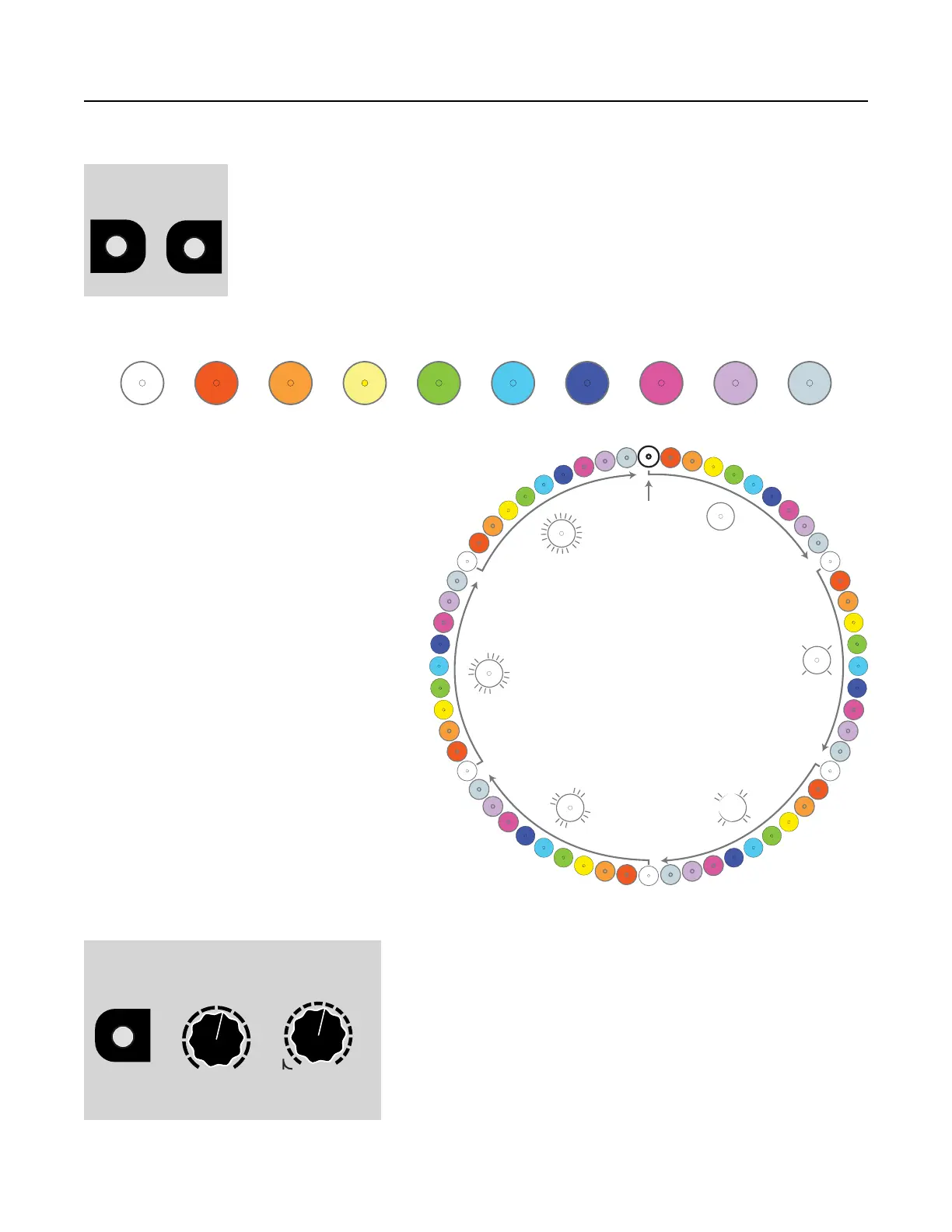
The banks on the Sampler are arranged by colors. The colors are arranged somewhat like a rainbow:"
White Red Orange Yellow Green Cyan Blue Magenta Lavender Pearl"
As you tap the Bank button, you move
through banks in order from White to Pearl.
When you reach Pearl, it loops back around
to White, but this White is different—it blinks
off every second or so. If you keep going,
you’ll see another White bank that blinks off
twice every second. If you’re using a new
Sampler with the default sample pack, the
banks are only full up until Green with two
flashes (we call this “Green 2 blinks” or
“Green-2” for short). After that, it wraps
back around to solid White. "
As you add samples to your card, you can
fill up a maximum of 60 banks. Since there
are 10 colors, that means each color can
have 0 (solid) to 5 flashes. At 5 flashes, the
bank button is flashing almost constantly.
Empty banks will be skipped as you cycle
through banks with the Bank button."
What if you’ve filled up your banks with
samples and you want to go from the solid
Red bank to Blue-3 (blue with 3 blinks)?
Well, you could tap the Bank button a few dozen times, but there’s a faster way."
Quick Bank Select"
To immediately jump to a specific bank, hold down the Bank
button while you turn the Sample and/or Length knobs. The
Sample knob selects the bank color, and the Length knob
selects the bank blinks. The bank button will change colors
and blinks as you turn the knobs, but the bank won’t actually
change until you release the Bank button."
For example, to go directly to Yellow-2, hold down the Bank
button and turn the Sample knob until the light is yellow.
Keeping the Bank button down, turn the Length knob until the


 To Next Page