3
Quick Setup
TheAPP‐1isapreampandneedsapowerampandspeakertobe
heardlive.Itcanalsoconnecttoasoundsystemoramixingconsole,
butwerecommendthatyouinsertacabinetemulatorliketh eA/DA
MicroCabtobalanceoutthesignalandtosoundlike
aguitaramp
andcabinet.
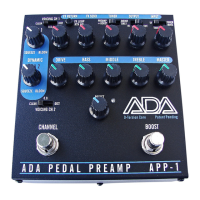
1. Setallknobsto11o’clock,asshowninFIGURE1below.
2. Setallswitchestothefarleftposition,exceptsetthe
TRUEBYPASSswitchtoitscenterpositionsotheAPP‐1is
inBYPASSmode.
3. Pluginthe
providedACAdapter,ADApartnumber
240005,(orusethepowerfromyoupedalboardpower
supply:12to18voltsDCat75mAorgreaterwitha2.1mm
plugwithcenterNegative).
4. MakesuretheBOOSTblueLEDisoff.Presstherighthand
footswitchtoturnifoff,
ifon.
5. PresstheleftfootswitchtolighttheredLEDforChannel1.
6. Connectyourguitarusingashielded¼inchphonecableto
theINPUTjackonthebackpanel.
7. Turnalltheknobsonyourguitartomaximumandselect
thebridgepickup.
8.
Usingashielded¼inchphonecable,connecttheOUTPUT
oftheAPP‐1toyourguitaramplifier.Useyouramp’s
“poweramp”inputforthebestresults.Ifyourampdoes
4
nothavethatinput,usetheEffectsLoopReturnjackto
connecttheAPP‐1.Ifyourcomboorheaddoesnothave
eitherjacksonthebackpanel,thentrytheusethelowest
gaininputonacleanchannel.DONOTUSEANY
HIGH‐GAINorCRUNCHCHANNEL
inputfortheAPP‐1,it
willnotsoundgood.Touseathecleanchannelinput,set
itto“flat”withtheGain(orDrive)setlowandMaster
Gainsethigh,andtypicallyfora3‐bandtonestack,the
BASSandTrebleat7to8o‐clock,
andtheMIDsetto5
o’clock.Detailedproceduresarefoundinthismanual
under“SettingupyourCombo,HeadorPowerAmp.”
9. Aftersettingthecontrolsproperly,turnonyouramplifier.
(TRUEBYPASS,topfarrightswitch,setinthemiddle
position.)YouwillbeintheBYPASS
modesoyoucanset
theplayinglevelsofyouramplifierbeforeengagingthe
APP‐1.
10. MovetheTRUEBYPASSswitchtothefarleftpositionto
engagetheAPP‐1PREAMP.
11. AdjusttheCHANNELMASTERcontroltomatchthelevel
yousetwithyourampwhenit
wasinBYPASSmode.


 To Next Page
 Loading...